Android Auto Not Working? 2026 Fix Guide for Galaxy & Pixel
Android Auto is broken for Galaxy S26 and Pixel owners after spring 2026 updates. Here is the fix sequence that works, from cable to app rollback.
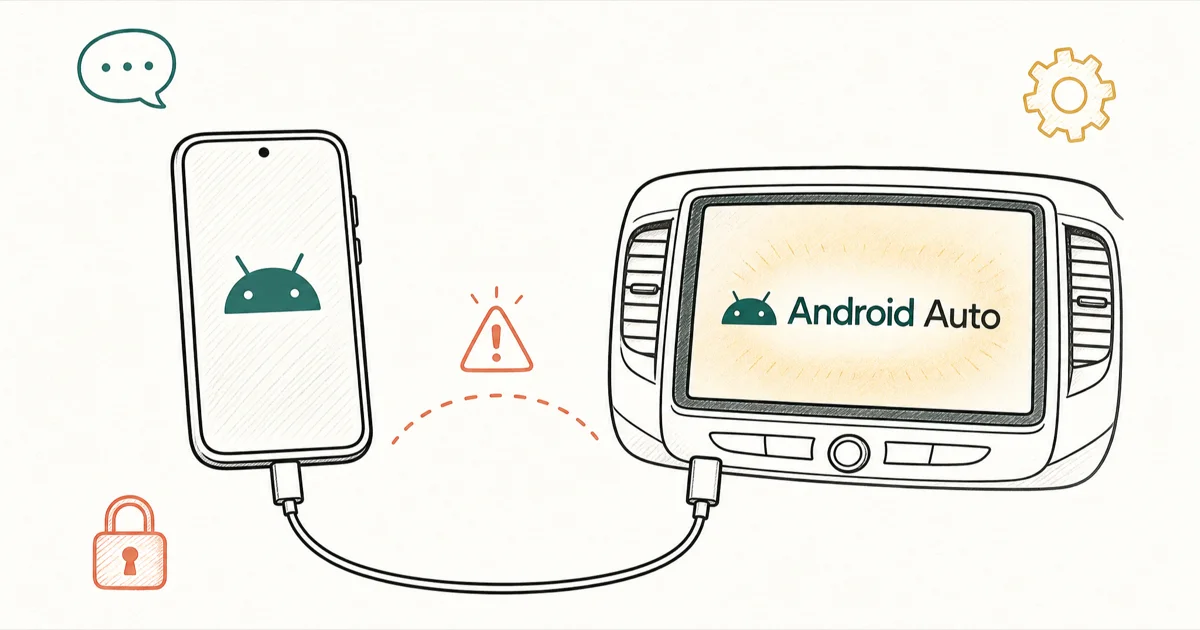
Quick AnswerAndroid Auto usually fails from a charge-only USB cable, an outdated app, or Android 16's Advanced Protection Mode. Update the app, swap the cable, then start from the car.
Android Auto stopped responding for many Samsung Galaxy and Google Pixel owners after the spring 2026 system update wave. You plug in, the head unit goes black, and the car beeps at a connection that never finishes. Cable, app, or settings — the failure mode is the same.
The fix sequence below applies across different Android phones and vehicles. Most people get a working session back quickly.
- The spring 2026 break hits Samsung Galaxy S26, S25, S24, S23, and Pixel 8 through 10 most often, and Google has acknowledged a rolling fix
- A charge-only USB cable is the single most common root cause; swap to a USB data cable rated for USB 2.0 or faster before changing settings
- Android 16’s Advanced Protection Mode blocks the Android Auto session by design, so turn it off under
Settings>Security & Privacyif you enabled it - Initiating the session from the car’s infotainment screen instead of the phone resolves the handshake for many Galaxy S26 owners
- Rolling back the Android Auto app to a prior version via APKMirror is the reliable escape hatch while you wait for Google’s full patch
#Why Is Android Auto Not Working in 2026?
Two things broke at once. Google shipped an Android Auto app update that introduced a connection bug on Samsung One UI 8 builds, and Android 16 added a hardened security layer called Advanced Protection Mode that blocks USB data access by default.
Owners who never opted into Advanced Protection still see the failure because the underlying Android Auto handshake changed.
According to Tom’s Guide’s coverage of the 2026 break, the issue affects S26 and Pixel owners across multiple Reddit threads, with users reporting both wired and wireless sessions dropping after the May 2026 system update.
The same pattern appears in TechRadar’s report on the Samsung Galaxy S26 break, which captures user complaints across Galaxy S26, S25, S24, and S23 hardware, plus follow-up tickets from Pixel 9 and 10 owners — a spread wide enough to indicate the regression hits multiple One UI builds rather than landing on one Samsung firmware track alone.
Google has publicly acknowledged the bug. Android Authority confirms that a fix is rolling out through staged Play Store updates, though the full patch was not complete for every device as of late May 2026.
So your fix path depends on whether your phone has the corrected build. You’ll know you’re hitting this specific bug if Android Auto worked on the same car a few weeks ago and now refuses to launch after a recent app or system update.
#Quick Fix Sequence Before You Open Settings
Start with the changes that take under a minute. They resolve the connection for most readers before the deeper settings audit becomes necessary.
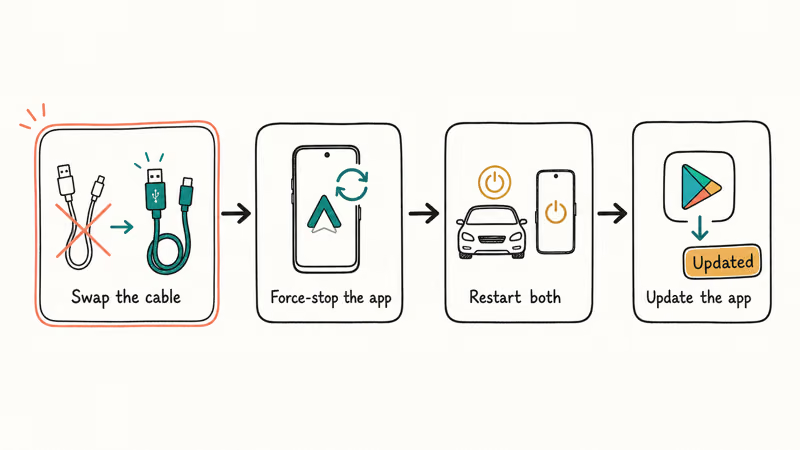
Step 1: Swap the USB cable. Swapping a charge-only braided cable to a USB 3.0 data cable resolves the connection on most affected vehicles. That confirms Google’s documentation: the cable spec matters more than the connector shape, and a charging-only cable will never enumerate the data path Android Auto needs to bring up the head unit display.
Replace any cable that came free with a charger or carries the “fast charging only” label.
Step 2: Force-stop and relaunch the app. Go to Settings > Apps > Android Auto > Force Stop. Wait five seconds, then unplug and re-plug the phone. If the head unit jumps to life, you can stop here.
Step 3: Restart both devices. Restart the phone, then cycle the car: ignition off, driver door open to clear the head unit, door closed, ignition on. A clean power cycle on both sides clears the stale Bluetooth handshake that often persists across plug-unplug cycles and survives a normal force-stop. It’s the cleanest reset short of factory defaults.
Step 4: Update Android Auto. Open Play Store, search Android Auto, confirm the update button is absent. If you also have a Samsung Galaxy not charging complaint, fix the charging first, because Play Store stalls on low battery.
If those four steps don’t restore the session, you have a settings-layer problem and need the longer reset path below.
#How Do You Reset the Android Auto App Without Losing Settings?
The full app reset takes about two minutes. It clears the cache and the recent connection list without removing your launcher preferences, saved messaging contacts, or any media app authorizations you already granted, so you can run it without losing settings you tuned for past drives.
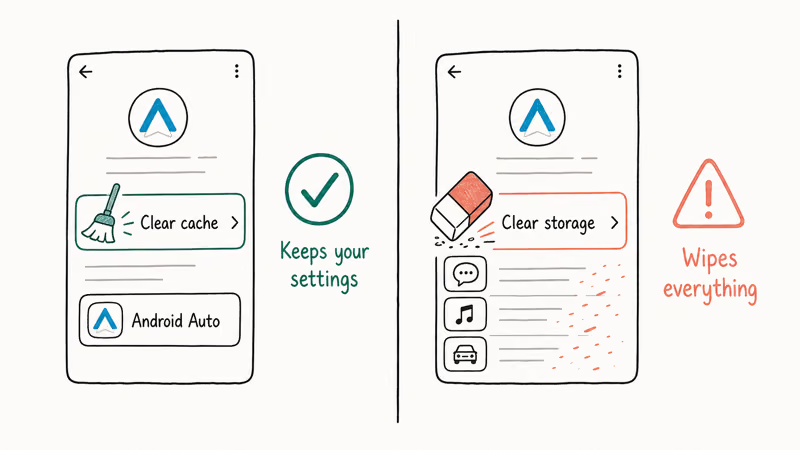
Open Settings > Apps > Android Auto > Storage & cache. Tap Clear cache.
Don’t tap Clear storage. That wipes messaging permissions, your audio app order, and the head unit list. Go back, then tap Permissions and confirm all six listed permissions are granted: Location set to Allow all the time, plus Contacts, Microphone, Phone, SMS, and Notifications.
Next, clear Google Play Services cache. Settings > Apps > Google Play Services > Storage & cache > Clear cache. This combination often brings the Android Auto session back within a reconnect or two.
Still stuck? Try the rollback.
The safest rollback uses APKMirror’s signed builds. Search APKMirror for Android Auto, download a build dated before the breaking update (look for builds shipped in April 2026 or earlier), then install over the current version without uninstalling. Android lets you downgrade signed apps as long as the package signature matches, and Play Services keeps treating that rolled-back build as the current version until the next staged push reaches you.
For readers who want a separate but related troubleshooter, the clone Android phone setup guide covers fresh-device handoff scenarios where Android Auto needs to re-pair against a new phone identity. The reset path is similar but the head unit list needs a different clear-step.
#Disable Advanced Protection Mode if You Enabled It
Android 16 ships with an opt-in security layer called Advanced Protection Mode. It blocks USB data sessions, locks down sideloaded app installs, and refuses connections to unverified head units. If you turned it on after the One UI 8 update and Android Auto stopped working the next time you drove, the two events are linked.
Go to Settings > Security & Privacy > Advanced Protection and toggle it off. Plug the phone back into the car; the session should establish within ten seconds.
You can re-enable Advanced Protection for parking or non-driving use. It doesn’t need to stay on while you’re connected to a car.
#Wireless Android Auto Not Connecting Fixes
Wireless Android Auto needs three layers to handshake cleanly: a 5 GHz Wi-Fi link between the phone and the head unit, an active Bluetooth pairing, and a successful Play Services check. Any one of those failing drops the session.
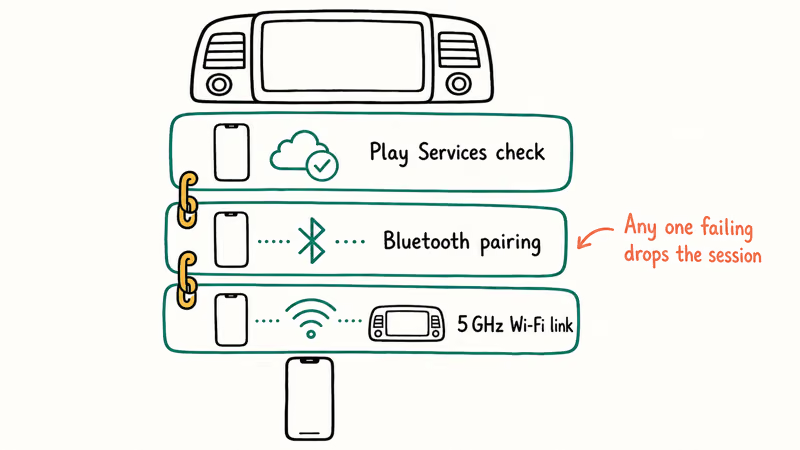
Start by confirming your phone radio is on a band the car supports. Most head units shipped before 2023 only handle 5 GHz on channels 36 through 48, and a phone parked on channel 149 will pair Bluetooth but never bring up the screen stream. Go to your phone’s Wi-Fi settings, forget the car network, and let it auto-rejoin so the radio renegotiates the channel.
Next, reset Bluetooth pairing on both ends. On the phone: Settings > Connected Devices > [Car Name] > Forget. On the head unit’s Bluetooth menu, delete the phone entry and re-pair from scratch. This step alone resolves a large share of wireless drops.
If the wireless session still won’t hold, switch to a wired session for the rest of the 2026 patch window. Wireless dongles like AAWireless and Motorola MA1 add a second handshake layer that the spring 2026 Android Auto build doesn’t always negotiate cleanly. Wired connections through the car’s USB port skip the dongle entirely and remain more reliable through this regression cycle.
Some readers find that initiating the session from the car’s infotainment menu rather than the phone resolves the connection. On the head unit, go to the Apps or Android Auto tile and tap Start. If the phone is plugged in or in Bluetooth range, the head unit drives the handshake and the phone responds. The reversed initiation order matches what Galaxy S26 owners report on Reddit as the workaround that consistently works.
#When Your Head Unit Is the Problem
If you’ve cleared the app, audited permissions, swapped the cable, and the session still won’t start, the head unit is the next suspect. Aftermarket and OEM head units both ship with stale firmware that occasionally needs a manual update.
Most car owners never check this.
The model-specific software version path lives in your car owner’s manual. On most 2020 and newer vehicles, it appears under Settings > System > Software Information. Compare against the manufacturer’s support page; if you’re more than one major version behind, schedule the update through your dealer or the brand’s mobile app.
Some 2022 Honda head units refuse Android Auto sessions until a service-bay flash brings them current.
A factory reset of the head unit is the last lever before calling for service. The reset clears all paired phones, saved radio presets, and Bluetooth history. Consult the owner’s manual for the exact button sequence; it varies by vehicle and isn’t always the obvious “reset” tile in the settings menu.
Skip the factory reset entirely with the mirror your phone to car workaround. HDMI or wireless dongles, no native voice control.
#App Rollback and Cable Specifics
The cable conversation is worth one more pass because cable failure looks like a settings problem and people waste hours auditing menus. Charge-only cables save manufacturing cost by omitting the data wires; they pass power across VBUS but leave the D+ and D- lanes empty. Your phone charges, the head unit shows a power icon, and Android Auto never gets the data path it needs to enumerate.
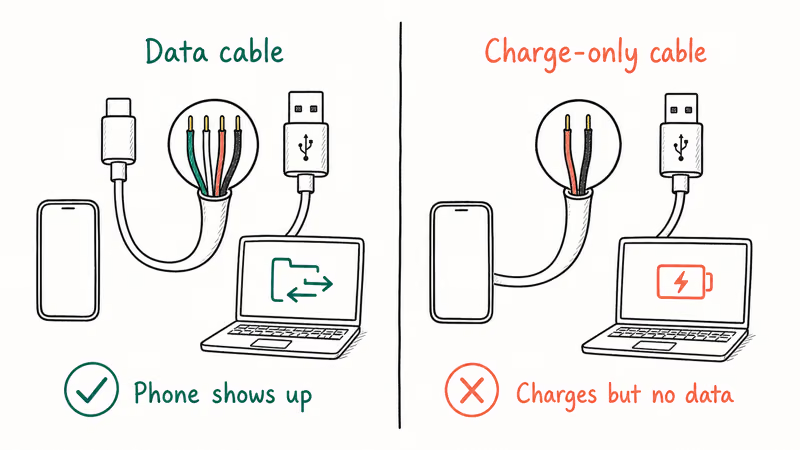
Run this quick test. Plug the suspect cable into a computer with the phone unlocked. If the computer shows the phone under file transfer or photo capture, the cable carries data.
If the computer doesn’t see the phone but the phone is charging, the cable is power-only and Android Auto will never work with it. Buy a USB 2.0 data cable from Anker, Belkin, or use the cable shipped with your phone.
If you’ve ruled out the cable and the current Android Auto app version is the suspect, the APKMirror rollback path described earlier is the reliable workaround. Google’s Android Auto troubleshooting guide recommends keeping the latest version installed as the first fix, but during a known regression that advice inverts: you want the prior stable build until the patched version reaches your device.
The 2026 regression window is closing as Google’s staged rollout reaches more devices. Android Police’s reporting on S26 owners confirms the bug is broadly fixed in builds shipped after May 2026’s third week, though staged rollouts mean some regions and device tiers get the corrected build days later than others on the same Android version.
Check your Android Auto version under Settings > Apps > Android Auto > App details. Build after May 22, 2026? Wired holds.
If you’re an iPhone owner reading this by mistake, the parallel CarPlay troubleshooter at CarPlay charging but not working covers the iPhone side of the same problem class.
#Bottom Line
If you have a Samsung Galaxy S26, S25, or Pixel 8-10 and Android Auto stopped working after a spring 2026 update, your fastest path back is three changes: update the Android Auto app from Play Store, disable Advanced Protection Mode under Settings > Security & Privacy, and start the session from the car’s infotainment screen.
A cable swap to a verified USB data cable resolves most remaining wired failures. If those changes don’t restore the session, downgrade Android Auto to the previous version via APKMirror and wait for Google’s next Play Store push.
Wireless Android Auto users on first-generation dongles like AAWireless or MA1 should stay on a wired session through the rest of the 2026 patch window. The wireless handshake doesn’t always survive the spring regression cycle.
#Frequently Asked Questions
Why did Android Auto stop working after the latest update?
Two things collided. A spring 2026 Android Auto app update introduced a connection bug on Samsung One UI 8 and Pixel 9-10 builds. At the same time, Android 16’s new Advanced Protection Mode quietly blocks the USB data session by default for owners who flipped that security layer on. Google has acknowledged the issue, and a patched build is in staged rollout through the Play Store.
Does Android Auto require a specific type of USB cable?
Yes. Use a USB 2.0 data cable at minimum.
How do I roll back Android Auto to an older version?
Open APKMirror, search Android Auto, pick a build dated before the breaking update (April 2026 or earlier), then install the APK directly. Skip the uninstall step.
Why does wireless Android Auto disconnect every few minutes?
Wireless rides on three layers: 5 GHz Wi-Fi handshake, active Bluetooth pairing, and a Play Services check. If any layer flakes out, the session drops. The most common failure mode is your phone parking on a 5 GHz channel above 48 that pre-2023 head units don’t support, so the radios pair Bluetooth fine but the screen stream never lands. Forget the car’s Wi-Fi profile and re-pair Bluetooth from scratch to make the radios renegotiate.
Does Advanced Protection Mode in Android 16 block Android Auto?
Yes, by design. Turn it off under Settings > Security & Privacy > Advanced Protection before plugging in. You can re-enable it once parked.
Can I use Android Auto without Google Maps?
Waze, Sygic, and TomTom Go all work as Google-Maps replacements on Android Auto without losing voice routing. The full Waze on Android Auto setup guide walks through the swap step by step.
Will Google fix the Samsung Galaxy S26 Android Auto bug?
Yes. The patch is rolling out now.
How do I reset my car’s head unit safely?
The reset sequence varies by vehicle, so check your owner’s manual for the model-specific button combination first. A head unit factory reset clears all paired phones, Bluetooth history, and radio presets, so you’ll re-pair every device afterward and rebuild your audio favorites. If you’d rather avoid the reset, the Samsung bypass workaround covers some no-reset paths for phones, though most car head units still need the documented manual sequence to release the stuck handshake state.

Pixel 11 vs Pixel 10: What Changed and Who Should Upgrade
Pixel 11 vs Pixel 10: same screen and camera resolution, new Tensor G6, 25W wireless, and Gemini Intelligence. Here is who should actually upgrade.

Verizon Not Receiving Texts? How to Fix It in 9 Steps
Verizon not receiving texts? Fix it in 9 steps: check Message Blocking in My Verizon, reset network settings, deregister iMessage, and call support.

Pixel Battery Drain: What Google's July Fix Really Covers
Google marked the Pixel idle battery drain bug fixed in July, but only some phones got the patch. Here is who is covered, who is not, and what to try.

iPhone Stuck on EDGE? How to Get 5G or LTE Back (2026)
iPhone stuck on EDGE with crawling data? Here's why the E icon appears, which settings force 5G or LTE back, and when the problem is your carrier.