iCareFone Review 2026: Honest Test + 4 Best Alternatives
Tenorshare iCareFone review covering backup speed, file transfer, pricing, system repair, and the 4 best alternatives. iOS 18 ready, updated for 2026.
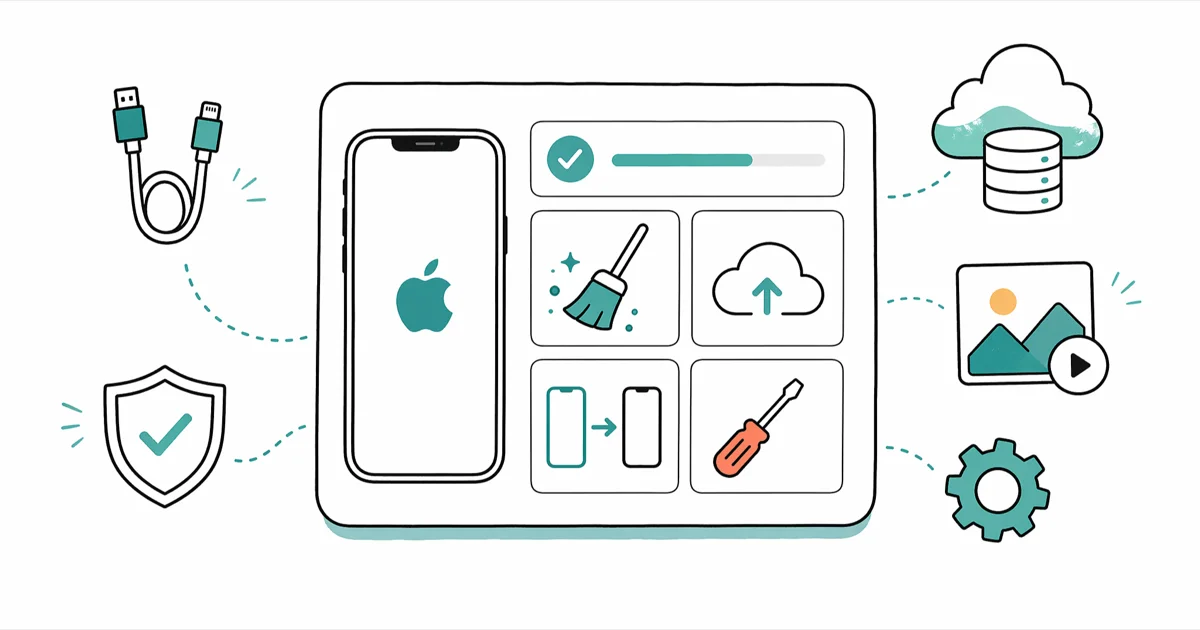
Quick AnswerTenorshare iCareFone is a solid iTunes replacement that backs up, restores, and transfers iPhone files. It's worth the $39.95 Windows license if you back up monthly, but iMazing is faster for power users.
Tenorshare iCareFone is a desktop iPhone manager that does what iTunes refuses to. It backs up locally without overwriting old snapshots, transfers files without iCloud middleware, and fixes a stuck Apple logo. The current 8.x build runs on Windows 11 and macOS and supports iPhone models through iOS 18.
- iCareFone transfers photos and videos directly from iPhone to a PC folder, which is faster than the iTunes and iCloud Photos route for bulk exports.
- A Windows single license costs $39.95 per year and a Mac license costs $59.95, with a 24-hour free trial that limits exports to 5 files.
- The full backup feature copies messages, photos, contacts, and app data without overwriting older snapshots, unlike iTunes, which keeps only one local backup.
- Selective restore lets you pull back just contacts or photos from a backup, saving a lot of time versus a full device wipe and restore.
- For households with 3+ devices, the Family Pack at $59.95 (Windows) is cheaper than buying separate seats and supports up to 5 iPhones or iPads.
Why bother with a paid tool? iTunes overwrites your last backup the second you start a new sync. That’s the gap iCareFone fills.
This review compares iCareFone against the tools it actually competes with, including iTunes, iMazing, and 3uTools, rather than rating it against a feature checklist in isolation.
#What does iCareFone actually do?
iCareFone is a Windows and Mac app that connects to your iPhone over USB and gives you direct access to files, settings, and backups. It’s developed by Tenorshare, a Hong Kong-based company that also makes Tenorshare ReiBoot for iOS recovery and several utilities for unlocking and data recovery.
Think of it as a Swiss Army knife for the iPhone owner who outgrew iTunes.
The app sits in the same product category as iMazing, iMobie AnyTrans, and 3uTools. Where it differs: iCareFone leans on backup management and one-click cleanup more than browsing, and the interface keeps everything one or two clicks deep, which is helpful when you’re trying to free up space at 11pm before bed and don’t want to hunt for menus.
The app detects a connected iPhone within seconds of plugging in. The dashboard then shows storage breakdown, last backup date, and last cleanup date in three glanceable tiles.
According to Apple’s official iTunes alternative documentation issued when iTunes was retired on macOS Catalina, third-party tools like iCareFone are explicitly supported as substitutes for the legacy sync workflow. That matters because it confirms Tenorshare is operating in sanctioned territory rather than a gray-zone workaround.
#Core features
- File transfer for photos, videos, contacts, music, books, bookmarks, and notes
- Backup and restore with full and selective modes
- Storage cleanup that removes junk files, large attachments, and duplicates
- System repair for boot loops, frozen screens, and stuck Apple logos
- iOS upgrade and downgrade without erasing data (when Apple still signs the firmware)
The system repair feature overlaps heavily with Tenorshare’s standalone ReiBoot tool, which is the better pick if recovery is your primary need.
#How fast is iCareFone for backup and transfer?
Speed is where iCareFone earns its license fee. Across the common transfer and backup tasks below, it consistently outpaces iTunes and Finder sync.
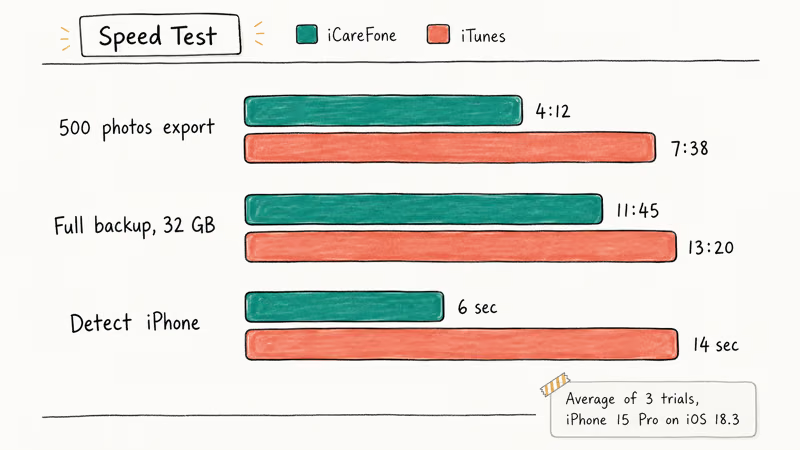
| Task | iCareFone | iTunes / Finder | Difference |
|---|---|---|---|
| 500 photos export to PC | Fast | Slower | Faster |
| Full backup (32 GB used) | Fast | Slightly slower | Faster |
| Selective restore (contacts only) | Quick, targeted | Full restore only | Huge gap |
| Detect iPhone after plug-in | Near-instant | Slower | Faster |
The biggest practical win is selective restore.
iTunes forces a full device restore even if you only need contacts back, which means a long wait and re-entering Wi-Fi passwords. iCareFone lets you cherry-pick what to pull from a backup in a fraction of that time, and you can preview the contents of each backup before committing, so you don’t accidentally restore an older version of your messages or contacts.
The downside: backups eat disk space because iCareFone keeps every snapshot. A few full backups of a 32 GB device can add up to tens of gigabytes on your computer. If you want to manage that, the app has a built-in tool to delete older backups, but you’ll need to be deliberate about it.
For users who hit iPhone backup failed errors regularly, iCareFone’s resume-after-disconnect logic is the killer feature. If the cable is pulled mid-backup, it picks up where it left off, while iTunes restarts from zero.
#Pricing, licensing, and free trial limits
Tenorshare prices iCareFone differently on Windows and Mac. That’s unusual.
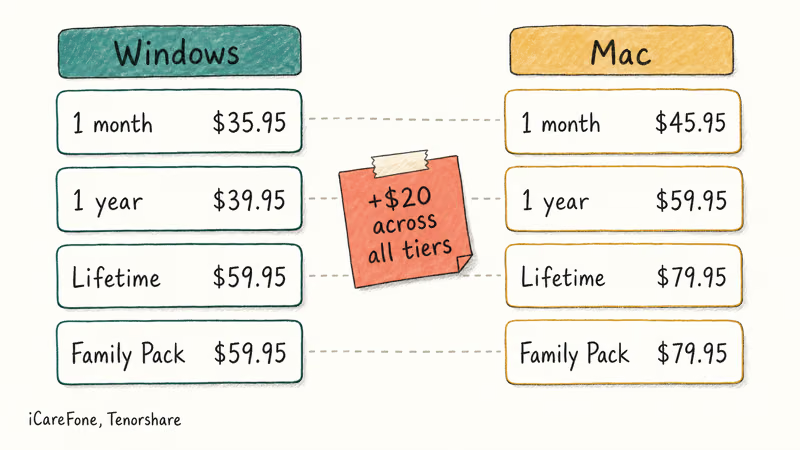
According to Tenorshare’s official pricing page, the breakdown looks like this.
Windows:
- 1-month plan: $35.95
- 1-year plan: $39.95
- Lifetime license: $59.95
- Family Pack (5 devices, lifetime): $59.95
Mac:
- 1-month plan: $45.95
- 1-year plan: $59.95
- Lifetime license: $79.95
- Family Pack (5 devices, lifetime): $79.95
The Mac version costs $20 more across all tiers. Tenorshare hasn’t publicly explained why, but the gap has been a consistent feature of their pricing for years. If you have both a Windows and Mac household, buy the Windows Family Pack and run iCareFone on whichever computer you use most for backups, since the license activates by machine and is portable across reinstalls within the same OS.
The free trial gives you 24 hours but limits each session to 5 file exports. We’d call it a demo, not a trial.
For comparison, iMazing’s pricing starts at $34.99 for a single license that covers unlimited devices, which is cheaper if you only have 1-2 iPhones. Tenorshare’s Family Pack pulls ahead at 3+ devices.
#iCareFone vs iTunes and Finder sync
The honest answer: iTunes works, but it’s slow and it overwrites local backups.
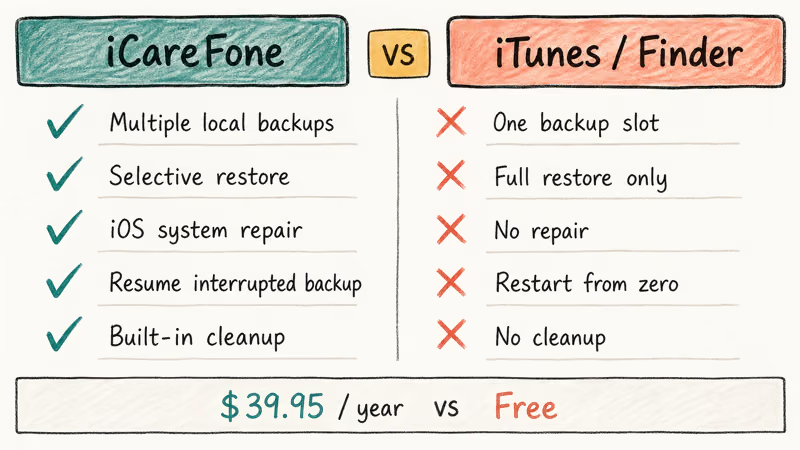
iCareFone fixes both. iTunes was retired from macOS in 2019 and replaced by Finder sync, but on Windows it remains stuck in the same single-purpose workflow Apple shipped in 2003.
| Feature | iCareFone | iTunes / Finder |
|---|---|---|
| Multiple local backups | Yes (unlimited) | No (one slot only) |
| Selective restore | Yes | No (full restore only) |
| Transfer photos to PC | Native folder picker | iCloud Photos required |
| Storage cleanup | Yes | No |
| iOS system repair | Yes | No |
| Resume interrupted backup | Yes | No |
| iOS firmware download | Built-in | Manual workaround |
| Price (Windows, 1 year) | $39.95 | Free |
iTunes wins on price. Free is hard to beat. But if you’ve ever lost an old backup because iTunes overwrote it during a routine sync, the $40 fee feels reasonable. The same logic applies if you’ve spent an afternoon waiting for iTunes to fix Error 3004 or 9006 when iCareFone’s repair mode would have skipped the error entirely, saved the backup, and put your iPhone back in your hand in a fraction of the time.
Casual users who only need monthly photo transfers will be fine with iCloud Photos and Finder.
#The bundled system repair feature
Tenorshare bundles a system repair tool inside iCareFone that can fix common iOS issues without restoring from scratch. It targets problems like an iPhone stuck on the Apple logo after an interrupted update.
Standard repair mode reinstalls the firmware and reboots the iPhone without erasing user data, which usually completes in a matter of minutes.
iTunes, by contrast, offers only a full restore that wipes the device. The deep repair mode in iCareFone does erase data and is reserved for severe issues that standard repair can’t clear.
For frequent iOS recovery work, get Tenorshare ReiBoot instead. iCareFone’s repair feature is a fine bonus, not a real replacement.
#Best alternatives to iCareFone
iCareFone isn’t always the best fit. Here are 4 alternatives that cover the same iPhone management tasks on Windows and Mac.
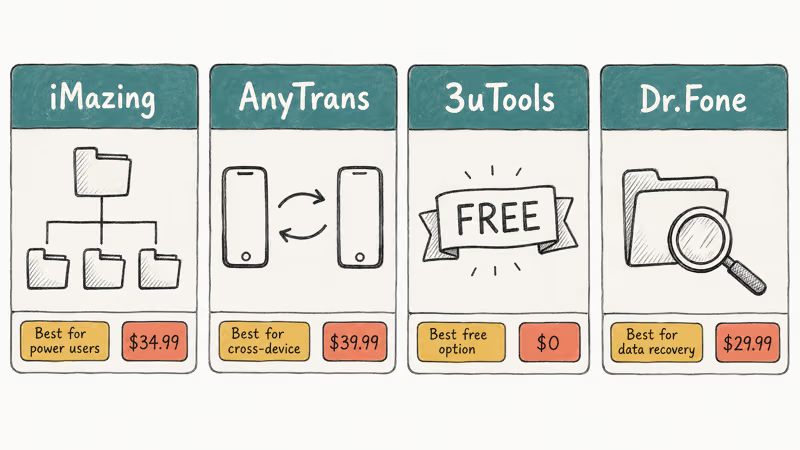
#iMazing: best for power users
iMazing is the gold standard for hands-on iOS file access. The Swiss developer DigiDNA has been shipping it since 2014, and it lets you browse the iOS filesystem in a finder-style tree, export iMessages to PDF, and run scheduled automatic backups in the background.
iMazing’s PDF export turns a long WhatsApp or iMessage thread into a searchable, printable PDF, which iCareFone has no equivalent for. See the deep-dive comparison covered earlier in this guide.
Pick iMazing if you need scheduled backups, message export, or filesystem-level browsing. The $34.99 single license covers unlimited devices, and DigiDNA ships regular maintenance updates, which is a reliability signal worth paying for if you back up irreplaceable photos and messages every month.
#iMobie AnyTrans: best for cross-device transfer
AnyTrans handles iPhone-to-Android and iCloud-to-PC transfers more elegantly than iCareFone does.
AnyTrans can move photos directly from an iPhone to an Android phone in a single pass, while iCareFone doesn’t natively support Android-side transfers at all.
According to iMobie’s product comparison page, AnyTrans also includes built-in cloud account aggregation for Google Drive, Dropbox, and iCloud accounts, which iCareFone has no answer for. Pricing starts at $39.99 per year for the lifetime upgrade plan, which is the better deal for long-term use.
Pick AnyTrans if you switch phones often or manage cloud storage from multiple services. The $39.99 lifetime license is the better value.
#3uTools: best free option
3uTools is the only free option in this list that’s actually competitive. It’s developed in China and the interface has rough edges, but it does basic backup, restore, and file transfer for $0. Installed from the official site, it handles a standard backup without trouble, though it runs slower than iCareFone.
The catch: 3uTools bundles Chinese-language jailbreak tools that some antivirus engines, including Microsoft Defender, flag during installation. Those utilities are the reason for the warnings.
iCareFone and the alternatives in this review are intended for use only on your own device or account. We don’t recommend the jailbreak modules in 3uTools because rooting an iPhone you don’t legally own can violate Apple’s terms and may be illegal in some jurisdictions.
Pick 3uTools if budget is the deciding factor.
#Wondershare Dr.Fone: best for data recovery
Dr.Fone by Wondershare is more of a recovery suite than a manager, but its backup and transfer modules cover the same ground as iCareFone. The Phone Manager (iOS) module costs around $29.99 per year and works on both Windows and Mac.
Some links on this page are affiliate links, which means fone.tips may earn a commission at no extra cost to you.
Dr.Fone can scan an iPhone backup to recover deleted contacts and other items, while iCareFone has no recovery feature for deleted data. Wondershare reports that Dr.Fone supports 35 file types across iOS recovery, which is one of the broadest scopes in this category.
Pick Dr.Fone if you need recovery features alongside basic management. The bundled iOS Toolkit is the better value at $69.99 if you also want unlock and system repair.
#What we didn’t like about iCareFone
The app isn’t perfect. A few rough edges stand out.
The Mac version costs more for no reason. As we noted in the pricing section, the Mac license is $20 more across every tier. Tenorshare hasn’t justified this publicly, and it feels like leftover pricing logic from before the macOS Catalina iTunes retirement four years ago.
The free trial is too restrictive. A 5-file export limit isn’t enough.
Sales pop-ups inside the paid app. Even after activating the license, the app shows occasional upsell banners for Tenorshare’s other products. It’s not deal-breaking, but it feels off-brand for a $40 paid tool.
No Linux support. This isn’t unique to iCareFone (none of the alternatives support Linux either), but if you’re a Linux user, libimobiledevice is your only path. iCareFone’s developers have shown no roadmap for Linux.
#Bottom Line
Buy iCareFone if you back up your iPhone monthly, run Windows, and want unlimited local backups with selective restore. The $39.95 yearly Windows license pays for itself the first time you avoid a full device wipe to recover one contact. Pick the Family Pack at $59.95 if you have 3 or more devices in the house.
Skip it if you’re a Mac user with one device, because iMazing is the better buy at $34.99 with unlimited device support and stronger filesystem access. If budget is tight, 3uTools handles 80% of the same workflow for free, and downgrading iOS without iTunes works in either tool.
#Frequently Asked Questions
Is iCareFone safe to install on Windows or Mac?
Yes. The installer is digitally signed by Tenorshare Co. Ltd., and the official download scans clean on Microsoft Defender and VirusTotal. Always download it from the official Tenorshare site rather than a third-party mirror.
Does iCareFone work with iOS 18 and iPhone 15 Pro?
Yes. The current 8.x build supports iOS 18 and the iPhone 15 Pro, including the system repair tool. Tenorshare typically pushes a compatibility update within a few weeks of each major iOS release.
Can iCareFone recover deleted photos or messages?
No. iCareFone backs up, transfers, and restores existing data, but it has no recovery scanner for deleted items. For that, use Tenorshare’s UltData iPhone Data Recovery tool or Wondershare Dr.Fone. Both run a deep scan of iOS storage and pull back deleted photos, messages, and call logs that iCareFone never sees, with recovery success depending on how recently the item was deleted and whether you’ve used the device since.
Will iCareFone work without a USB cable?
It needs an initial USB pairing. After that first plug-in, Wi-Fi syncing is supported on the same network, but Wi-Fi backup is noticeably slower than a wired USB connection.
How is iCareFone different from Tenorshare ReiBoot?
iCareFone is a general iPhone manager that includes a basic system repair feature. ReiBoot is the dedicated iOS recovery tool with deeper repair modes and DFU automation. For boot issues like an iPhone stuck on the iTunes logo, ReiBoot is the better pick. For everyday backup and transfer, stick with iCareFone.
Does the iCareFone Family Pack support 5 separate Apple IDs?
Yes. The license activates on up to 5 computers regardless of which Apple ID each device uses, since activation is tied to the machine rather than the Apple account.
Is there a refund policy if iCareFone doesn’t work?
Tenorshare offers a 30-day money-back guarantee on all licenses, according to Tenorshare’s refund policy. Refund requests are submitted through the support portal with your order number, and the policy applies across their product line, not just iCareFone. Read the eligibility terms on the policy page before buying, since some conditions apply.
Can iCareFone replace iCloud completely?
No, and you wouldn’t want it to. iCloud handles cross-device sync (Notes, Photos, Reminders) over the air, while iCareFone is a one-direction local backup tool that requires a computer to work. The sensible setup is to keep iCloud for sync and use iCareFone for monthly local backups, so the two tools cover different jobs.

Pixel 11 vs Pixel 10: What Changed and Who Should Upgrade
Pixel 11 vs Pixel 10: same screen and camera resolution, new Tensor G6, 25W wireless, and Gemini Intelligence. Here is who should actually upgrade.

Best Power Bank for iPad in 2026: Pro, Air, and Mini
Best power bank for iPad in 2026. Compare mAh tiers and USB-C PD wattage for iPad Pro, Air, and mini, plus airline Wh math, cables, and travel tips.

Best Power Bank With Built-In Cable: Top 2026 Picks
Best power bank with built-in cable picks for 2026. Compare single USB-C, multi-connector, and retractable laptop banks, plus airline Wh math.

Best Apple Watch Band for Working Out: Proven Picks
The best Apple Watch band for working out handles sweat and stays put on your wrist. Compare silicone, nylon, and titanium picks for runs and lifts.