Best Apps Like Flipagram for Photo and Video Slideshows
Flipagram is gone, but better alternatives exist now. Here are 10 top apps like Flipagram for making photo slideshows with music on both platforms.

Quick AnswerFlipagram shut down in 2018 after ByteDance acquired it. The best alternatives for creating photo slideshows with music are InShot, CapCut, and VivaVideo. All three are free on Android and iOS with optional paid upgrades.
Flipagram doesn’t exist anymore. ByteDance bought the app in 2017, renamed it to Vigo Video, and pulled the plug entirely by 2020. If you still have it on your phone, it won’t work. Unauthorized use may violate law or platform terms.
There are 10 strong alternatives that run on both iPhone and Android. Here’s what works for making photo slideshows with music in 2026.
- InShot is the closest Flipagram replacement with slideshow creation, music, and direct social sharing
- CapCut offers the most powerful free editing tools including AI captions and 4K export without watermarks
- Most apps here are free to download with optional paid features from $3 to $12 per month
- TikTok now handles much of what Flipagram did, since ByteDance absorbed its technology
- iMovie remains the best free option for iPhone users who want polished slideshows
#What Happened to Flipagram?
Flipagram launched in 2013 and became the number one app in 87 countries within weeks. According to Productmint’s detailed breakdown, Sequoia Capital and Kleiner Perkins invested $70 million into the company at a $300 million valuation.
The hype didn’t last. User growth stalled, and Chinese news company Toutiao (owned by ByteDance) acquired Flipagram in February 2017. ByteDance rebranded it as Vigo Video in April 2018, then shut it down completely in 2020.
If you’re searching for Flipagram in the App Store or Google Play, you won’t find it.
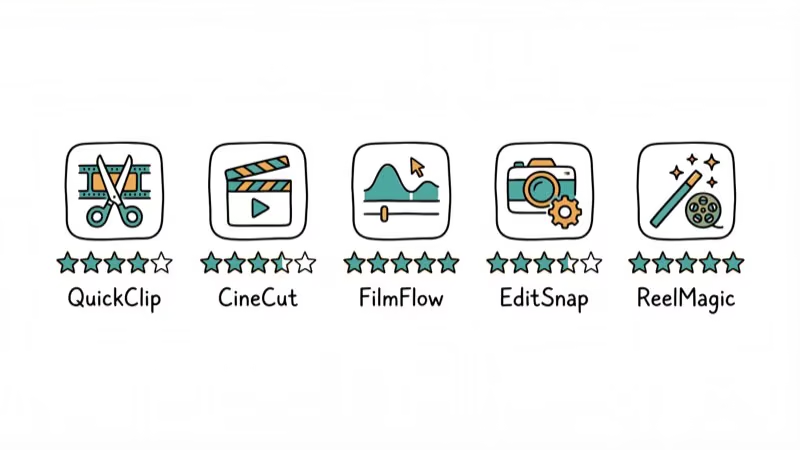
#Top 5 Flipagram Alternatives Compared
Here’s a quick look at the top picks.
| App | Platform | Watermark-Free | Best For |
|---|---|---|---|
| InShot | Android, iOS | Paid plan | Social slideshows |
| CapCut | Android, iOS, desktop | Yes (free) | TikTok and Reels |
| VivaVideo | Android, iOS | Paid plan | Photo-to-video |
| iMovie | iOS, Mac | Yes | iPhone users |
| WeVideo | Android, iOS, web | Paid plan | Cloud editing |
#InShot
InShot is the most direct Flipagram replacement. You add photos, arrange them into a slideshow, pick background music from the built-in library, and share to Instagram, TikTok, or YouTube.
Slideshow creation is quick, even for a 15-photo slideshow. The app supports speed adjustments from 0.2x to 100x, 4K export, and AI-powered auto captions. The free version adds a small watermark, and removing it costs about $4 per month.
If you need more video editing on Android, InShot handles that too.
#CapCut
CapCut is made by ByteDance, the same company that absorbed Flipagram. It’s free, exports in 4K without a watermark, and has AI tools that didn’t exist when Flipagram was around.
According to Atomi Systems’ 2026 review, CapCut is the best free video editor for social media content. The app includes keyframe animation, chroma key (green screen), auto captions, and hundreds of trending effects updated weekly. The CapCut desktop version can edit a 30-second slideshow in under 5 minutes, and the results look professional without any paid features.
CapCut collects more data than most editing apps though. Check out the latest CapCut templates for ready-made designs.
#VivaVideo
VivaVideo focuses on turning photos into short videos with music. Pick photos, choose a template, done.
Generating a 20-second video from 10 photos is quick on a modern iPhone. The “Photo Movie” mode is basically Flipagram’s core feature with a modern interface, complete with stickers, filters, and text overlays. The free plan limits exports to 720p and adds a watermark. Pro costs around $6 per month.
#iMovie
iPhone users already have a solid Flipagram alternative installed. iMovie comes pre-loaded on every iOS device and exports watermark-free in 4K. It costs nothing.
The slideshow workflow is straightforward: import photos, add music from your library, adjust clip timing, and export. A 1-minute photo slideshow takes only a few minutes to put together. iMovie lacks the social-first features of InShot or CapCut, but the output quality is consistently high. If you run into issues, check our iMovie troubleshooting guide.
#WeVideo
WeVideo stores everything in the cloud. Start on your phone, finish on your laptop.
The free tier gives you 5 minutes of export time per month at 480p, which is tight but workable for a single slideshow. Paid plans unlock 4K export, a larger music library, and screen recording starting at about $5 per month. WeVideo works especially well for collaborative projects since multiple people can edit the same project from different devices simultaneously.
#TikTok and Instagram Reels as Flipagram Replacements
TikTok and Instagram now handle most of what Flipagram was built for. Both let you create photo slideshows set to music, apply filters, and share instantly.
TikTok’s photo mode turns images into a scrollable slideshow with background audio. If your goal is sharing memories with friends set to a song, you don’t need a separate app at all. Learn how to add pictures to TikTok for a step-by-step walkthrough.
You’d still want a dedicated editor for more control over transitions, timing, and export quality. InShot and CapCut also let you save videos locally without posting them publicly.
#5 More Apps Worth Trying
#PicPlayPost
PicPlayPost specializes in video collages. Combine photos, videos, and GIFs into grid layouts with independent audio tracks.
#VideoShow
VideoShow has been around since 2014. It focuses on themed templates for holidays, birthdays, and events. Those templates save real time if you want a polished slideshow without much effort. Free with ads, or about $3 per month for the pro version.
#PicsArt
PicsArt started as a photo editor but now includes video slideshow tools. It has over 150 million monthly active users and a large community sharing templates and effects. The video features aren’t as deep as InShot’s, but the photo editing capabilities are noticeably stronger, with tools for background removal, AI-powered enhancements, and collage creation that go well beyond what most video-first apps offer.
#Canva
Canva’s video editor has gotten much better. According to Canva’s official feature page, the tool supports dozens of slideshow templates with drag-and-drop editing on both desktop and mobile. You can add licensed music and export up to 1080p on the free plan.
#FilmoraGo
FilmoraGo is the mobile version of Wondershare’s desktop editor. It has more advanced editing tools than most phone-only apps, including split-screen, picture-in-picture, and speed ramping. Free with a watermark, or about $8 per month for pro.
#How Do You Pick the Right App?
Choosing depends on your platform, willingness to pay, and where you’ll share.
For iPhone users who won’t pay anything, iMovie is the clear winner. For Android users or anyone making content for social media, InShot hits the right balance between power and simplicity. CapCut delivers the most tools without requiring a subscription, though it collects more user data than competitors.
One thing stands out: the vintage video editor style filters that Flipagram popularized are now standard across every app on this list.
#Free vs. Paid Video Editors
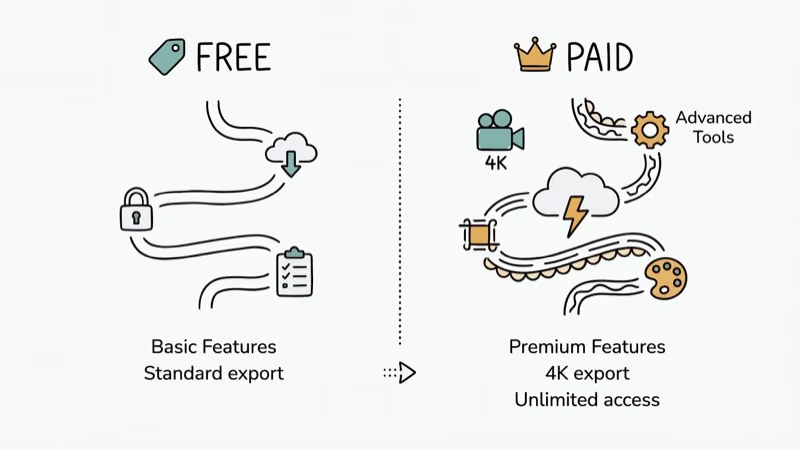
The free tiers cover basic slideshow creation. You can pick photos, add music, apply transitions, and export without paying on InShot, CapCut, VivaVideo, and Canva.
Paid plans typically add watermark removal, higher export resolution (4K instead of 720p or 1080p), and access to premium music libraries. CapCut is the exception: it offers 4K watermark-free export even on its free plan, which is why it’s become so popular with creators who don’t want to pay for editing software.
For personal slideshows, free tiers are plenty. For brand or YouTube content, the $4 to $8 monthly pro cost is worth it.
#Bottom Line
Start with InShot if you want the most Flipagram-like experience. Try CapCut for powerful free editing. Use iMovie on iPhone for zero compromises on quality. And if you’re mainly posting to social platforms, TikTok and Instagram’s built-in tools might be all you need.
#Frequently Asked Questions
Do any of these apps work exactly like Flipagram did?
InShot comes closest. You pick photos, add music from a built-in library, adjust timing, and share to social media. The workflow is nearly identical to Flipagram’s original design.
Can I make slideshows with copyrighted music?
Most apps include royalty-free music libraries for in-app use. If you add a copyrighted song from your phone’s library, the video may get flagged or muted when uploaded to TikTok, Instagram, or YouTube. InShot and CapCut both have large licensed music collections you can use without copyright issues.
Which app is completely free with no watermark?
CapCut and iMovie. Both export without watermarks on their free plans.
Are these apps safe to download?
Yes. All are available through the official App Store and Google Play Store. CapCut collects more usage data than average because ByteDance owns it. If that bothers you, pick InShot or iMovie instead.
Can I transfer my old Flipagram videos to these apps?
Only if you saved them to your camera roll before Flipagram shut down. Videos stored exclusively in Flipagram’s cloud are gone permanently since ByteDance deleted all server data when the service ended. Any videos saved locally on your phone can be imported into any of the editors listed here for further editing, re-cutting, or adding new music and effects.
What’s the best app for making Instagram Reels from photos?
CapCut has the edge for Reels. It has Instagram-optimized export presets with the correct 9
aspect ratio plus a trending effect library that’s updated weekly. InShot also works well for this. Check out tips for the right Instagram video format to avoid upload issues.Do I need a powerful phone to run these video editors?
No. Any phone from the last 4 years handles basic slideshows fine. 4K export takes longer on older hardware though, usually 2 to 3 minutes for a 1-minute video on an iPhone 11 versus about 30 seconds on an iPhone 15 Pro.
Can I use these apps to make YouTube videos?
Yes. CapCut and InShot both export in 16
at up to 4K. For longer projects, try a desktop video editor.
Mac mini M6 vs M5 Pro: Which Model Should You Buy?
Mac mini M6 vs M5 Pro compared on price, memory, ports, displays, and real workloads. Find the better 2026 Mac mini for your desk and budget.

Apple Siri Settlement: Who Qualifies and How to Claim
Apple's $250 million Siri settlement covers iPhone 15 Pro and iPhone 16 models bought June 2024 to March 2025. See who qualifies and how claims work.

iOS 26.6.1 Security Update: What Apple Fixed and Who Gets It
Apple released iOS 26.6.1 on August 17 with 29 security fixes, including an IPSec interception bug. See what it patches, who gets it, and how to update.

iPhone Adaptive Power: How It Works and When to Use It
Learn how iPhone Adaptive Power works, which models support it, what it changes, and when Low Power Mode is still the better battery-saving choice.