iPhone Flashlight Not Working? 8 Proven Fixes (2026)
iPhone flashlight greyed out or won't turn on? Restart, close camera apps, charge past 20%, and update iOS. Step-by-step for all eight fixes.
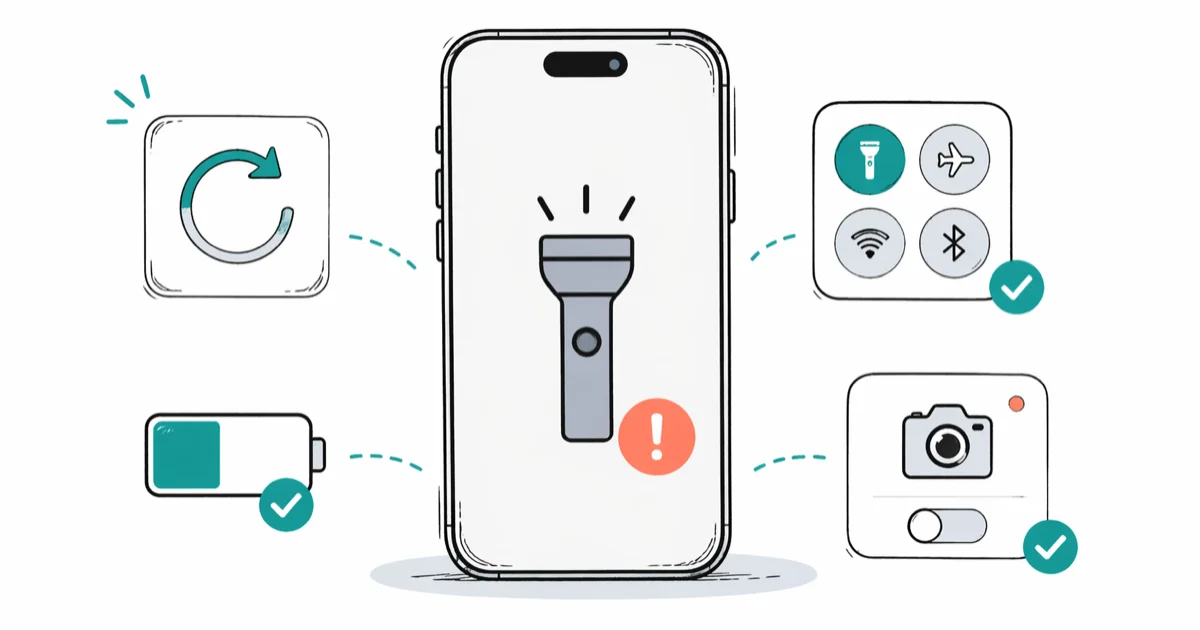
Quick AnswerRestart your iPhone first. If the flashlight button is still greyed out, close all camera apps, charge the battery above 20%, and check that the flashlight toggle exists in Control Center. Most failures clear up within two minutes.
Your iPhone flashlight stopped working and the button looks greyed out in Control Center. The eight fixes below work through the causes in order, and the first three usually solve the problem in under two minutes.
- A restart clears the software glitch causing most flashlight failures in under 90 seconds
- The camera app and flashlight share the same LED, so closing all camera apps frees the hardware
- iPhones disable the flash LED when battery drops below 20% to protect the lithium-ion cell
- Resetting all settings fixes corrupted system configurations without deleting photos or apps
- Hardware LED damage from drops is the only cause that requires professional Apple repair
#Why Is Your iPhone Flashlight Greyed Out?
The flashlight button in Control Center turns grey for six common reasons. Identifying yours narrows the fix to one step.
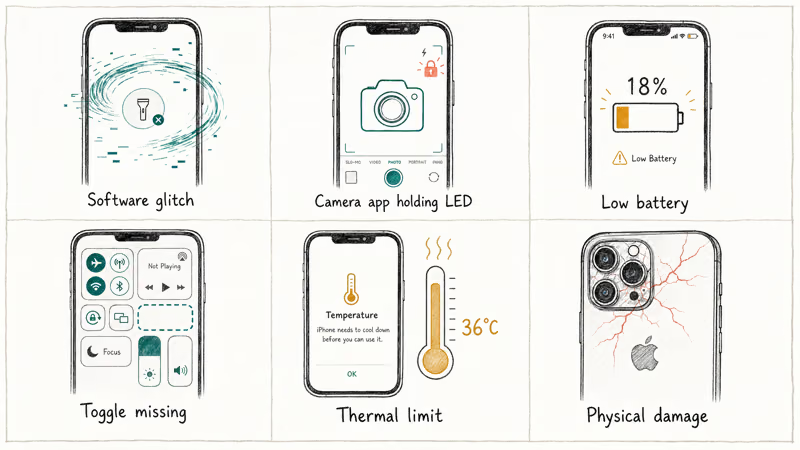
Software glitch. iOS loses access to the flash LED after a crash or memory pressure event. The button appears but does nothing when tapped. A restart clears it fast.
Camera app holding the LED. The rear flash and the flashlight share one hardware component, and when any app holds an active camera session, iOS locks the LED exclusively for that app. Snapchat, Instagram, TikTok, FaceTime, and barcode scanners all trigger this lock, which means the flashlight toggle stays grey until you close every one of them.
Low battery. Apple’s battery and performance documentation states that the iPhone disables power-hungry components including the LED flash when the battery falls below a critical threshold to prevent deep discharge damage. On most models, the cutoff sits around 20%.
Control Center toggle missing. Someone removed the shortcut. Hardware works fine.
Thermal protection. Apple’s temperature management guide confirms that the iPhone’s safe operating range is 0 to 35 degrees Celsius. The flash LED is one of the first features iOS shuts down when internal temperature exceeds that upper limit, and the device won’t restore it until it cools below the threshold.
Physical damage. A drop cracking the rear camera module housing can disconnect or damage the LED permanently. This requires an Apple repair.
#Quick Software Fixes for the Flashlight
Start here. These take under three minutes combined and cover the majority of failures.
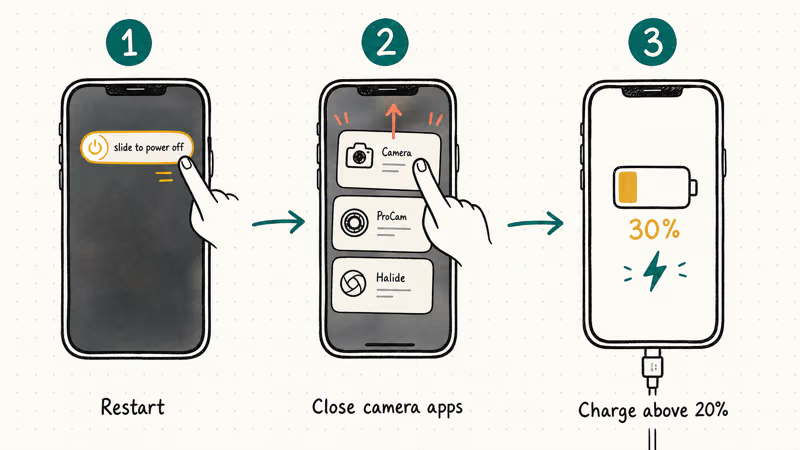
#Fix 1: Restart the iPhone
Hold the Side button and either volume button together until the power-off slider appears. That works on Face ID models, iPhone X and later. For older Home button iPhones, hold the Side button alone.
Drag the slider and wait 30 seconds for a full shutdown, then hold the Side button until the Apple logo appears. According to Apple’s restart guide, a restart clears temporary software states that block hardware access including the flash controller, so an unresponsive flashlight usually returns the moment the phone finishes rebooting.
If your iPhone won’t turn on at all during this step, that’s a different issue entirely.
#Fix 2: Close All Camera Apps
Open the App Switcher by swiping up from the bottom and pausing in the middle of the screen. On Home button models, double-press the Home button instead.
Swipe away every camera-using app: Camera, Snapchat, TikTok, Instagram, FaceTime, and any barcode scanner. Wait five seconds. Often a single app like Instagram is holding the LED, and closing it frees the flashlight toggle within seconds.
#Fix 3: Charge Above 20%
Check your battery at Settings > Battery. Below 20%, plug in.
Charge to at least 30% before testing the flashlight again. The iPhone blocks the LED flash at low battery regardless of settings, apps, or toggles, and no software trick overrides this hardware-level restriction.
#Advanced Troubleshooting Steps
When a restart, closing camera apps, and charging don’t solve the problem, these four fixes target deeper causes.
#Fix 4: Add the Flashlight Back to Control Center
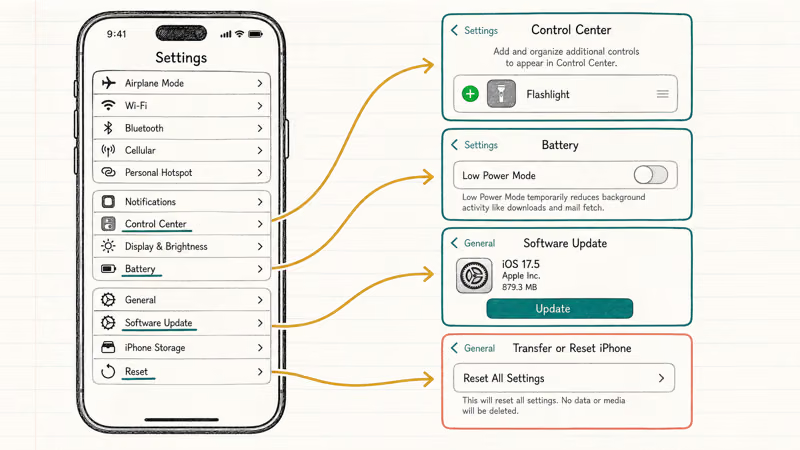
If the flashlight icon is missing from Control Center entirely, go to Settings > Control Center and tap the green plus icon next to Flashlight. On iOS 18, Apple redesigned Control Center into multiple pages, so scroll through every page before assuming the toggle is gone.
#Fix 5: Turn Off Low Power Mode
Go to Settings > Battery and toggle Low Power Mode off.
Apple doesn’t officially list the flashlight as affected by Low Power Mode, but toggling it off can still bring a greyed-out button back to life within a couple of seconds. The likely cause is that Low Power Mode plus a marginal battery percentage together push iOS into disabling the flash preemptively as a precaution, even though the LED itself is fine and the system is simply playing it safe with the remaining charge.
#Fix 6: Update iOS
Go to Settings > General > Software Update and install any available version. Apple patches flash-related bugs in point releases, and running two or three major versions behind means you could be hitting a known camera-flash issue already fixed upstream. The update takes about 15 minutes on Wi-Fi.
#Fix 7: Reset All Settings
Go to Settings > General > Transfer or Reset iPhone > Reset > Reset All Settings. According to Apple’s reset options guide, this restores every system preference to its factory default without erasing photos, apps, or personal files.
Wi-Fi passwords and Bluetooth pairings get wiped. Reconnect after. If brightness problems came alongside the flashlight issue, check iPhone brightness keeps dimming for that specific fix.
#When Should You Contact Apple for a Flashlight Repair?
If the flashlight doesn’t work after a restart, full charge, closing all camera apps, and a settings reset, the LED hardware is damaged. Book service through Apple’s iPhone repair page. Out-of-warranty rear camera and flash module repairs range from $200 to $500 depending on the model, while AppleCare+ reduces that to a flat service fee regardless of which iPhone you own.
#Flashlight Stopped Working After a Drop
Drops change everything. Look at the rear camera area for cracked glass, a loose housing, or deformation around the camera bump.
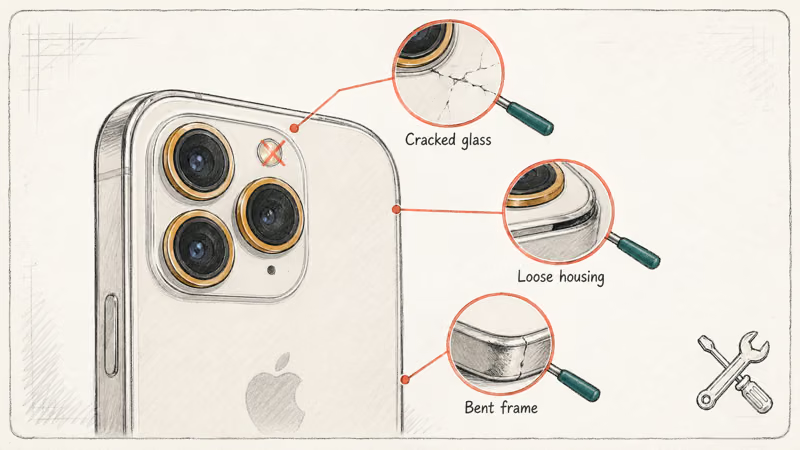
If the rear camera died at the same time, the LED module absorbed the impact directly. Skip all software fixes and contact Apple Support or visit a store. Under warranty or AppleCare+, the repair may cost nothing beyond the flat service fee.
Drop damage often hits multiple components. Check for ghost touch issues and a frozen screen too.
#Temporary Flashlight Restrictions by Design
Not every greyed-out button means something broke.
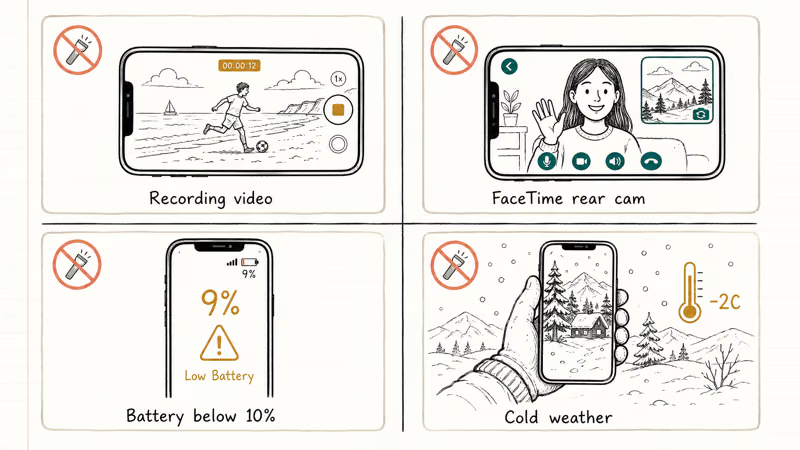
The flashlight won’t activate during Slo-Mo recording, regular video capture, or active photo mode. It’s also blocked while FaceTime uses the rear camera. These restrictions clear automatically the moment you stop recording or hang up the call, so there’s nothing to fix.
Below 10% battery, most iPhone models block the flashlight entirely.
Cold weather drains lithium-ion batteries fast. Apple recommends operating the iPhone between 0 and 35 degrees Celsius, so bring it indoors and let it warm for five minutes if the phone has been in freezing conditions. For broader battery drain beyond the flashlight, check iPhone battery dying fast.
#Bottom Line
Restart the iPhone and charge it above 20%. Those two steps fix most flashlight failures in under two minutes. If the button stays greyed out, close camera apps, confirm the Control Center toggle exists, disable Low Power Mode, and update iOS. Reset all settings as the last software step before booking Apple repair.
After a drop, skip software troubleshooting entirely and go to Apple Support.
Related guides for issues that often appear alongside flashlight problems:
- Lock screen shortcut customization: removing the flashlight from the lock screen
- Call audio glitches pair with flashlight failures more often than you’d expect, so check iPhone speaker not working on calls when both appear together
- Boot failures alongside a dead flashlight appear in the iPhone stuck on Apple logo guide
#Frequently Asked Questions
Why did my iPhone flashlight suddenly stop working?
A temporary software glitch. iOS loses access to the flash LED after a crash, memory pressure event, or failed app transition, and restarting clears it in under 90 seconds.
Can a low battery cause the iPhone flashlight to fail?
Yes. The iPhone disables the LED flash below roughly 20% battery to protect the cell from deep discharge. Charge to at least 30% before testing the flashlight again. The exact cutoff varies slightly between iPhone generations, but 30% provides a reliable margin on every model Apple currently supports.
Why is the flashlight greyed out when Camera is open?
They share the same LED. Close Camera from the App Switcher, wait three seconds, and the flashlight toggle reactivates.
Will resetting all settings fix a broken flashlight?
It fixes flashlight problems caused by corrupted system configurations blocking the flash controller. The reset restores factory defaults for every system preference without deleting photos, apps, or files. You’ll need to re-enter Wi-Fi passwords and re-pair Bluetooth devices afterward, but that takes about two minutes and is worth it when nothing else works.
Does cold weather affect the iPhone flashlight?
Yes. Lithium-ion batteries lose capacity fast below freezing. Bring the phone indoors for five minutes.
Is there a third-party flashlight app that bypasses the restriction?
No. Every third-party flashlight app accesses the same LED through the same iOS API, so low battery, active camera sessions, and thermal throttling block them identically to the built-in flashlight. Save yourself the download and the storage space, because nothing about a third-party app changes the underlying hardware lock that iOS applies when conditions prevent flash activation.
When should I take my iPhone to Apple for the flashlight?
Visit Apple if the flashlight fails after a restart, a full charge to 100%, closing all camera apps, and resetting all settings. That combination rules out every software cause, which means the LED module itself has a hardware defect. Also go immediately after a drop that killed the flashlight, since software fixes won’t repair physical damage to the flash assembly, and delaying only risks further corrosion or component shift from the impact.
Can water damage break the iPhone flashlight?
Water near the rear camera module corrodes LED contacts and can short-circuit the flash controller. Let a water-exposed iPhone air-dry for 48 hours in a ventilated spot. Don’t use heat or rice. If it still fails, Apple’s diagnostics confirm whether internal liquid indicators were triggered.

Mac mini M6 vs M5 Pro: Which Model Should You Buy?
Mac mini M6 vs M5 Pro compared on price, memory, ports, displays, and real workloads. Find the better 2026 Mac mini for your desk and budget.

Apple Siri Settlement: Who Qualifies and How to Claim
Apple's $250 million Siri settlement covers iPhone 15 Pro and iPhone 16 models bought June 2024 to March 2025. See who qualifies and how claims work.

iOS 26.6.1 Security Update: What Apple Fixed and Who Gets It
Apple released iOS 26.6.1 on August 17 with 29 security fixes, including an IPSec interception bug. See what it patches, who gets it, and how to update.

iPhone Adaptive Power: How It Works and When to Use It
Learn how iPhone Adaptive Power works, which models support it, what it changes, and when Low Power Mode is still the better battery-saving choice.