How to Get iPhone Emojis on Android: 3 Working Methods
Get iPhone emojis on your Android phone with 3 working methods. Covers emoji keyboards, Samsung font replacement, and the Magisk root approach.
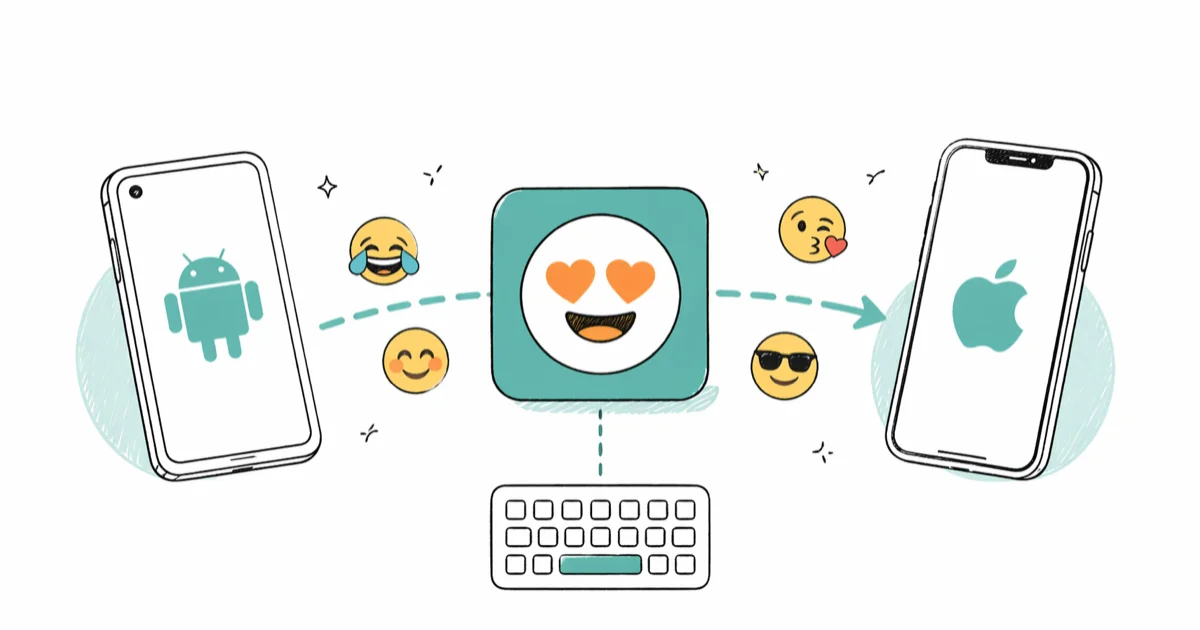
Quick AnswerInstall an iOS-style emoji keyboard from the Play Store for instant results, or use a font replacement app like Emoji Font 3 on Samsung devices for system-wide Apple emojis. Both methods work without rooting.
Getting iPhone emojis on Android doesn’t require buying an iPhone or doing anything complicated. Three different methods work on Samsung and Pixel phones running current Android versions in 2026. Two of these take under 5 minutes and don’t involve rooting.
- iOS emoji keyboard apps from the Play Store work on any Android phone in under 2 minutes
- Samsung phones support system-wide emoji replacement through built-in font settings
- The Magisk root method gives you the closest match to real iPhone emojis across all apps
- Emoji keyboards only change what you type, not emojis you receive from other people
- Font replacement and rooting both change emojis system-wide including in notifications
#Why Do Android and iPhone Emojis Look So Different?
Apple, Google, and Samsung each design their own emoji artwork for the same Unicode characters. A grinning face on iPhone uses Apple’s rounded, glossy style. That same code on a Pixel renders with Google’s flat look.
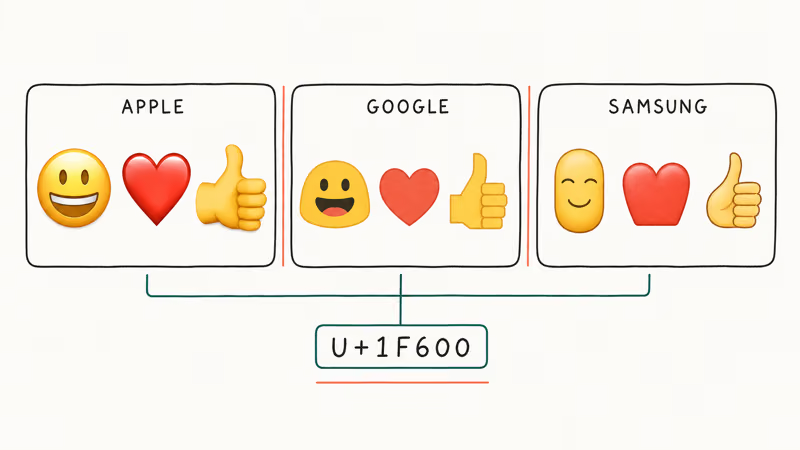
According to the Unicode Consortium’s emoji documentation, vendors are free to create their own visual interpretation as long as the core meaning stays the same. The same report states that the underlying character data is identical across platforms. When someone sends you a heart emoji from an iPhone, your Android receives the exact same Unicode character but displays it using your manufacturer’s artwork instead of Apple’s design.
Apple’s designs have become the cultural default, especially on Instagram and TikTok. That gap between what your friends see and what your phone shows is why emoji apps for Android stay consistently popular.
#Install an iOS Emoji Keyboard (No Root Needed)
This is the fastest approach. Takes about 2 minutes.
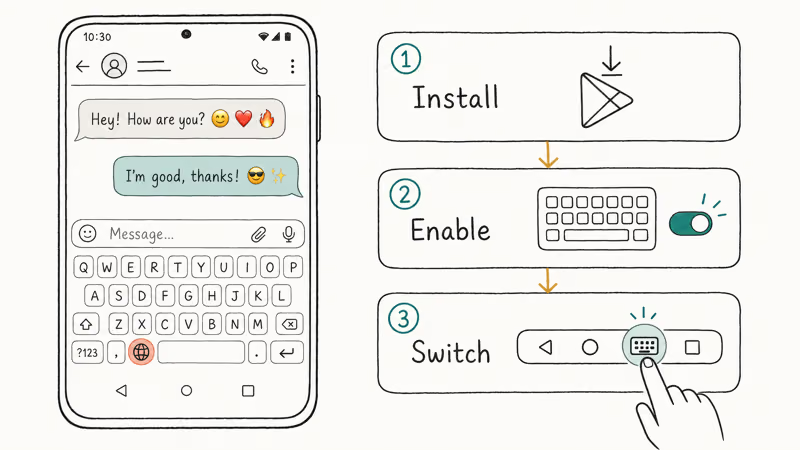
Open the Google Play Store and search for “iOS emoji keyboard.” Facemoji Keyboard and Kika Keyboard both offer Apple-style emoji packs with over a million downloads each. Pick one and install it.
After installing, open the app and follow the on-screen setup. Go to Settings > System > Language and Input > On-Screen Keyboard, then enable the new keyboard. In any messaging app, tap the keyboard icon in the bottom navigation bar to switch.
Facemoji matches Apple’s emoji designs closely across the standard smiley, hand gesture, and animal categories. Food and object emojis can show minor shading differences that most people won’t notice at normal screen sizes. Google’s Gboard help page confirms that third-party keyboards operate within Android’s standard input framework, so they don’t affect your phone’s security or data in any way.
One key limitation: keyboard apps only change emojis inside the keyboard picker. Notifications, system UI, and emojis other people send you still show your phone’s default style. If you also want custom keyboard sizing, most iOS emoji keyboards let you adjust layout too.
#Can You Replace Emojis System-Wide on Samsung Without Rooting?
Yes. Samsung phones running One UI 1.0 or later support emoji replacement through the built-in font system. This is free, system-wide, and safe. Stock Android devices like Pixel phones don’t have this option at all.
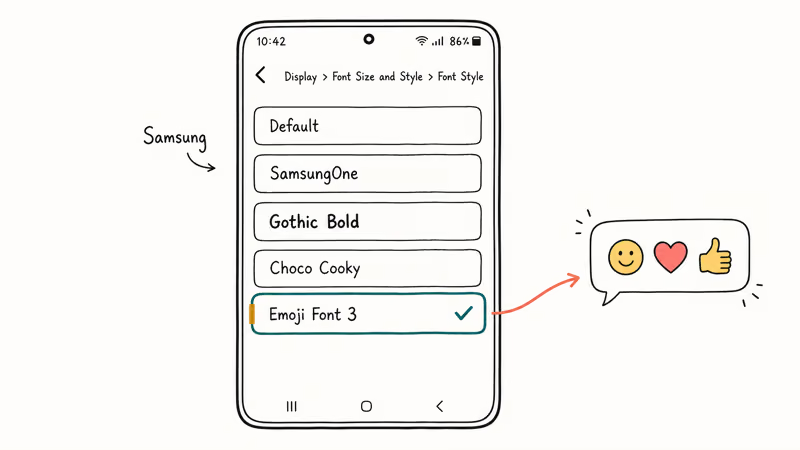
Using Emoji Font 3:
Emoji Font 3 isn’t on the Play Store. Enable installs from unknown sources at Settings > Security > Install Unknown Apps, download the APK from a trusted site like APKMirror, then install it. Go to Settings > Display > Font Size and Style > Font Style and pick Emoji Font 3.
Set Gboard as your default keyboard for the best pairing.
This combo changes emojis everywhere on a Samsung phone: text messages, Instagram, notification badges, and the system picker all show Apple-style designs. Font customization has been part of One UI since version 1.0 on Android 9. Older Samsung devices running Android 7 or 8 may render certain emojis incorrectly because those versions use an earlier font rendering engine.
Using FlipFont Apps:
Prefer the Play Store? Search for “Emoji Fonts for FlipFont 10.” Download it, open the app, tap Apply, then go to Settings > Display > Font Style and select the new font.
This won’t help on Pixel or other stock Android phones. For those, comparing SwiftKey vs. Gboard gives you the best keyboard-level emoji options.
Privacy note: downloading APKs outside the Play Store bypasses Google’s automated malware scanning. Stick with sources that verify digital signatures, like APKMirror. Disable “Install Unknown Apps” after you finish to keep your phone secure.
#Root With Magisk for Near-Perfect iPhone Emojis
This method gives you the closest match to real iPhone emojis.
Rooting replaces the actual system emoji font file on any Android phone regardless of manufacturer. The trade-offs are serious: voided warranty, potential banking app problems, and mandatory module reinstallation after every system update your phone receives throughout its lifetime.
Start by rooting your phone with Magisk. The specific steps depend on your device model, and the whole process typically takes 30 to 60 minutes if you haven’t done it before, including unlocking the bootloader and flashing the Magisk image. Once rooted, open Magisk Manager, tap the modules icon, and search for “iOS Emoji.” You can also download the module from the XDA Forums iOS emoji thread. Install it, grant permissions, reboot.
On a rooted phone, every app shows Apple-style emojis. Only the newest additions differ, since module developers lag one to two iOS releases behind Apple.
Rooting triggers SafetyNet on Pixel phones, disabling Google Pay and sometimes affecting Netflix playback. On Samsung, it trips the Knox security counter, permanently blocking Samsung Pay and certain banking apps. Use Android backup tools to create a full backup before starting.
Legal disclaimer: rooting is legal in most countries for personal use, but it voids your manufacturer warranty. Some carriers restrict service on rooted devices. Only root a phone you own and accept full responsibility for any resulting issues.
#Comparing the Three Methods
Each method fits a different use case. Here’s how they stack up:
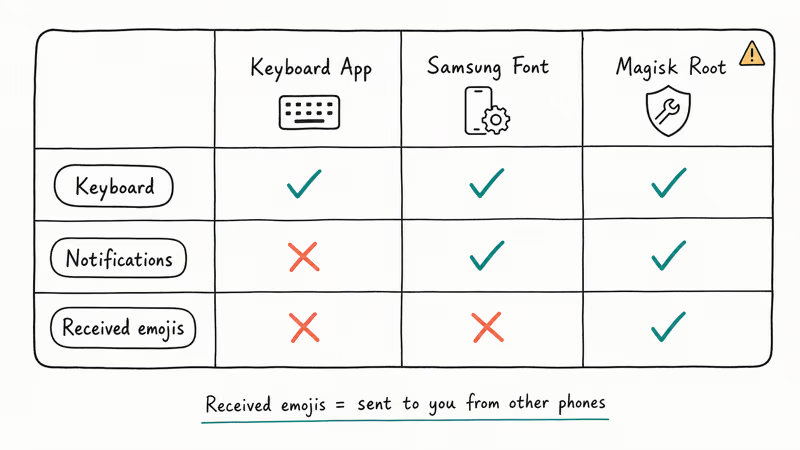
Emoji keyboard apps work on any Android phone, cost nothing, and take about 2 minutes. The catch: they only change emojis in the keyboard picker, not in notifications or messages you receive.
Font replacement is free and changes emojis system-wide on Samsung devices. Every app shows Apple-style designs. Setup takes about 5 minutes through the font settings menu.
Magisk rooting works on all phones and delivers the closest match to real iPhone emojis everywhere on your device. Setup runs 30 to 60 minutes, you lose your warranty, and banking apps may break. You also need to reinstall the module after every Android update.
For most people, a keyboard app handles the job. Samsung owners who want full system-wide coverage without risk should try the font replacement route.
#What to Know Before Changing Your Emojis
Keyboard apps don’t change received emojis. When someone sends you an emoji from their iPhone, your Android still renders it using the default system font.
Some apps bundle their own emoji artwork. WhatsApp, Facebook Messenger, and X (formerly Twitter) ship with embedded emoji fonts that font replacement won’t override. Magisk does override most bundled sets, though WhatsApp started shipping its own since late 2024, so even rooting may not change WhatsApp emojis on the latest app versions.
Reverting is straightforward. Uninstall the keyboard app, switch back to the default font in Samsung settings, or remove the Magisk module. None of these methods permanently alter your phone’s software in a way that can’t be undone.
A few related tasks work the same regardless of which emoji font you install:
- Remove emojis from photos using standard editing tools.
- Browse Snapchat emoji inspiration when you want creative pairings.
- Send GIFs from Android using any keyboard app that supports the iOS emoji style.
#Bottom Line
Start with a keyboard app from the Play Store. Facemoji or Kika take 2 minutes to set up and give you Apple-style emojis with zero risk to your phone. Samsung owners wanting emojis changed everywhere should install Emoji Font 3 through Settings > Display > Font Style. Save Magisk rooting for non-Samsung phones where you need near-perfect iPhone emojis in every single app and you’re willing to trade your warranty and banking app access for it.
#Frequently Asked Questions
Do iPhone emojis display correctly when you send them to other Android users?
No. The recipient sees their phone’s default emoji artwork. Your Apple-style emojis only appear on your own screen because each device renders the same Unicode data using its own design library.
Will installing an emoji keyboard slow down my phone?
Emoji keyboards use about 50 to 100 MB of storage and minimal RAM. On a phone with 8 GB of RAM, an app like Facemoji has no real impact on app launch times or battery drain. If your phone has less than 2 GB of RAM, stick with Gboard’s built-in emoji search instead.
Is it safe to download APK files from outside the Play Store?
Only from verified sources. APKMirror checks digital signatures against the original developer’s release. Avoid random links from social media.
Can you get system-wide iPhone emojis on a Pixel without rooting?
No. Pixel phones run stock Android with no custom font support, so a keyboard app is your only non-root option. It changes the picker but not notifications or system UI. Magisk rooting is required for full system-wide emoji replacement on Pixel devices, which means accepting the warranty and SafetyNet trade-offs described in the rooting section above.
Do emoji replacement methods work on Android tablets?
Yes, all three work on Android tablets identically. Same setup steps, same limitations.
What happens to your custom emojis after a major Android update?
It depends on the method. Keyboard apps survive all updates. Font replacements usually persist through minor patches but reset on major version jumps like Android 14 to 15. Magisk modules break after every update and need reinstalling, which takes about 5 minutes if the module developer has released a compatible version.
How often does Apple update its emoji designs?
Apple refreshes its emoji library once or twice yearly with major iOS releases. Magisk module developers typically publish matching updates within a few weeks of each new iOS emoji rollout.

Pixel 11 vs Pixel 10: What Changed and Who Should Upgrade
Pixel 11 vs Pixel 10: same screen and camera resolution, new Tensor G6, 25W wireless, and Gemini Intelligence. Here is who should actually upgrade.

Verizon Not Receiving Texts? How to Fix It in 9 Steps
Verizon not receiving texts? Fix it in 9 steps: check Message Blocking in My Verizon, reset network settings, deregister iMessage, and call support.

Pixel Battery Drain: What Google's July Fix Really Covers
Google marked the Pixel idle battery drain bug fixed in July, but only some phones got the patch. Here is who is covered, who is not, and what to try.

iPhone Stuck on EDGE? How to Get 5G or LTE Back (2026)
iPhone stuck on EDGE with crawling data? Here's why the E icon appears, which settings force 5G or LTE back, and when the problem is your carrier.