Fake GPS on Tinder: Passport vs Spoofer Apps (2026)
A plain-English guide to faking GPS on Tinder in 2026. Covers Tinder Passport, ToS risks, iOS/Android spoofers, and how to avoid bans or harming matches.
Quick AnswerTinder Passport is the only ToS-compliant way to change your Tinder location. Third-party GPS spoofing apps violate Tinder policy and can trigger account bans, so reserve them for your own test account or travel rehearsal.
Faking GPS on Tinder sounds simple. Then you read the policy. Third-party location tools can put your account at risk under Tinder’s rules. This guide covers the official way to change your Tinder location, why workarounds still exist on iOS and Android, and the honesty rules that keep you from hurting real matches along the way.
Every technique below is written for your own Tinder account on your own device, in legitimate contexts: travelers previewing a city before moving, testers checking location-based features on a personal dev account, or users who want to protect their precise coordinates. Catfishing and impersonation are not what this article is for.
- Tinder Passport is the only spoofing method that complies with Tinder’s Terms of Service
- Passport pricing starts at 9.99 USD per month on Tinder Plus in most US regions per Tinder’s pricing page
- Third-party GPS spoofers on iOS and Android work, but trigger Tinder’s anti-spoofing signals
- Android mock-location tools need Developer Options turned on and sometimes root
- Disable fake GPS before opening other apps like Uber, food delivery, or banking
#Is Faking GPS on Tinder Legal or Against the Rules?
Law and policy are two different things here. Running a GPS spoofing app on a phone you own is not a crime in the US, UK, or EU. Using it to defraud or impersonate someone is.
Policy is a cleaner picture. Tinder’s Community Guidelines state that users must not misrepresent themselves or misuse the service, and the guidelines confirm that impersonation and deception are grounds for removal. Location spoofing on a free account is not listed by name, but it sits inside that misrepresentation umbrella the moment you present a fake city to matches instead of where your feet are.
Tinder’s Terms of Use allow account suspension, termination, or a ban when Tinder believes the service was misused.
The policy doesn’t publish a 24-hour spoofing schedule or promise how location tools affect profile distribution.
If your account gets flagged, the appeal path is narrow. Our write-up on Tinder account under review covers what the review screen means, and how to get unbanned from Tinder walks through the support ticket process. Neither guarantees recovery once spoofing is in your device history.
#Tinder Passport: The Only Compliant Way to Change Location
Tinder Passport is the feature Tinder sells specifically so you don’t need to fake GPS. It ships with Tinder Plus, Gold, and Platinum, and it lets you drop a pin anywhere in the world.
Match Group’s Tinder Plus help page states that Passport is available on all paid tiers, with Gold and Platinum adding Likes You and Priority Likes on top. According to Tinder’s Passport explainer, you get unlimited location changes, can swipe in multiple cities before you even arrive, and keep the profile discoverable in the home city too.
On a Tinder Plus account, switching from one city to another takes only a few seconds end to end, and matches in the new city appear in the queue shortly after.
To use Passport:
-
Upgrade to Tinder Plus, Gold, or Platinum.
-
Open the profile menu, tap Settings, then Swiping in.
-
Search for a city, or drop a pin on the map anywhere in the world.
-
Confirm the new location — your profile appears there immediately.
-
To return home, tap My Current Location in the same menu.
The one etiquette rule: tell matches where you actually are. A short line in your bio like “Traveling through Lisbon next month, here to make plans” removes the deception element and usually lifts match quality.
For the full Passport walkthrough, see our Tinder location change guide, which covers pricing tiers and the Android vs iOS differences in detail.
#How GPS Spoofing Works on Phones
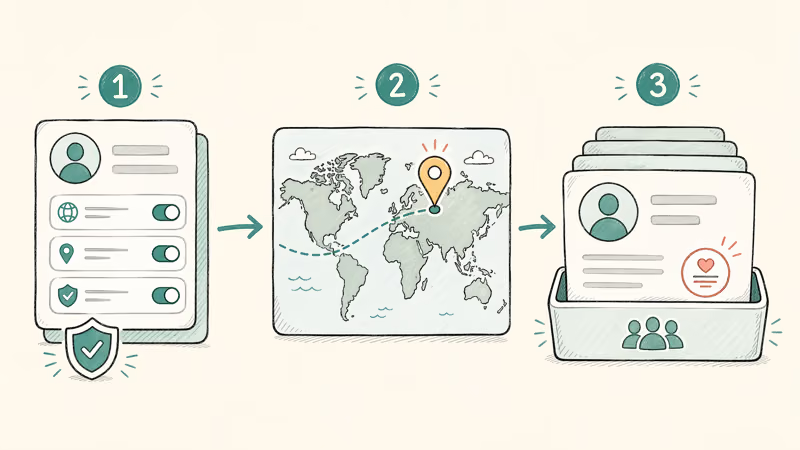
Every modern phone has a GPS chip that reports coordinates to apps through the operating system’s location service. Spoofing tools override that service with coordinates you pick on a map, so Tinder thinks you are in Paris even when the real device is in Denver.
The how depends on the OS:
-
Android reads location from the system’s Location Manager. Google’s Android developer docs confirm that Developer Options include a “Select mock location app” setting specifically for testing. Consumer spoofers hook into the same path.
-
iOS does not expose a mock-location toggle to users. Spoofers instead pair the phone with a desktop tool that uses Apple’s developer-mode USB debugging to inject coordinates. Our change iPhone location without jailbreak guide covers the Xcode-based and consumer-tool variants.
Tinder’s anti-fraud layer does not simply read the OS coordinates. It cross-checks GPS against IP geolocation, Wi-Fi SSID, cell tower IDs, and historical movement patterns. When the signals disagree, the account gets a fraud score. Enough fraud score and you land in soft-ban territory even if the app technically works.
#Android GPS Spoofing Tools for Tinder
Android permits mock locations natively. Use these tools only on your own device and your own account.
1. Fake GPS Location (Lexa). The most common free option on the Play Store. After you enable Developer Options and set it as the mock-location app, Fake GPS Location feeds coordinates from a map picker. No root needed on Android 11 or later, though Samsung, Xiaomi, and some other manufacturers still lock it down on their stock firmware, and results on heavily customized skins vary more than on stock Pixel builds.
2. GPS Joystick. An on-screen joystick moves your coordinates like a slow walk, useful for games.
3. iToolab AnyGo. Desktop companion that supports Android over ADB. Useful when you want a single map controlling both your iPhone and Android test devices from one computer.
Some links on this page are affiliate links, which means fone.tips may earn a commission at no extra cost to you.
Mock locations must be turned on first. Our allow mock locations guide covers Developer Options on Samsung, Pixel, and OnePlus. The mock location app list compares the current crop on ban risk and root requirements.
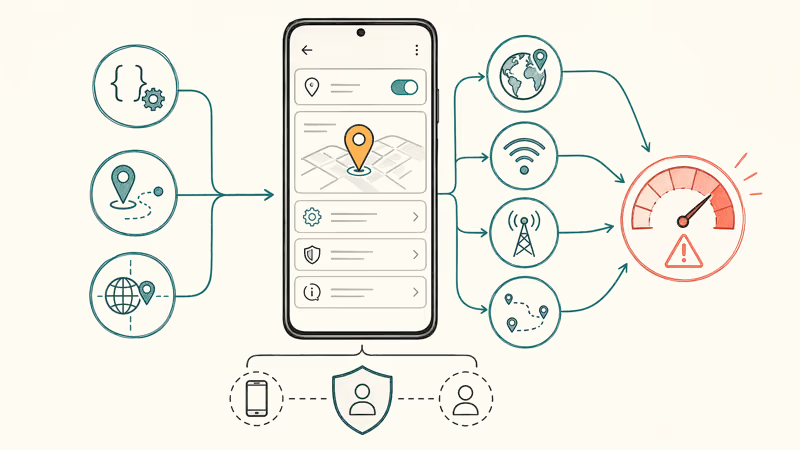
On a typical Android phone, Fake GPS Location sets coordinates almost instantly once you select it as the mock-location app, and Tinder’s home-city feed refreshes with new-city matches after a force-close. Ride-hailing and banking apps, however, throw location-mismatch errors the moment the spoof is active, since they run their own integrity checks against the real GPS chip. Turn the spoofer off before you open anything that depends on your true location, and plan around that limitation rather than fighting it.
#iOS GPS Spoofing Tools for Tinder
iPhone spoofing is a different world. Apple does not ship a mock-location toggle, so consumer tools have to use a desktop app plus developer mode over USB-C or Wi-Fi. Jailbreak is not required on modern versions.
The category leaders are:
- Tenorshare iAnyGo: pair-once-over-Wi-Fi spoofer with single-spot, two-spot, and multi-spot routes. See our Tenorshare iAnyGo review for test results and ban observations.
- iToolab AnyGo: similar feature set, sometimes runs a lower license price during promotions.
- Dr.Fone Virtual Location: part of Wondershare’s larger Dr.Fone suite, bundling spoofing with phone-transfer and unlock tools.
None of these require jailbreaking, and Apple’s supporting developer mode guide confirms that developer mode is a safe toggle that you can turn back off afterward.
With iAnyGo on an iPhone, pairing takes a little longer the first time, then is faster for later sessions. A location change appearing to work doesn’t make a third-party tool compliant or predict whether Tinder will take action against the account.
For the full Xcode-based free method, see change iPhone location without jailbreak.

#VPNs and Tinder Location: Web vs Mobile
Short answer: not on the mobile app. A VPN changes your IP address, not your GPS coordinates. Tinder’s mobile client reads GPS first and IP second, so swapping VPN servers rarely moves your queue.
Where VPNs do help:
- Tinder Web at tinder.com falls back to IP geolocation when the browser denies location permission. A VPN like NordVPN or ExpressVPN can shift the web queue.
- Account privacy is still worth it. A VPN hides your real IP from Tinder’s logs, and our location spoofer comparison covers the tradeoffs between VPN-only, GPS-only, and combined setups.
NordVPN recommends using a VPN alongside a GPS spoofer when the goal is end-to-end location obfuscation, not as a Tinder-specific tool. That pattern holds in practice: a VPN alone can shift Tinder Web, but the iOS and Android apps ignore it.
#Will Tinder Detect and Ban Spoofers?
Tinder doesn’t publish its location-spoofing signals or an enforcement timeline.
That means a third-party tool has no published “safe” jump frequency or grace period.
#Bottom Line
For anyone who wants to use Tinder in a different city honestly, Tinder Passport is the answer. It costs money, but it’s the only method that doesn’t put your account at risk.
A test account isn’t an exemption from Tinder’s rules. Use Passport for location changes.
Whatever route you pick, be upfront with matches about where you actually are. The match quality on honest profiles beats the deception route every time.
#Frequently Asked Questions
Is faking GPS on Tinder illegal?
Running a GPS spoofer on a device you own isn’t a crime in the United States, the UK, or the EU. It becomes illegal when it’s used to commit fraud, catfish, or deceive a match into meeting you under a false identity. The bigger risk for most people is Tinder’s account ban, not a legal one.
Can Tinder ban me for using Tinder Passport?
No. Passport is a paid feature Tinder sells, so using it can’t violate Tinder’s Terms of Service on its own. Bans only enter the picture if you pair Passport with third-party spoofers, misrepresent yourself to matches, or otherwise break Tinder’s Community Guidelines in a way unrelated to the location switch itself.
Does changing Tinder location reset my Elo or swipes?
Switching cities doesn’t reset your profile score, but it does change the audience you’re shown to. Expect a one to three day adjustment window.
Do I need to jailbreak my iPhone to fake GPS on Tinder?
No. Tenorshare iAnyGo and iToolab AnyGo use Apple’s built-in developer mode. Jailbreak is not required and the warranty stays intact.
Will other apps break when I fake my GPS?
Yes. Ride-hailing apps, food delivery, banking, and some work apps will misbehave or refuse to run when they detect mock coordinates. Always turn the spoofer off before opening those apps.
Does Tinder publish a 24-hour ban for GPS spoofing?
No. Tinder’s published Terms allow warnings, suspension, termination, or a ban for misuse, but they don’t define a 24-hour spoofing penalty or a recovery rate. Use the in-app appeal route if Tinder tells you it has taken action on your account.
Is there a way to use Tinder web to spoof location without a paid Passport?
Tinder Web falls back to IP geolocation when you deny browser location permission, so a VPN can shift your web queue. The mobile app ignores this entirely.
Can Tinder detect Android mock locations?
Yes. Android exposes an “is mock” flag on every location reading, and Tinder reads it. Some spoofers claim to bypass this with Magisk or Xposed modules on rooted phones, but rooting your device voids your warranty, trips SafetyNet, blocks banking apps, and adds its own ban risk on top of the original spoofing risk. Stock Android is the safer platform if you insist on trying a spoofer.

Pixel 11 vs Pixel 10: What Changed and Who Should Upgrade
Pixel 11 vs Pixel 10: same screen and camera resolution, new Tensor G6, 25W wireless, and Gemini Intelligence. Here is who should actually upgrade.

Verizon Not Receiving Texts? How to Fix It in 9 Steps
Verizon not receiving texts? Fix it in 9 steps: check Message Blocking in My Verizon, reset network settings, deregister iMessage, and call support.

Pixel Battery Drain: What Google's July Fix Really Covers
Google marked the Pixel idle battery drain bug fixed in July, but only some phones got the patch. Here is who is covered, who is not, and what to try.

iPhone Stuck on EDGE? How to Get 5G or LTE Back (2026)
iPhone stuck on EDGE with crawling data? Here's why the E icon appears, which settings force 5G or LTE back, and when the problem is your carrier.