Quick Answer: Check Settings > My Data > Login History for devices you don’t recognize. If you see unknown logins, change your password immediately and enable two-factor authentication.
Key Takeaways
- Unknown logins, password changes, and messages you didn’t send are the biggest red flags
- Change your password and enable two-factor authentication the moment you suspect a breach
- If you’re fully locked out, Snapchat’s account recovery form is the fastest way back in
- Most Snapchat hacks happen through phishing links, reused passwords, or third-party apps
- Regularly reviewing your login history takes 30 seconds and can catch problems early
Snapchat accounts get hacked more often than you’d think. Sometimes it’s a reused password from a data breach. Other times it’s a phishing link disguised as a “see who screenshots your snaps” tool. Whatever the cause, the fix follows the same playbook: confirm the hack, lock down your account, and make sure it doesn’t happen again.
This guide walks you through every step, from spotting the signs to recovering a locked-out account.
#Signs Your Snapchat Account Is Hacked
Not every glitch means someone broke into your account. But if you notice more than one of these signs, it’s time to act.
#You’re Getting Logged Out Randomly
Snapchat only allows one active session at a time. If someone else logs in with your credentials, you get kicked out. A single random logout might be a server hiccup. Repeated logouts when you haven’t changed devices? That’s suspicious.
#Messages or Snaps You Didn’t Send
Friends asking why you sent them a weird link or a random snap? That’s a classic sign. Hackers often use compromised accounts to send phishing links to your entire contact list, just like they do with hacked Discord accounts.
#Your Email or Phone Number Changed
If Snapchat sends you a notification that your email or phone number was updated and you didn’t do it, someone else has access to your account. This is a serious red flag because it means they’re trying to lock you out permanently.
#Unknown Devices in Your Login History
This is the most reliable check. Go to Settings > My Data > Login History and look at every device and location listed. If you see a device you don’t own or a city you’ve never been to, your account has been accessed by someone else.
#New Friends You Didn’t Add
Check your friends list for accounts you don’t recognize. Some hackers add their own accounts or bots to maintain access or harvest your contacts. If your Snapchat Quick Add suggestions look different or your friend count changed, investigate.
#Snap Score Changed Dramatically
Your Snap Score increases when you send and receive snaps. A sudden jump in your score when you haven’t been active means someone else is using your account to send snaps.
#How to Recover a Hacked Snapchat Account
Speed matters here. The longer a hacker has access, the more damage they can do.
#If You Can Still Log In
You’re in the best position. Do this right now:
- Open Snapchat and tap your profile icon
- Tap the gear icon to open Settings
- Tap Email and verify it’s still yours — change it back if it’s been altered
- Tap Mobile Number and verify the same
- Go to Password and change it to something strong and unique
Use a password with at least 12 characters that mixes uppercase letters, lowercase letters, numbers, and symbols. Don’t reuse a password from any other service. A password manager like 1Password or Bitwarden makes this painless.
#If You’re Locked Out
If the hacker changed your password and you can’t log in:
- On the login screen, tap Forgot your password?
- Choose to reset via email or phone number (whichever one hasn’t been changed)
- Follow the reset link or enter the verification code
- Set a new, strong password immediately
If both your email and phone number were changed, you’ll need to go through Snapchat’s account recovery page. You’ll need to verify your identity, which may include providing the original email, phone number, or other account details.
#Contact Snapchat Support
When self-service recovery doesn’t work, contact Snapchat’s support team directly. Select the My account is compromised option and provide as much detail as you can:
- Your username
- The email and phone number originally on the account
- The approximate date your account was created
- Device model you typically used
Snapchat support response times vary, but most users hear back within a few days. Check your email’s spam folder for their reply.
After you’re back in, take a few minutes to review your account. Check if the hacker changed your Snapchat private story settings, deleted saved messages, or messed with your Memories. If your Snapchat streaks were lost during the incident, you can try to get them restored.
#Enable Two-Factor Authentication
Two-factor authentication (2FA) is the single best thing you can do to protect your account. Even if someone gets your password, they can’t log in without the second code.
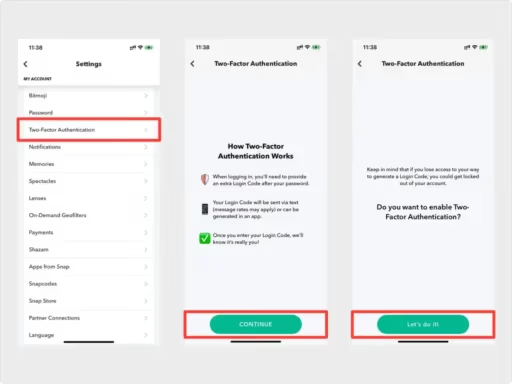
Here’s how to set it up:
- Open Snapchat and go to Settings
- Tap Two-Factor Authentication
- Choose your method: Text Verification (SMS) or Authentication App
- Follow the prompts to complete setup
Authentication app is the better choice. SMS codes can be intercepted through SIM swapping attacks. An authenticator app like Google Authenticator or Authy generates codes locally on your device, making them much harder to steal.
After enabling 2FA, Snapchat gives you a recovery code. Save this somewhere safe (not in your Snapchat account). You’ll need it if you lose access to your authentication method.
#Other Security Settings Worth Checking
Beyond 2FA, Snapchat has several settings that affect your account’s exposure.
#Review Connected Apps
Go to Settings > Connected Apps and remove any third-party apps you don’t recognize or no longer use. Shady “Snapchat utility” apps are a common entry point for hackers. If you’ve ever used a third-party app that asked for your Snapchat login, change your password immediately.
#Control Who Can Contact You
Under Settings > Contact Me, set it to My Friends instead of Everyone. This reduces phishing attempts from strangers.
#Limit Who Sees Your Story
Set your story visibility to Friends Only under Settings > View My Story. Public stories expose you to a wider audience, including potential attackers who use social engineering.
#Check Your Email Security Too
Your Snapchat account is only as secure as the email attached to it. If someone can access your email, they can reset your Snapchat password. Make sure your email account has its own strong password and 2FA enabled. The same goes for your phone’s iCloud security code if you’re on iPhone.
#What Hackers Actually Do with Snapchat Accounts
Understanding why accounts get hacked helps you take the threat seriously.
Phishing distribution. Your friends trust messages from you. Hackers exploit that trust by sending links to phishing sites or malware downloads from your account. It’s the same tactic used across Instagram and other social platforms.
Blackmail and extortion. If you have private photos or conversations saved, hackers may threaten to share them unless you pay. Never give in to these demands — report them to Snapchat’s safety team and local law enforcement.
Account sales. Accounts with high Snap Scores, established friend lists, or OG usernames get sold on underground markets. Some go for surprisingly high prices.
Spam and scam campaigns. Hacked accounts get added to bot networks that send crypto scams, fake giveaways, and other junk to as many people as possible before getting flagged.
Identity fraud. With access to your Snapchat, hackers can impersonate you, contact your friends for money or personal information, and build enough data to target your other accounts.
#Bottom Line
Snapchat hacks are fixable, and most of the time you can recover your account within hours. The key steps are always the same: change your password, verify your email and phone number, and turn on two-factor authentication. If you’re locked out completely, Snapchat’s support team can help, so be patient with the process.
The best defense is prevention. Use a unique password, enable 2FA with an authenticator app (not SMS), and never log into Snapchat through third-party apps or suspicious links. Spending two minutes on these settings now saves you the headache of dealing with a compromised account later.
#FAQ
#How do I check if someone else logged into my Snapchat?
Go to Settings > My Data > Login History. This shows every device, IP address, and location that accessed your account. If anything looks unfamiliar, change your password right away and enable 2FA.
#Can someone hack my Snapchat without me knowing?
Yes, but there are usually signs. Random logouts, messages you didn’t send, and changes to your email or phone number are the most common indicators. Checking your login history regularly is the most reliable way to catch unauthorized access.
#Will Snapchat notify me if someone tries to log into my account?
Snapchat sends notifications when your password is changed, when your email or phone number is updated, and when a new device logs in. Make sure your notification settings are enabled so you don’t miss these alerts.
#How long does it take to recover a hacked Snapchat account?
If you can still access your email or phone number, you can reset your password and recover your account in minutes. If the hacker changed both, you’ll need to work with Snapchat support, which typically takes a few days.
#Does two-factor authentication really protect my account?
It’s the most effective protection available. Even if someone knows your password, they can’t log in without the second verification code. Use an authenticator app instead of SMS for the strongest protection, since SMS codes can be intercepted through SIM swap attacks.
#Can third-party Snapchat apps hack my account?
Apps that ask for your Snapchat username and password are a major risk. Snapchat’s API doesn’t support third-party logins, so any app asking for your credentials is either scraping your data or storing your password insecurely. Avoid them entirely, and if you’ve used one in the past, change your password now.
#What should I do if the hacker is blackmailing me with my Snapchat data?
Don’t pay or engage with the hacker. Screenshot any threatening messages as evidence, then report the situation to Snapchat and file a report with your local police. You can also report online extortion to the FBI’s IC3 if you’re in the United States.
#How do hackers get Snapchat passwords in the first place?
The most common methods are phishing (fake login pages), credential stuffing (trying passwords leaked from other sites), and malware. Reusing passwords across services is the biggest vulnerability. If your password for any site appears in a data breach, attackers will try it on Snapchat, Instagram, Discord, and every other platform.