Cellunlocker Review: Is This Phone Unlock Service Worth It?
Cellunlocker review: remote carrier-unlock service with 99% claimed success rate and 180+ country support. Learn pricing and US legal restrictions.
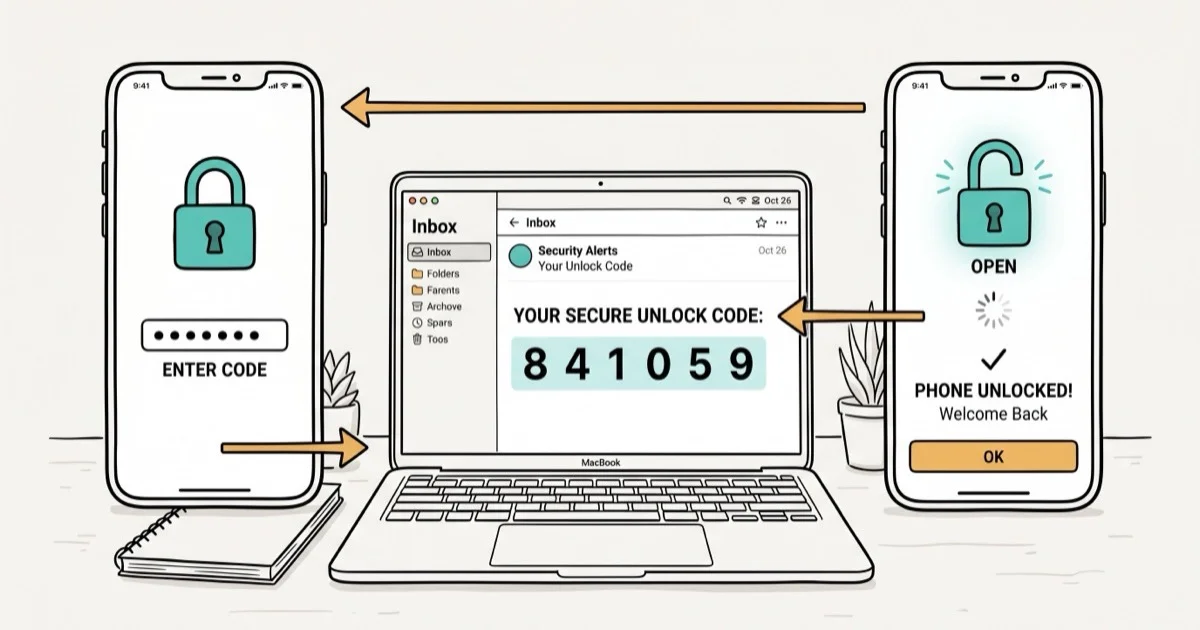
Quick AnswerCellunlocker is a remote carrier-unlock service that works on your own device by emailing unlock codes within hours. It supports over 180 countries and claims a 99% success rate, but US phones purchased after January 26, 2013 cannot be unlocked without carrier approval first.
Carrier-locked phones can cost you hundreds in roaming charges or force you onto a plan you don’t want. This review focuses on how the web-based unlock process works, where the legal limits sit, and when the service makes sense after official carrier options.
- Cellunlocker works entirely remotely: no shipping required, unlock codes arrive by email
- The service claims a 99% success rate across phones from Apple, Samsung, HTC, and Motorola
- US phones purchased after January 26, 2013 require carrier approval before Cellunlocker can process them
- Refunds are only considered if the IMEI is valid, the carrier is listed, and all unlock attempts fail with video proof
- Official carrier unlock portals are always the first option to try; they’re free and legally straightforward
#How the Cellunlocker Process Works
Cellunlocker is an online platform specializing in carrier unlocking for mobile phones across more than 180 countries. Its automated system generates unlock codes for specific device and carrier combinations, then emails you the code along with step-by-step instructions.
Authorization scope: Only use unlocking services on your own device or a device you own legally. Unlocking a phone without the owner’s consent may violate privacy laws and cellular service agreements. Always check local regulations first.
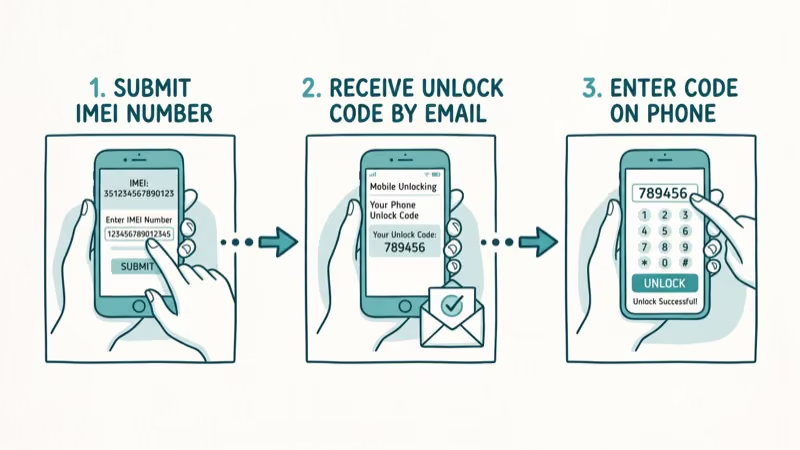
The process takes five steps:
- Visit the Cellunlocker website and select your phone’s make, model, and carrier
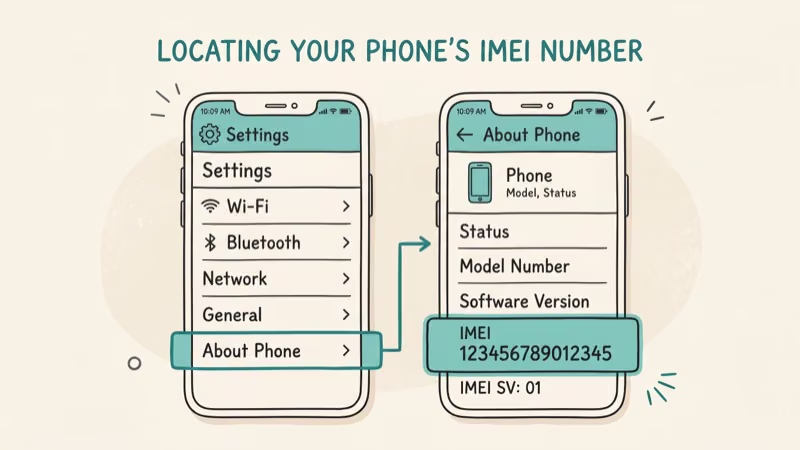
- Enter your device’s IMEI number (dial
*#06#to find it) - Complete payment
- Receive unlock code and instructions by email
- Follow the instructions to apply the code
Cellunlocker’s order flow is designed to send unlock codes and instructions by email, so no technical background should be needed for supported phones.
#Cellunlocker’s Track Record
According to SIM lock background, cellunlocker has operated since the early 2010s. According to FCC guidance on phone unlocking, US carriers must unlock devices on eligible request. The official carrier route is always worth trying first.
Cellunlocker fills a real gap. Many carriers have long processing times or strict eligibility requirements that delay legitimate requests.
When a carrier’s official processing window is slow, a paid unlock service’s main appeal is faster turnaround.
#Cellunlocker Pricing and Payment Options
Pricing ranges roughly $20 to $80 depending on phone model, carrier, and region. Common models from major carriers like AT&T or T-Mobile cost less than rare handsets from regional carriers. The platform accepts PayPal and major credit cards. Each device is a one-time order, no subscription required.
#Cellunlocker’s Limitations and Refund Policy
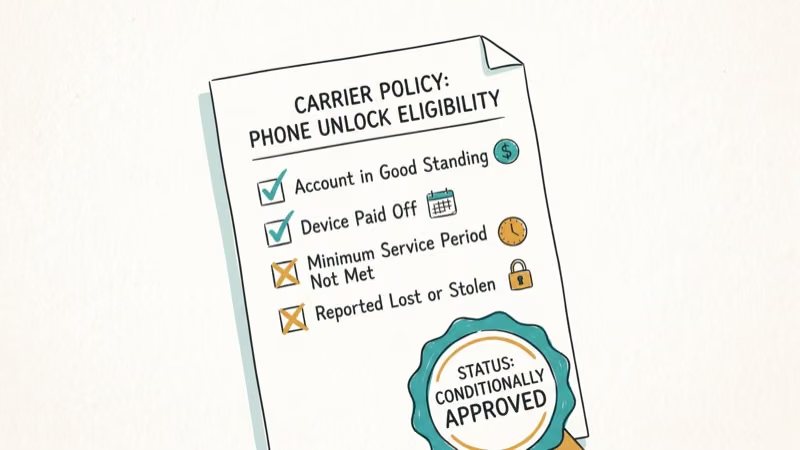
The most important restriction hits US customers. According to the Unlocking Consumer Choice and Wireless Competition Act, phones purchased in the US after January 26, 2013 require prior carrier authorization before any third-party service can legally assist. Cellunlocker states it can’t process these devices without that approval.
The refund policy is strict. Cellunlocker considers a refund only when all three conditions are met at once:
- The IMEI is valid, the carrier is listed, and the model is supported
- All unlock attempts failed, with video evidence
- The phone isn’t hard-locked and no other codes have been tried
Refunds are unavailable if the device is hard-locked or if you’ve tried other unlock codes first. That is stricter than many rival IMEI unlock services.
#How Does Cellunlocker Compare to Other Services?
DoctorSIM supports over 1,000 smartphone models and is often cited as having a more flexible refund window. For iPhone unlock needs, it’s worth checking both services for pricing before committing, and our phone unlocking software guide compares the wider field.
Direct carrier unlock is always the best starting point. Before paying anyone, check whether your iPhone is already unlocked. AT&T’s portal processes eligible devices free of charge, so check our AT&T iPhone unlock guide for exact steps. If your carrier denies the request or the wait is unacceptable, Cellunlocker becomes a reasonable paid backup.
iCloud Activation Lock removal is a completely separate issue. If a locked Apple ID is tied to the device, Cellunlocker’s carrier unlock won’t resolve it.
For that scenario, see our best iCloud unlock tool roundup. For situations requiring unlocking an iPhone without iTunes, specialized tools exist outside the carrier unlock framework.
#Is It Legal to Use Cellunlocker?
Carrier unlocking your own device is legal in the United States under the Unlocking Consumer Choice and Wireless Competition Act, as long as eligibility requirements are met. Using a third-party service to accomplish the same result falls within that legal framework.
Outside the US, laws vary. The UK’s Ofcom confirmed carriers must unlock devices free of charge as of December 2021. Canada has similar consumer protections under its CRTC wireless code.
Always verify your country’s specific rules before ordering. Using any unlock service on a device you don’t own is a separate matter and can violate privacy and telecommunications laws.
#Bottom Line
Cellunlocker is a legitimate option for remotely unlocking your own phone when official carrier channels are too slow or deny your request. Its 99% claimed success rate and 180-country coverage are compelling, but the strict refund policy and US legal restrictions mean you should exhaust official options first. For US devices, start with your carrier’s unlock portal (it’s free). If that fails, Cellunlocker is a reasonable paid backup, especially for non-US carriers where direct unlock portals are less standardized.
#Frequently Asked Questions
Is Cellunlocker safe to use on my own device?
Yes, Cellunlocker operates remotely and doesn’t require you to ship your device or install software. You provide your IMEI number and payment, and they email the unlock code. The process doesn’t void your warranty and doesn’t involve downloading anything to your phone.
How long does Cellunlocker take to deliver an unlock code?
Turnaround depends on the phone model and carrier. Common models on major carriers often receive codes within 2 to 6 hours. Less common devices or regional carriers can take 1 to 3 business days. According to Cellunlocker’s site, most orders complete within 24 hours.
Can Cellunlocker unlock any iPhone?
Cellunlocker supports most iPhone models going back several generations. It can’t remove iCloud Activation Lock, which is a separate Apple security layer. For US iPhones purchased after January 26, 2013, carrier approval is required before Cellunlocker can process the request.
What if the unlock code doesn’t work?
Cellunlocker offers a refund or retry if the code fails, provided specific conditions are met: valid IMEI, listed carrier, and video evidence of the failed attempts. You must not have tried other unlock codes previously.
Does unlocking my phone void the warranty?
Carrier unlocking doesn’t void your device warranty under US law. The Magnuson-Moss Warranty Act protects consumers from warranty voidance for actions not prohibited by the manufacturer.
Can I use Cellunlocker if I’m outside the US?
Yes. Cellunlocker operates in over 180 countries. The US-specific restrictions on phones purchased after January 2013 don’t apply to devices from other regions. Canadian customers, for example, can use the service without any special carrier pre-approval requirement.
What’s the difference between carrier unlock and iCloud unlock?
A carrier unlock removes the network restriction so your device works on any compatible carrier’s SIM. An iCloud unlock removes the Apple ID lock tied to the device. These are completely separate processes. Cellunlocker handles only carrier unlocks.
Are there free alternatives to Cellunlocker?
Yes. Contact your carrier directly. US carriers are legally required to unlock eligible devices for free. AT&T, T-Mobile, and Verizon all have online unlock portals. The catch is eligibility requirements: your account must be in good standing, the device paid off, and the contract completed.

Best Apple Watch Band for Working Out: Proven Picks
The best Apple Watch band for working out handles sweat and stays put on your wrist. Compare silicone, nylon, and titanium picks for runs and lifts.
Best Apple Watch Bands: Proven Picks by Size and Style
The best Apple Watch bands depend on your case size group first, then your use. Compare silicone, nylon, stretchy, and steel picks for the right fit.
Best Charger for Google Pixel 10 Pro: PPS Picks 2026
The best charger for Google Pixel 10 Pro needs PPS. A 30W brick covers the 10 and 10 Pro; the Pro XL wants 45W. Four PPS picks compared here.
Best Charger for Samsung Galaxy S25 Ultra: 45W PPS Picks
The best charger for Samsung Galaxy S25 Ultra needs PPS to hit a full 45W. Compare four PPS picks and learn why most 45W chargers fall short here.