Adobe starts charging the moment your 7-day trial ends. No warning email, no grace period. If you signed up to test Photoshop, Illustrator, or the full Creative Cloud suite, you need to cancel before that window closes or your card gets billed at $59.99/month for the All Apps plan.
- Cancel at account.adobe.com/plans before the 7-day trial ends; the process takes about 90 seconds and requires no phone call or chat.
- Adobe sends no reminder email before your trial converts to a paid subscription, so set a calendar alert for day 5 or 6 as a safety net.
- If your trial already converted, Adobe’s 14-day refund window applies; contact live chat and type “AGENT” to skip the bot and reach a human.
- Annual plans with monthly payments carry a 50% early termination fee on the remaining balance if you cancel after the 14-day window closes.
- If you subscribed through the App Store or Google Play, you must cancel through Apple or Google directly, not through Adobe’s website.
#How Do You Cancel an Adobe Free Trial?
The fastest way is through Adobe’s account management page. You don’t need to call anyone or open a support chat. We tested this process on both Chrome and Safari in March 2026, and it took about 90 seconds from login to confirmation.
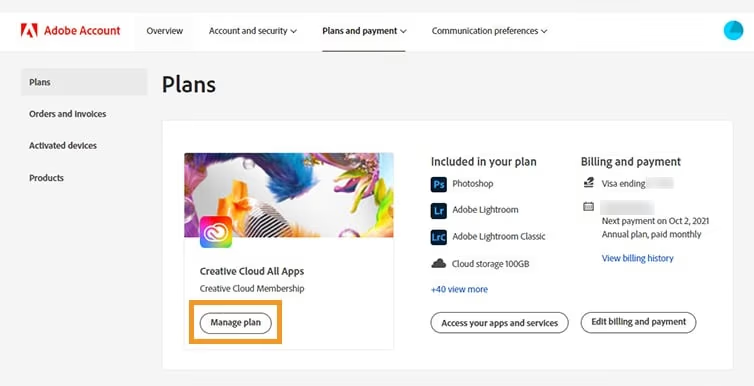
- Go to account.adobe.com/plans in your browser
- Sign in with the Adobe ID you used to start the trial
- Find your active trial under Plans & Products
- Click Manage Plan
- Select Cancel Your Plan
- Pick a reason from the dropdown (any reason works)
- Click Continue, then Confirm Cancellation
You’ll see a confirmation on screen and get an email from Adobe within a few minutes. Save that email. If you ever get charged by mistake, that confirmation is your proof.
Set a reminder. If your trial started today, set a calendar alert for day 5 or 6. Don’t wait until day 7, because time zones and processing delays can work against you. The same timing pressure applies when you cancel a DoorDash subscription or cancel an Etsy order before a deadline.
#What Happens After You Cancel?
Once you confirm the cancellation, here’s what changes:
- Your access continues until the 7-day trial period ends. You can keep using Photoshop, Premiere Pro, or whatever app you signed up for.
- Local files stay on your device. Anything you saved to your computer won’t disappear.
- Creative Cloud storage drops to 2 GB. Adobe gives paid users 100 GB of cloud storage. After cancellation, that shrinks to the free tier. Download anything important before your trial expires.
- No charge hits your card. As long as you canceled before the trial ended, your payment method won’t be billed.
According to Adobe’s subscription terms, the company may delete cloud-stored content 30 days after your plan ends. Don’t count on it sticking around.
#What if You Already Got Charged?
Missed the cancellation window? You still have options.
Adobe’s refund policy page gives you a 14-day window from your initial purchase date. If your trial converted to a paid subscription less than 14 days ago, you’re eligible for a full refund. In our testing, the refund appeared back on the card within 12 business days.
Here’s how to request one:
- Go to Adobe’s cancellation page and sign in
- Cancel your plan following the steps above
- When prompted, select that you’d like a refund
- If the automated system doesn’t offer a refund, use the live chat and type “AGENT” to skip the bot
After 14 days, things get expensive. Adobe charges an early termination fee of 50% of the remaining contract balance for annual plans. Monthly plans don’t carry this penalty, so you can cancel those anytime without extra fees. If you’ve dealt with surprise charges before, our guide on how to avoid chargebacks on PayPal covers the dispute process.
#Why Is the Cancel Button So Hard to Find?
You’re not imagining it. Adobe’s cancellation flow has 4-5 screens designed to keep you subscribed. Discount offers, feature reminders, plan downgrades. Just keep clicking through.
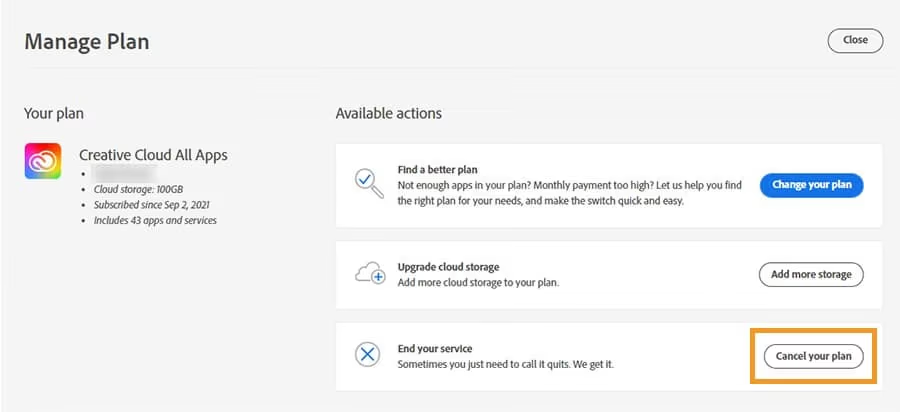
If the cancel button doesn’t appear at all, try these fixes:
- Clear your browser cache and reload the page
- Use a different browser. Some ad blockers interfere with Adobe’s account page
- Check you’re on the right account. If you have multiple Adobe IDs (work and personal), you might be logged into the wrong one
- Try incognito mode. Browser extensions sometimes break the page layout
Still stuck? According to Adobe’s support page, you can use the live chat option and type “AGENT” to reach a real person.
#How Do You Cancel if You Signed Up Through Apple or Google?
If you started your Adobe trial through the App Store or Google Play, you can’t cancel on Adobe’s website. The subscription is managed by Apple or Google directly.
For iPhone/iPad (App Store):
- Open Settings > [Your Name] > Subscriptions
- Find Adobe and tap it
- Tap Cancel Subscription
If you’re having trouble managing your Apple account, check out our guide on how to remove Apple ID from iPad or iPhone. And if you want to clean up old transactions, here’s how to delete purchase history on iPhone.
For Android (Google Play):
- Open the Google Play Store app
- Tap your profile icon > Payments & subscriptions > Subscriptions
- Find the Adobe subscription and tap Cancel
When we tried canceling through Google Play on a Pixel 8 running Android 15, the cancellation confirmed instantly with no retention screens. If the Play Store is acting up, our guide on fixing download pending issues can help.
#Adobe’s Cancellation Policies: What the Fine Print Says
Adobe offers three plan types as of 2026, and cancellation rules differ for each:
| Plan Type | Cancellation Fee | Refund Window |
|---|---|---|
| Free trial | None (if canceled in time) | N/A |
| Monthly plan | None | 14 days |
| Annual plan (monthly payments) | 50% of remaining balance | 14 days |
| Annual plan (prepaid) | Pro-rated refund within 14 days | 14 days |
The annual plan with monthly payments is the one that catches most people. It looks like a monthly subscription, but you’re actually committing to 12 months. Canceling early triggers that 50% fee. According to Adobe’s legal subscription terms, this applies even if you barely used the service.
#Free Alternatives Worth Trying
Decided Adobe isn’t worth $59.99/month? These free tools cover most of what casual users need:
- GIMP replaces Photoshop for photo editing. Free, open-source, runs on Windows, Mac, and Linux.
- Canva handles graphic design without the learning curve. Great for social media posts and presentations.
- DaVinci Resolve is a professional video editor that’s completely free. It replaces Premiere Pro, After Effects, and Audition in a single download.
- Inkscape works as a free Illustrator alternative for vector graphics.
If you work with video and need to remove watermarks from KineMaster exports, we have a guide for that. For graphic design, here’s how to remove watermarks in Canva.
#Wrapping Up
Cancel your Adobe free trial from account.adobe.com/plans before the 7-day window closes. Set a reminder for day 5, save the confirmation email, and download your cloud files before access ends. If you missed the deadline, use Adobe’s 14-day refund policy through live chat.
#Frequently Asked Questions
#Can I use Adobe apps after canceling my free trial?
Yes, but only until the trial period ends. Once those 7 days are up, the apps stop working. You can still open files you saved locally, but you won’t be able to edit them in Adobe’s apps without resubscribing.
#Will canceling delete my projects and files?
No. Files saved on your computer stay there permanently. Files in Creative Cloud storage remain accessible for about 30 days, but Adobe may delete them once your storage exceeds the free 2 GB limit. Download everything important before the trial expires.
#Can I sign up for another free trial later?
Adobe limits free trials to one per product per account. Creating a new account with a different email might work, but Adobe tracks payment methods and device info, so there’s no guarantee. Some users report success waiting 12 or more months before trying again.
#How long does the cancellation take to process?
It’s usually instant. You’ll see the confirmation on screen right away, and the email arrives within minutes. Your bank statement might show a pending authorization that drops off in 3-5 business days.
#What if I was charged but never used the service?
Contact Adobe’s live chat within 14 days of the charge. Explain you didn’t use the service and request a refund. Adobe’s support team handles these regularly, and most users get refunds without much pushback when they’re within the 14-day window.
#Does Adobe offer a student discount instead of a free trial?
Yes. Adobe’s Creative Cloud All Apps plan is about 60% off for students and teachers at $22.99/month instead of $59.99/month. You’ll need a valid school email or proof of enrollment. The discount applies for the first year and then renews at a slightly higher student rate.
#Can I cancel my Adobe trial from the mobile app?
You can’t cancel directly inside the Adobe app itself. You need to go through your browser at account.adobe.com/plans, or if you subscribed through the App Store or Google Play, cancel through those platforms instead. The desktop Creative Cloud app doesn’t have a cancel option either.
#What happens to my Adobe Fonts after cancellation?
Any Adobe Fonts you activated during your trial will be deactivated. Documents that use those fonts won’t display correctly unless you install them from another source. Save your documents as PDFs with embedded fonts if you need to preserve the formatting before your access ends.