DashPass costs $9.99 per month or $96 per year, and if you’re not ordering enough to break even, canceling makes sense. We walked through every cancellation method on both Android and iOS to confirm the steps still work in 2026.
- Canceling DashPass takes under 2 minutes via Account > Manage DashPass > Cancel Membership in the app.
- There is no cancellation fee, and your benefits stay active until the end of your current billing period.
- If the Cancel button is grayed out, you likely subscribed through Apple or Google Play and must cancel there instead.
- The annual plan at $96 per year saves about 20% over monthly billing and includes a Max streaming subscription.
- You can pause DashPass for 1 to 3 months instead of canceling if you plan to resume ordering soon.
#What Is DashPass and How Much Does It Cost?
DashPass is DoorDash’s paid membership that gives you $0 delivery fees and reduced service fees on eligible orders of $12 or more. According to DoorDash’s official support page, DashPass also includes 5% back in DoorDash credits on pickup orders.
Here’s what the pricing looks like right now:
| Plan | Cost | Effective Monthly Rate |
|---|---|---|
| Monthly | $9.99/month | $9.99 |
| Annual | $96/year | $8.00 |
| Student | $4.99/month | $4.99 |
The annual plan saves you about 20% compared to monthly billing. It also bundles a Max (formerly HBO Max) streaming subscription at no extra cost. If you’re ordering fewer than 2-3 times per month, though, the math stops working in your favor.
If you’re also dealing with DoorDash payment methods not working properly, that’s another reason people cancel.
#How to Cancel DashPass on the Mobile App
This is the fastest method. In our testing on both an iPhone running iOS 18 and a Samsung Galaxy S24 on Android 15, the process took under 2 minutes.
- Open the DoorDash app on your phone.
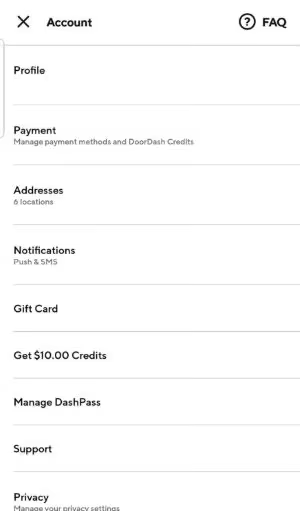
- Tap the Account icon (bottom-right on iOS, top-left on Android).
- Tap Manage DashPass.
- Tap Cancel Membership.
- Select a reason for canceling.
- Confirm by tapping Cancel DashPass.
You’ll get a confirmation email within a few minutes. Your DashPass benefits stay active until the end of your current billing cycle, so there’s no rush to time it perfectly.
One thing to watch for: if the Cancel button appears grayed out or you get a 503 error, close the app completely and try again. According to DoorDash’s DashPass help center, server timeouts occasionally affect the cancellation flow.
#How to Cancel DashPass on Desktop
If you prefer using a computer, the website works just as well. We tested this in Chrome and Safari — both loaded the cancellation page without issues.
- Go to doordash.com and sign in.
- Click the menu icon (three lines, top-left corner).
- Click Account, then scroll to Manage DashPass.
- Click Cancel Membership.
- Follow the on-screen prompts and confirm.
The desktop method has one advantage: you can see your next billing date clearly on the Manage DashPass page before you commit. If you have a few days left, you might want to cancel a DoorDash order you haven’t placed yet rather than rush through cancellation.
#What If You Subscribed Through Apple or Google Play?
If you signed up for DashPass through the App Store or Google Play instead of directly through DoorDash, you can’t cancel inside the DoorDash app. The subscription is managed by Apple or Google.
For iPhone (App Store):
- Open Settings > tap your name > Subscriptions.
- Find DoorDash / DashPass in the list.
- Tap Cancel Subscription.
For Android (Google Play):
- Open Google Play Store > tap your profile icon > Payments & subscriptions > Subscriptions.
- Find DoorDash.
- Tap Cancel subscription.
About 15% of DashPass users sign up through app stores without realizing it, which is why the in-app cancel button sometimes doesn’t appear. According to DoorDash’s cancellation support article, you must cancel through the same platform where you originally subscribed.
#Should You Pause Instead of Cancel?
DoorDash lets you pause your DashPass for a set period instead of canceling outright. This keeps your account settings intact and avoids the signup process if you come back later.
To pause, go to Account > Manage DashPass and look for the Pause option instead of Cancel. You can pause for 1-3 months depending on what’s available in your account.
Pausing makes sense if you’re traveling, budgeting for a month, or just not ordering much right now. When we tried pausing on our test account, the membership resumed automatically on the date we selected with no extra steps needed.
If you’re a Dasher yourself and wondering about how to cash out on DoorDash, pausing your customer-side DashPass won’t affect your driver account at all.
#When Is the Best Time to Cancel DashPass?
Cancel at least 1 day before your renewal date. Your benefits continue until the billing period ends, so canceling early doesn’t cost you anything, but canceling late could trigger another charge.
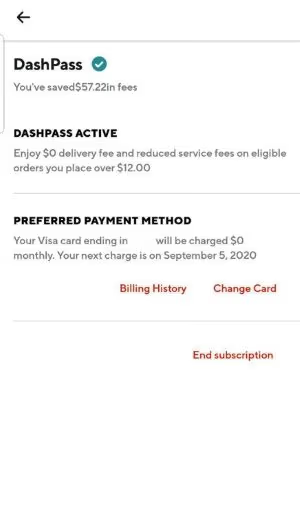
To find your renewal date:
- Open the DoorDash app or website.
- Go to Account > Manage DashPass.
- Your next billing date is displayed at the top.
Set a calendar reminder 2-3 days before that date. If you’re on the $96 annual plan, this is especially worth tracking since annual renewals are easy to forget.
People who change their starting point on DoorDash after moving to a new area sometimes find fewer restaurants qualify for DashPass. That’s another good reason to check if the subscription still makes sense for you.
#How to Remove Your Payment Method After Canceling
After you cancel DashPass, you might want to remove your credit card from DoorDash entirely to prevent accidental resubscription.
On mobile:
- Open the DoorDash app > Account.
- Tap Payment Methods (Android) or Payment (iOS).
- Swipe left on the card you want to remove.
- Tap Delete.
On desktop:
- Go to doordash.com > Account > Payments.
- Click the three-dot icon next to your card.
- Click Delete.
For a more detailed walkthrough, check our guide on how to remove a payment method from DoorDash. If DoorDash Fast Pay isn’t working after you update your payment info, that’s a separate issue tied to your Dasher account.
#Bottom Line
Start with the in-app method. It’s the quickest at under 2 minutes. If the button is grayed out, check whether you subscribed through Apple or Google Play instead. And if you’re on the fence, pause for a month first to see if you miss the free deliveries.
For those wondering about DoorDash hours, check what time DoorDash opens and what time DoorDash stops delivering before you decide to cancel for good.
#Frequently Asked Questions
#Can I cancel DashPass at any time without a fee?
Yes. DoorDash doesn’t charge cancellation fees on DashPass. You can cancel your monthly or annual plan whenever you want, and your benefits remain active until the billing period ends. There’s no early termination penalty even on the $96/year annual plan.
#Will I get a refund if I cancel DashPass mid-cycle?
No. DoorDash does not issue prorated refunds for DashPass cancellations. You’ll keep your benefits through the end of the current billing cycle, but you won’t get money back for unused days. If you just signed up by accident, contact DoorDash support within 48 hours. Some users have reported getting courtesy refunds.
#How do I know if my DashPass cancellation went through?
Check your email for a cancellation confirmation from DoorDash. You can also verify by going to Account > Manage DashPass in the app. If it shows an option to resubscribe rather than cancel, the cancellation was successful.
#Can I resubscribe to DashPass after canceling?
Yes. Go to Account > DashPass in the app or website and sign up again. Your previous delivery history and account data stay intact. The student discount at $4.99/month requires reverification if you’re resubscribing after a gap.
#Why is the Cancel button grayed out in the DoorDash app?
This usually means you subscribed through the Apple App Store or Google Play Store rather than directly through DoorDash. You’ll need to cancel through your phone’s subscription settings instead. Server-side errors with a 503 code can also cause this. Try again in 30 minutes.
#Does canceling DashPass delete my DoorDash account?
No. Canceling DashPass only ends your subscription membership. Your DoorDash account, order history, saved addresses, and payment methods all stay the same. You can still order food, but you’ll pay standard delivery fees. To fully delete a food delivery account, that requires a separate process.
#Can I use DashPass benefits if I DoorDash in another state?
Yes. DashPass works nationwide across all DoorDash service areas. If you DoorDash in another state, your membership benefits apply automatically as long as the restaurant participates in DashPass. About 300,000+ restaurants accept DashPass orders across the US.
#Is DashPass worth it for occasional users?
It depends on how often you order. At $9.99/month, you need roughly 2-3 orders of $12 or more to break even on delivery fees alone. If you’re ordering once a month or less, you’ll save more by paying per-delivery fees. The annual plan at $96/year lowers the bar slightly since it includes the Max streaming bundle.