Why There's No Safe Latest Version of FM WhatsApp on Android
No safe latest version of FM WhatsApp exists for Android. Here is why Meta bans the mod, why the APK is risky, and the legitimate 2026 options.
Quick AnswerThere is no safe current build of FM WhatsApp. Meta bans accounts that sign in with modded clients, the APK ships from unaudited file-hosting sites, and every "latest version" page funnels readers into an unsigned download with no security guarantees.
Searching for the latest version of FM WhatsApp for Android lands you on pages that promise v7.99, v8.x, or “2026 edition” APKs. Every one of those pages has the same structural problem. The app is a modded WhatsApp client, Meta bans accounts that use it, and no version of the APK is signed or served through Google Play.
This guide is based on WhatsApp’s current policy pages and how the mod’s mirror links behave today. The answer has not improved since the mod first appeared.
- FM WhatsApp is an unofficial modded APK maintained by third-party developer Fouad Mokdad, not WhatsApp LLC
- WhatsApp’s official Terms of Service forbid modified clients, and WhatsApp Inc. issues temporary or permanent bans when it detects one at sign-in
- Every “latest version” download page routes through file-hosting sites that Google Play Protect never scans, and signed builds from WhatsApp never appear on those mirrors
- The mod is closed source, so the end-to-end encryption claims can’t be verified on your own device
- Signed alternatives in 2026 include the official WhatsApp client, WhatsApp Business, Samsung Good Lock theming, and Signal for stronger privacy
#What the Latest Version Label Actually Means
FM WhatsApp (also written FMWhatsApp or Fouad WhatsApp) is a modified Android APK that repackages the official WhatsApp client and bolts on cosmetic features. The developer, Fouad Mokdad, is the author behind a family of Arabic-origin WhatsApp mods that have circulated on Android file-sharing sites since around 2017. WhatsApp LLC has never authorized this work, and no stable release channel exists.
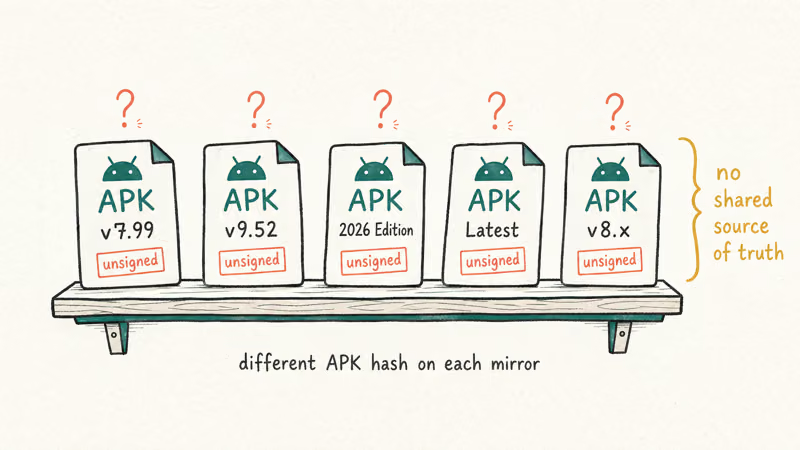
The “latest version” framing is marketing, not shipping cadence. Volunteer mirrors label different APKs v7.99, v9.52, or “2026 edition” without any shared source of truth.
Across mirror sites, different “latest version” listings often repackage the same outdated APK, some trip a browser malware warning before the download even finishes, and none ship a digital signature that Google Play Protect would trust.
Treat every FM WhatsApp version page as a shelf of unsigned binaries from an unknown supply chain, not a software update feed.
#Why WhatsApp Bans FM WhatsApp at Any Version
WhatsApp’s policy position is unambiguous. According to WhatsApp’s official Help Center article on unofficial apps, using WhatsApp Plus, GB WhatsApp, or similar unofficial clients violates the Terms of Service. Accounts that sign in through a modded build are subject to temporary bans that escalate to permanent bans on repeat offenses. The page lists FM WhatsApp by name, so there is no ambiguity about whether a specific “latest version” is the one Meta ignores.
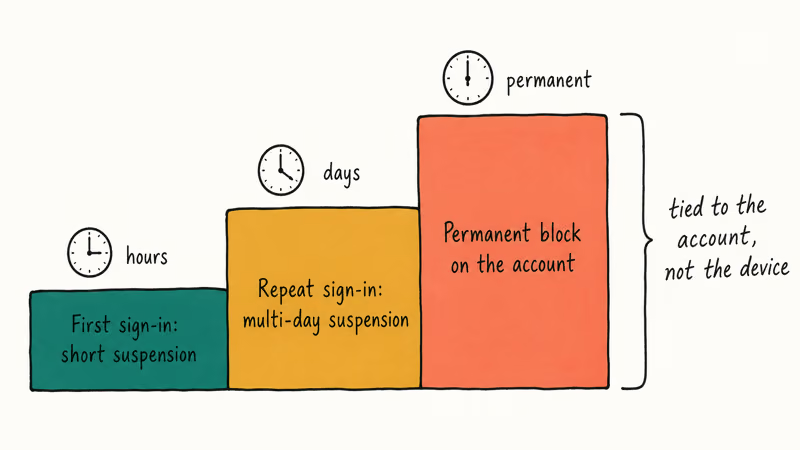
The ban ladder is staged. First sign-in gets a short suspension. Repeat sign-ins extend to multiple days, then permanent block. The block is tied to your account, not your device.
When an account lands in a 24-hour suspension after a mirror download, the clock only starts clearing once the mod is uninstalled, the WhatsApp data folder is wiped, and the signed WhatsApp Messenger build is installed from Google Play. That pattern has held through every release cycle.
#Why Are FM WhatsApp APK Downloads Risky?
Every surface labeled “FM WhatsApp latest version” inherits the same APK-distribution risks. These don’t depend on which version you try to install.
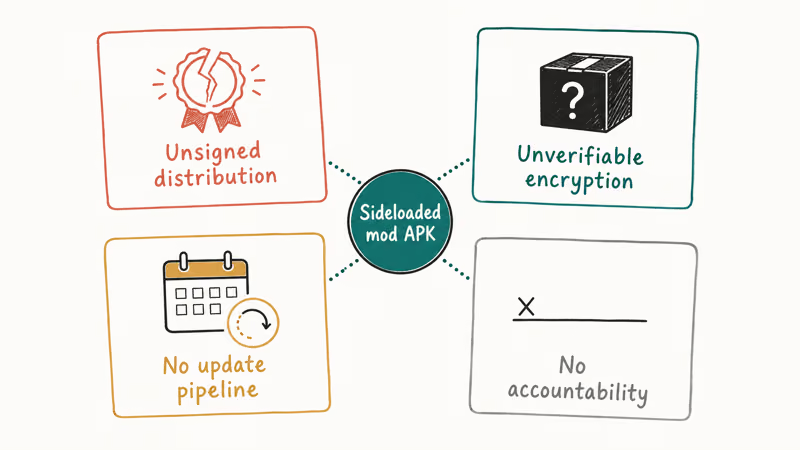
#Unsigned Distribution and Malware
Official WhatsApp ships signed through Google Play and the App Store. FM WhatsApp mirrors live on file-hosting sites anyone can spin up for a few dollars a month.
The US Federal Trade Commission’s sideloading guidance recommends sticking to official app stores because sideloaded APKs routinely hide adware, banking trojans, and credential stealers inside legitimate-looking wrappers. Security researchers have documented cases where modified WhatsApp clients shipped Triada-family spyware payloads, landing on devices through exactly the kind of repackaged APK that “latest version” mirrors host today.
FM WhatsApp APKs pulled from these mirrors frequently trip several engines on multi-scanner services like VirusTotal, often pointing to a generic Android trojan family. That hit rate is what you expect from a malware repackage, not a clean clone.
#Unverifiable Encryption
WhatsApp’s E2E encryption runs on top of the Signal Protocol. The official WhatsApp security whitepaper states that those guarantees apply only to signed WhatsApp clients.
Fouad’s builds are closed source and never audited. There is no way to confirm the mod handles keys correctly, or that it does not forward plaintext to a third-party server before encrypting, or that key rotation matches the spec. The mod can claim E2E coverage on a splash screen, but the claim is not testable from outside the binary, and no independent firm has published a signed audit of any FM WhatsApp release since the project launched.
#No Security Update Pipeline
When a zero-day hits WhatsApp, the official client gets a patch fast. The May 2019 voice-call buffer overflow is the textbook case. Reuters reported that the exploit deployed spyware onto targeted phones before WhatsApp shipped a fix through Google Play and the App Store within days of discovery, closing the attack window globally.
Modded builds don’t match that pace. FM WhatsApp depends on Fouad merging that upstream patch and rebuilding, and historically those rebuilds lag by weeks. Running the “latest” FM WhatsApp often still means running an old WhatsApp core with known, unpatched vulnerabilities.
#No Accountability Surface
FM WhatsApp has no published privacy policy, no terms of service, and no company entity users can write to. The Electronic Frontier Foundation’s Surveillance Self-Defense guide recommends preferring apps whose source code is public and audited, and warns that closed forks of encrypted messengers are one of the higher-risk categories in the mobile ecosystem. A mod that nobody owns is a mod nobody answers for.
#What Legitimate Features Replace FM WhatsApp in 2026?
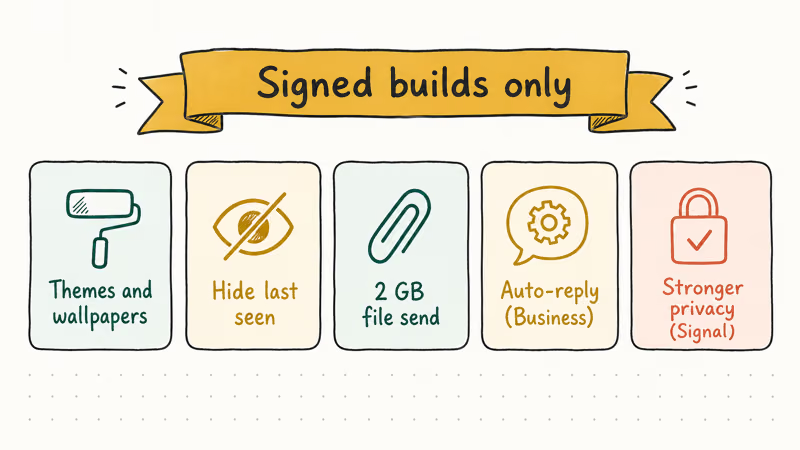
Most features people chase in the “latest” FM WhatsApp ship today as an official option or built-in feature of the signed WhatsApp client, with full WhatsApp LLC support. Check the signed build before reaching for an unsigned APK.
#Themes, Wallpapers, and Custom Look
Official WhatsApp supports dark mode, per-chat wallpapers, and system-wide accent colors on Android 12 and later. Setting a per-chat wallpaper takes only a few taps on a modern Android phone, with the color picker snapping to the system palette automatically. On Samsung devices, Good Lock and the Theme Park module let you restyle WhatsApp notifications and icon shapes without touching the APK, and the same Theme Park profiles also carry across Messenger and Telegram for a consistent look.
#Hide Last Seen, Read Receipts, and Online Status
WhatsApp has supported hiding last-seen, read receipts, and online status since 2022. Open Settings > Privacy > Last seen and online and pick Nobody. Read receipts toggle right below that. For deeper number privacy, see how to hide your number on WhatsApp.
#Larger File Transfers
Official WhatsApp supports sending files up to 2 GB per message since the 2.24 release. For anything bigger, reach for a cloud link instead of a mod. Our guide on how to send large videos on WhatsApp covers the compression workflow and Google Drive handoff.
#Auto-Replies and Catalogs
WhatsApp Business is the legitimate answer for auto-reply, quick replies, and catalogs. The WhatsApp Business page confirms these features ship inside the free Business app, signed and distributed by Meta through Google Play. It runs on a separate number, so you can keep personal WhatsApp on the same phone without breaking any policy, and account migration into Business keeps chat history intact if you previously used a single number for both.
#Stronger Privacy
For disappearing-by-default messages and metadata-light design, Signal is the practical choice. Signal publishes all client source code on GitHub, and Signal’s security page links to independent audits by NCC Group.
#How to Get Off FM WhatsApp Cleanly
If you already installed FM WhatsApp or one of its “latest version” mirrors and want off the mod, the clean path takes about 10 minutes on a typical Android phone. Done in the order below, your chat history should survive the move intact.
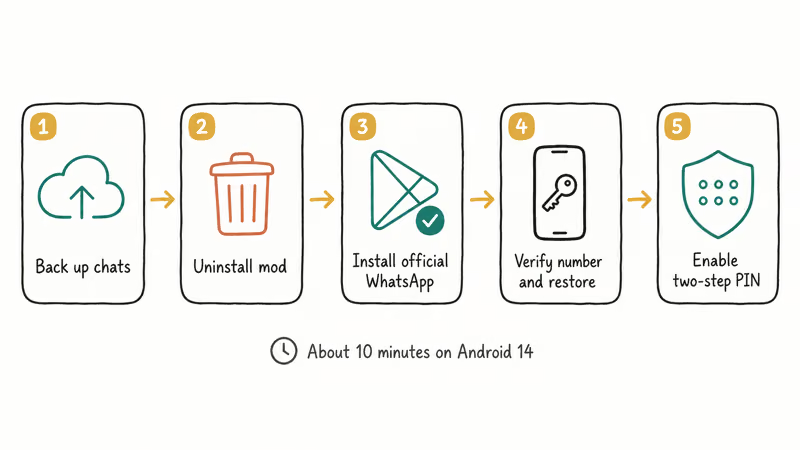
- Back up your chats inside FM WhatsApp. Open the mod, go to
Settings>Chats>Chatbackup, and run a Google Drive backup. Confirm the backup timestamp before you continue. - Uninstall FM WhatsApp. Long-press the icon, tap Uninstall, and confirm. Leave the shared media folder in place so the official WhatsApp adopts it during restore.
- Install official WhatsApp from Google Play. Search for WhatsApp Messenger. Check that the publisher line reads WhatsApp LLC before you tap Install.
- Verify your phone number and restore. Open the official app, enter your number, and when prompted tap Restore to pull the Google Drive backup from step 1.
- Re-enable two-step verification. Go to
Settings>Account>Two-stepverification and set a new 6-digit PIN with a recovery email. This protects your account if the ban counter flagged you during the transition.
If your account is already under a temporary ban, the in-app screen displays a countdown. Wait out the clock before you repeat step 4. For permanent bans, WhatsApp’s account ban review process is the only recovery path, and the odds improve when the mod is uninstalled before you submit.
For install failures during step 3, our fix “App not installed” error on Android walkthrough covers the Play Store edge cases. If you ran the mod for weeks, bookmark how to know if your WhatsApp is hacked to spot session anomalies.
If the Google Drive restore in step 4 silently fails, see WhatsApp backup not working for the most common fixes.
For a deeper policy breakdown, see our FM WhatsApp explainer. Readers comparing mods should also read our notes on WhatsApp Plus, which has the same risk profile.
The YoWhatsApp download walkthrough covers another mod in the same family if you want a side-by-side picture of how these projects share supply-chain weaknesses. The pattern repeats across every fork in this family: unsigned APKs, opaque maintainers, lagging security patches, and ban risk that scales with how often Meta refreshes its detection rules at sign-in.
#Authorization and Legal Boundaries
The clean-up flow above is written for your own account on your own device. Don’t run it on someone else’s phone without explicit consent. Unauthorized access to another person’s messaging account violates law in most jurisdictions, including the US Computer Fraud and Abuse Act.
On a shared device, ask the primary user to run the steps themselves.
Parents managing a minor’s device should follow Google’s Family Link flow rather than reaching for a modded WhatsApp build. Employers managing staff devices should route changes through a sanctioned MDM tool, not a sideloaded APK.
#Bottom Line
Stop chasing the “latest version” of FM WhatsApp. Every mirror carries the same three risks: Meta bans your WhatsApp account on detection, the APK is unsigned and often malware-laced, and the encryption claims are unverifiable.
The signed WhatsApp Messenger client from Google Play already covers the features people install FM WhatsApp for, including 2 GB file sharing, per-chat wallpapers, and hidden last-seen. Pair it with WhatsApp Business for auto-reply and catalogs, lean on Samsung Good Lock for theming, and install Signal if you want stronger privacy.
#Frequently Asked Questions
Is there a safe latest version of FM WhatsApp for 2026?
No. Every FM WhatsApp APK is distributed from unofficial file-hosting sites, unsigned by WhatsApp LLC, and never scanned by Google Play Protect. Whichever version number you land on, the same supply-chain risks apply.
Will WhatsApp ban my account if I install the latest FM WhatsApp build?
Yes. WhatsApp’s Help Center confirms that unofficial clients violate the Terms of Service, and Meta’s detection runs at sign-in time. Ban counters start at a few hours, escalate to multi-day suspensions for repeat offenses, and eventually lock the phone number permanently. Switching phones does not reset the clock because the ban is tied to the account, not the device.
Does the latest FM WhatsApp still offer end-to-end encryption?
You can’t verify that it does. The mod is closed-source, never audited, and not covered by the official WhatsApp security whitepaper.
Can I keep FM WhatsApp and official WhatsApp on the same phone?
Not on the same account. Both apps share the Android package identifier, so installing one forces you to uninstall the other on most builds. Dual-app sandboxing, work profiles, and second-space setups don’t work around the ban risk because sign-in detection runs at the WhatsApp account level, not the package level. The account itself is the entity that gets flagged.
Is FM WhatsApp latest version available for iPhone?
No. FM WhatsApp is Android-only, and any page offering an FM WhatsApp IPA is a scam or malware vector.
What should I use instead of FM WhatsApp for auto-reply or custom themes?
Install WhatsApp Business from Google Play for auto-replies, quick replies, away messages, and catalogs on a separate number. For visual customization, use Android 12+ themed icons, per-chat wallpapers, and Samsung Good Lock. These tools cover the real-world FM WhatsApp use cases without putting your account at ban risk, and they install from the Play Store with full Play Protect scanning.
Does uninstalling the latest FM WhatsApp version remove any malware it dropped?
Not necessarily. Uninstalling the APK removes the app itself, but any payload it wrote to system directories, or any permissions it granted to background services, can persist on the device. After uninstalling, run Google Play Protect’s full scan from Play Store > Profile > Play Protect, and check Settings > Apps for any accessibility or device admin grants you don’t recognize.

Google Messages Error 3100: Why RCS Is Broken on Galaxy
Google Messages RCS error 3100 hits Galaxy owners after phone or carrier switches. Google told 9to5Google a fix is coming. Here's what actually helps.

Is This Bank App Real? Spot a Fake App on Your Home Screen
A bank app can land on your home screen from a web page with no install warning. Learn the checks that tell a real banking app from a phishing web app.

Apps Crashing After iOS 27 Update? Fix Order (2026)
Apps crashing after the iOS 27 update? Update the app in the App Store first, then offload and reinstall to clear stale cache, then restart. The fix order.

Do AI Translation Earbuds Work Offline? What to Know
Do AI translation earbuds work offline? A few do with downloaded language packs, but most need the cloud. Here's what works offline and what you give up.