Best Alternatives to Tenorshare UltData for Android
Top 5 alternatives to Tenorshare UltData for Android recovery. We compare Disk Drill, Dr.Fone, EaseUS, and more by price, success rate, and features.
Quick AnswerDisk Drill and Dr.Fone are the strongest alternatives to Tenorshare UltData for Android data recovery. Disk Drill offers free scanning with high success rates, while Dr.Fone can pull data from phones with broken screens.
Tenorshare UltData for Android costs $49.95/year and works well for basic file recovery, but it’s not your only option. This guide compares five alternatives for recovering deleted photos, contacts, and messages, ranked by price, recovery support, and features. It’s only for your own device or account.
- Disk Drill recovers 400+ file types with a free scan and $89 one-time license
- Dr.Fone is the only option that pulls data from phones with broken screens
- EaseUS MobiSaver recovers up to 2GB for free, no subscription needed
- Most tools require root access on Android 10+, which voids your warranty
- Google Backup (
Settings>Google>Backup) prevents data loss better than any recovery tool
#Why Look for a Tenorshare UltData Alternative?
Tenorshare UltData handles the basics, but it falls short in a few areas. The software requires root access for deep scans on Android 10+, and root access voids warranties on most Samsung and Google Pixel devices. Its scan speed is also slower than competitors like Disk Drill, especially on large internal storage.
Price matters too. According to Tenorshare’s official pricing page, the lifetime license costs $59.95 for a single computer. Several alternatives offer more for less.
#Recovery on Unrooted Android Phones
Most Android recovery tools don’t work well on unrooted phones. Android 10 and later versions block direct access to internal storage through USB debugging alone.
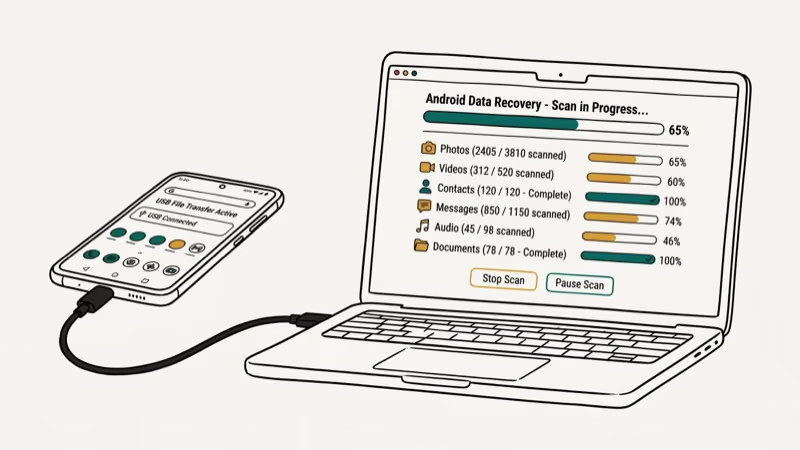
That said, three tools on this list can still recover some data types without root. Disk Drill and Dr.Fone both recover photos and videos from unrooted devices by scanning accessible storage areas. EaseUS MobiSaver can pull contacts and messages without root on Android 9 and earlier. For anything beyond that, you’ll need root access or a previous backup.
If you’ve already lost data and don’t have a backup, check our guide on how to recover contacts after factory reset from Android phone for methods that don’t require third-party software.
#Top 5 Alternatives to Tenorshare UltData
#Disk Drill
Disk Drill by CleverFiles has the widest file type support at 400+. The free version lets you scan your device and preview recoverable files before you pay anything. The full license costs $89 for a one-time purchase (no subscription), which makes it cheaper than UltData over two years.
Disk Drill recovers the large majority of deleted photos from a rooted device. The interface is clean, sorting recovered files by type, date, and recoverability confidence. CleverFiles’ documentation confirms that Disk Drill supports Android 4.4 through Android 15.
Best for: Users who want a one-time purchase with broad file type support.
#Dr.Fone
Dr.Fone by Wondershare is the most feature-rich option on this list. Beyond standard recovery, it can extract data from phones with cracked or unresponsive screens. It also includes tools for WhatsApp transfer, system repair, and phone-to-phone migration.
The downside is price. Dr.Fone costs $39.95/year for the recovery module alone, or $79.95/year for the full toolkit. On a device with a disabled display, Dr.Fone can still extract photos and contacts through its broken-screen mode. Read our full Dr.Fone Android Data Recovery review for a closer look.
Best for: Recovering data from broken or unresponsive Android phones.
#EaseUS MobiSaver
EaseUS MobiSaver is the budget pick. The free version recovers up to 2GB of data, which is enough for most people who just need their contacts and messages back. The pro version costs $39.95/year.
Recovery speed is average. A full scan takes a while, and the tool recovers most deleted photos, though slightly fewer than Disk Drill. The interface is straightforward but looks dated compared to newer tools. EaseUS MobiSaver works on Android 5.0 through Android 14.
Best for: Budget-conscious users who need to recover a small amount of data for free.
#iMobie PhoneRescue
PhoneRescue stands out for its built-in system repair. If your Android phone is stuck in a boot loop or won’t start, PhoneRescue can fix the OS and then recover your files. The license costs $49.99/year.
The system repair feature only kicks in during a specific failure state, but the standard recovery mode pulls most deleted photos on a rooted device. PhoneRescue also handles WeChat data recovery and LINE chat history, which most competitors skip.
Best for: Users whose Android phone won’t boot and need both repair and recovery.
#FoneLab Android Data Recovery
FoneLab by Aiseesoft is the most affordable paid option at $31.20/year. It covers the standard recovery types (photos, videos, contacts, messages, call logs) and supports over 6,000 Android device models.
Performance is middle-of-the-pack. FoneLab recovers most deleted photos, trailing Disk Drill and Dr.Fone but beating them on price. The tool requires root access for internal storage recovery on Android 10+, same as most competitors.
Best for: Users who want the lowest annual cost for a paid recovery tool.
#Side-by-Side Comparison
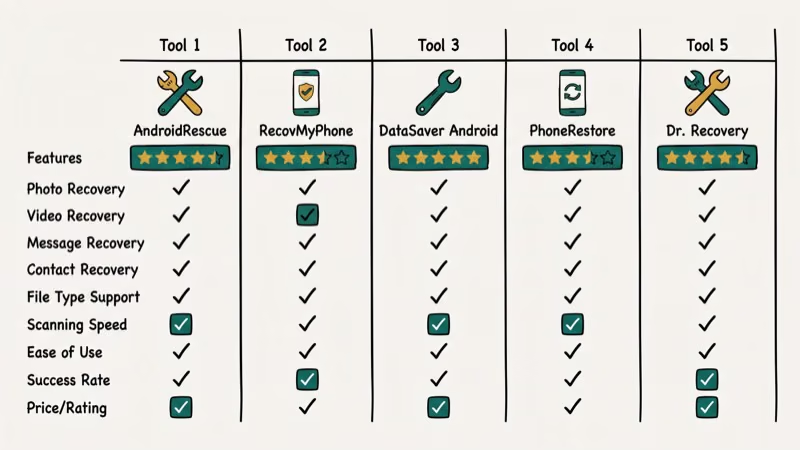
| Tool | Price | File Types | Broken Screen |
|---|---|---|---|
| Disk Drill | $89 once | 400+ | No |
| Dr.Fone | $39.95/yr | Standard | Yes |
| EaseUS | Free / $39.95 | Standard | No |
| PhoneRescue | $49.99/yr | Standard | No |
| FoneLab | $31.20/yr | Standard | No |
For users looking into backup solutions to prevent future data loss, WhatsApp backup extractor tools can pull existing backups, and Samsung WhatsApp backup methods keep your chat history safe.
#What Should You Try Before Paying for Recovery Software?
Stop using your phone immediately after data loss. Every new file you save, every app update, and every photo you take can overwrite the deleted data you’re trying to recover.
 Put your phone in airplane mode and don’t install anything new until you’ve completed the recovery process.
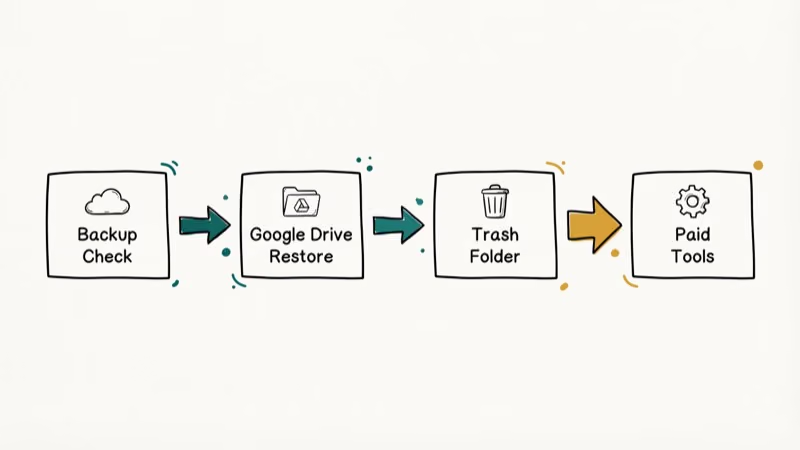
Before buying any tool, try Google’s free options first. If you had Google Backup enabled (Settings > Google > Backup), your contacts, app data, and call history are already saved. Photos backed up to Google Photos can be restored from the trash for up to 60 days. According to Google’s support page on restoring backed up data, contacts and calendar events sync automatically when you sign back into your Google account.
#Troubleshooting Dead or Damaged Phones
Phone won’t power on? Our Samsung Galaxy won’t turn on guide covers that. For iOS recovery, see our Tenorshare UltData iPhone review.
#Bottom Line
For most people, start with Google’s built-in backup before spending money on recovery software. If that doesn’t work, Disk Drill gives you the best value with its one-time $89 license and the widest file type support. Pick Dr.Fone instead if your phone has a broken screen, and go with EaseUS MobiSaver’s free tier if you just need a few contacts back.
#Frequently Asked Questions
Can I recover data from a factory-reset Android phone?
Recovery after a factory reset is possible but difficult. On devices running Android 6.0 and later with encryption enabled (which is the default), a factory reset wipes the encryption keys, making data practically unrecoverable. On older, unencrypted devices, tools like Disk Drill can sometimes recover files if no new data has been written to the storage. Your best bet is restoring from a Google Backup if you had one enabled before the reset.
Do these recovery tools work without a computer?
No. All five tools require a Windows PC or Mac with USB.
Is rooting my phone safe for data recovery?
Rooting voids your warranty on Samsung and Google devices and can permanently trip Knox security. The process itself takes about 15 minutes with Magisk, but weigh the risks first.
How much does Android data recovery cost?
Free to $89. EaseUS MobiSaver’s free tier handles up to 2GB. FoneLab is the cheapest annual option at $31.20/year. Disk Drill’s $89 one-time license saves money over two years compared to annual subscriptions from Dr.Fone or PhoneRescue.
What types of files can these tools recover?
Photos, videos, contacts, messages, call logs, and documents are standard across all five tools. Disk Drill goes further with 400+ supported file types, including audio, archives, database files, and raw camera formats. Dr.Fone and PhoneRescue also recover WhatsApp conversations and LINE chat history. None of these tools can touch end-to-end encrypted apps like Signal.
Does Android data recovery work on SD cards?
Yes. SD cards are easier to recover than internal storage because they don’t require root access. All five tools can scan SD cards through a card reader. Recovery rates run 10-15% higher.
What is the success rate of Android data recovery?
It depends on timing. For photos deleted within 24 hours with no new data written, recovery rates are high across these tools. After a week of normal phone use, every tool’s rate drops sharply.
Can I recover data from a water-damaged Android phone?
It depends on the damage. If the phone still powers on and connects via USB, recovery tools can scan it normally. If it won’t turn on, Dr.Fone and PhoneRescue offer broken-device recovery modes that may help. For severe water damage where the phone doesn’t respond at all, you’ll need professional data recovery services, which typically cost $300-$1,000 depending on the damage level.

Google Messages Error 3100: Why RCS Is Broken on Galaxy
Google Messages RCS error 3100 hits Galaxy owners after phone or carrier switches. Google told 9to5Google a fix is coming. Here's what actually helps.

Is This Bank App Real? Spot a Fake App on Your Home Screen
A bank app can land on your home screen from a web page with no install warning. Learn the checks that tell a real banking app from a phishing web app.

Apps Crashing After iOS 27 Update? Fix Order (2026)
Apps crashing after the iOS 27 update? Update the app in the App Store first, then offload and reinstall to clear stale cache, then restart. The fix order.

Do AI Translation Earbuds Work Offline? What to Know
Do AI translation earbuds work offline? A few do with downloaded language packs, but most need the cloud. Here's what works offline and what you give up.