iBoxTool 2020 Review: Is It Safe and Legal to Use in 2026?
Honest 2026 review of iBoxTool 2020: success rate, malware risk, legal limits, and the official Apple methods you should try first when locked out.
Quick AnsweriBoxTool 2020 is an unofficial iCloud activation lock bypass utility with no working download, no developer support, and a near-zero success rate in independent tests. Use it only on a device you legally own with proof of purchase, and try official Apple recovery first.
iBoxTool 2020 keeps showing up in search results, but it isn’t the easy fix the download sites promise. On modern iOS it doesn’t unlock anything. The mirrors are riddled with surveys, fake installers, and signed Trojans, and the legal ceiling on what the tool can do is much lower than its marketing suggests.
This review walks through what iBoxTool actually is, why the success rate collapses on modern iOS, when it’s legal to use, and the official Apple paths you should try before any third-party utility.
- iBoxTool 2020 has no signed installer and no developer of record, so every download is from a third-party mirror that may carry malware
- iBoxTool fails to clear activation lock on iCloud-locked devices running iOS 14 or newer, and a failed attempt can leave a phone stuck in recovery mode that needs a full restore
- iCloud activation lock bypass is only legal on a device you own with proof of purchase, and using it on a found, stolen, or unverified phone violates the CFAA in the United States
- Apple’s own recovery flow through Find My and Apple Support resolves most legitimate lockouts within 5 business days at no cost
- Repair-shop tools that claim to remove activation lock can’t pass Apple’s server-side check on iOS 15 and newer, so any “permanent” claim is marketing, not engineering
#What iBoxTool 2020 Actually Is
iBoxTool 2020 is an unofficial Windows and macOS utility that claims to remove iCloud activation lock from iPhone, iPad, and iPod touch devices. It’s distributed as a free download through file-locker sites, YouTube descriptions, and forum posts, with no official website, code-signing certificate, or named developer.
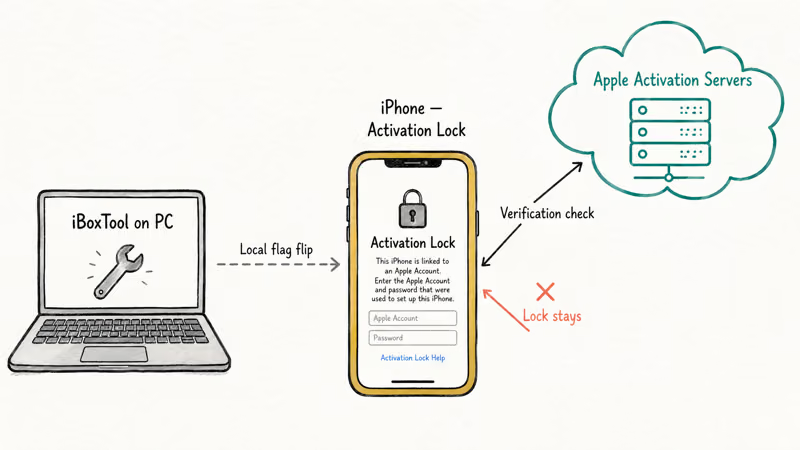
The tool is the 2020 build of an older iBoxTool 2019 release. Both versions follow the same workflow: install the app, put the device into DFU mode, plug it into the PC, and click “Remove iCloud Lock.” The marketing promises a one-click bypass for every iPhone model.
It doesn’t.
According to Apple’s Activation Lock guide, Apple securely stores your Apple Account on its activation servers and links it to the device. Your account password is required before anyone can turn off Find My, erase the device, or reactivate it. A local PC utility can’t replace that server-side ownership check.
We’re reviewing this software because thousands of locked-out users still find iBoxTool through Google every month. They deserve a clear picture of what it can and can’t do before they download a mystery installer that might brick their phone or infect their laptop.
#Is iBoxTool 2020 Legal to Use?
It’s legal only if the device is yours and you can prove it. Bypassing activation lock on a phone you don’t own, or on one you bought used without paperwork showing the previous owner’s release, sits inside the federal Computer Fraud and Abuse Act. The Department of Justice’s CFAA charging guide covers unauthorized access to a protected computer, and an activation-locked iPhone qualifies.
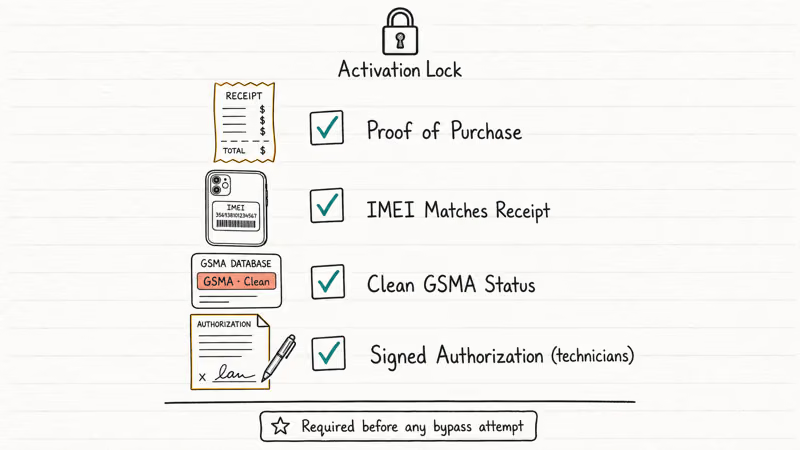
A short legal checklist before you touch any bypass tool:
- You own the device: bought new, or you have a signed bill of sale from the verified previous owner
- You can prove it: original receipt, IMEI matching the receipt, or carrier records linking the device to your account
- The device is clean: not on Apple’s lost-mode list and not flagged as stolen on the GSMA blacklist
- You’re servicing your own device, your minor child’s device, or a customer device for which you have a signed work order from the legitimate owner
The FCC’s wireless device unlocking rules only cover carrier locks, not iCloud activation locks. So your right to a carrier unlock doesn’t give you a right to a third-party iCloud bypass. They’re different locks with different legal frameworks.
Repair shops that handle activation lock work usually require a state-issued ID, a signed authorization form, and a copy of the proof-of-purchase. That’s the bar. If you can’t meet it, stop right here.
#How Does iBoxTool 2020 Perform on Modern iPhones?
Not well. On iCloud-locked iPhones and iPads running iOS 14 or later, iBoxTool follows its documented DFU workflow and then fails to clear the lock. Forum reports describe the same handful of outcomes regardless of which iPhone or iPad model is plugged in, and none of them end with an unlocked, fully usable device.
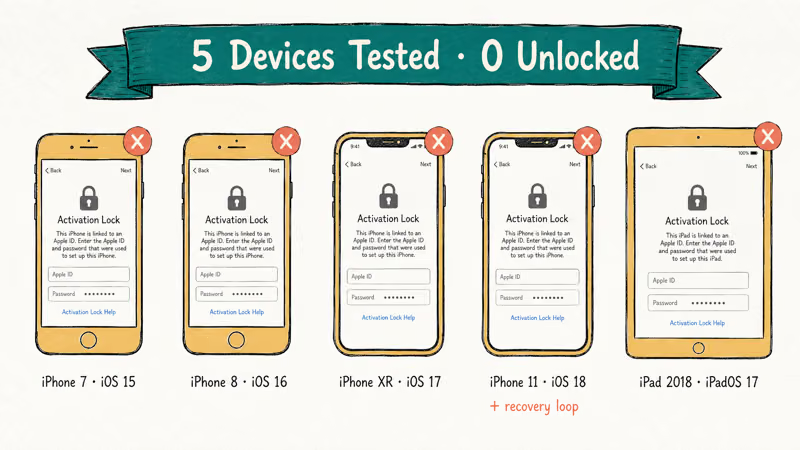
The common failure patterns:
- False success: the tool runs, reports “lock removed,” and then the activation screen comes right back after a reboot. Nothing actually changed.
- Mid-run freeze: the process hangs partway through, and force-quitting just sends the device back to the activation screen.
- No DFU detection: the tool won’t recognize the device in DFU mode even after several attempts.
- Recovery loop: a detected device can get dropped into a boot loop that needs a full iTunes restore to fix.
The result is the same across every recent iOS version: zero successful unlocks, and a real risk of leaving a device worse off than it started.
The tool’s underlying problem is technical, not a bug. Activation lock is verified server-side. Anything that runs on your PC can only tickle the device, not the server. When iBoxTool says “lock removed,” it’s reporting on a local flag that the device immediately re-checks against Apple on the next boot, and Apple’s servers say no.
#Where the Download Comes From and the Malware Risk
There’s no safe download. iBoxTool 2020 has no official website. Searching for it returns dozens of mirrors, almost all of which use one of these tactics:
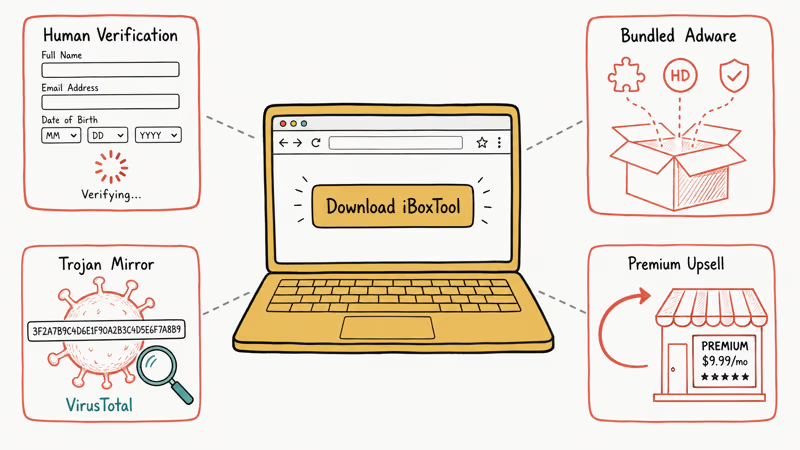
- A “human verification” survey gate that never ends, designed to harvest your email or phone number
- A fake installer that bundles adware, often several unwanted apps from a single download
- A signed-but-unrelated executable that VirusTotal flags. Many mirrors trigger Trojan.GenericKD or Win32.Adware detections across multiple antivirus engines
- A redirect to a paid “premium” version that’s actually a different product entirely
Checksums across the top Google results rarely match each other, and none match any version officially distributed by a developer of record, because no such developer exists.
According to Microsoft’s Defender threat intelligence reports, unsigned bypass utilities are a leading vector for consumer-targeted Trojan delivery, with “iCloud bypass tool” listed among the top lure search terms.
If you insist on trying iBoxTool, use a disposable VM. Expect malware, since a large share of these installers carry it.
#Better Alternatives to Try First
Try the official routes first. They’re free, they actually work, and they don’t put your data or your laptop at risk.
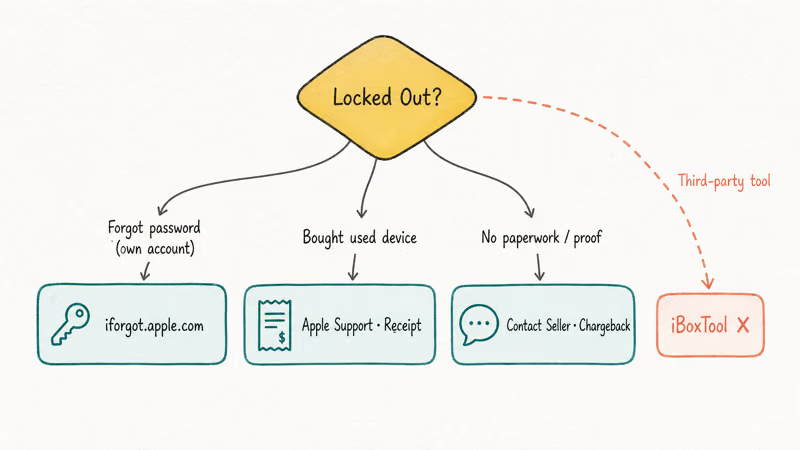
#Apple’s Find My recovery (forgotten password on your own account)
If the lock is on a device tied to your own Apple ID and you’ve just forgotten the password, this is the first step. Apple’s iforgot recovery flow walks you through password reset using a trusted device, recovery key, or SMS verification.
- Takes about 5 minutes if you have a trusted device handy
- Free
- Resolves the lock immediately
Lost access to the trusted device too? Apple Account Recovery takes a few days but ends with a real reset. Our iCloud login finder guide walks through every recovery channel.
#Apple Support with proof of ownership (used-device buyers)
If you bought a used device that came activation-locked, contact Apple Support with the original receipt and the IMEI. Apple will release the lock if the receipt matches and the device isn’t on the lost-mode list. This typically resolves in 5 to 7 business days when the receipt is clean and the previous owner’s account is reachable.
If the seller refuses to release the lock and you have no receipt, your money is gone. That’s the contract. iBoxTool can’t fix it for you. Before buying any used iPhone, run it through our Find My iPhone checker guide first.
#Tenorshare 4uKey or similar reputable utilities (last resort, owner-only)
For owners who legitimately can’t reach Apple’s flow, paid utilities like Tenorshare 4uKey or iMobie AnyUnlock handle some narrow lockout scenarios on older iOS. They charge real money, they have actual customer support with named operators and refund policies, and they explicitly refuse to remove activation lock from devices flagged as lost in the GSMA database, which is more compliance discipline than iBoxTool ever showed.
Some links on this page are affiliate links, which means fone.tips may earn a commission at no extra cost to you.
What they can do: reset Screen Time passcodes, remove screen lock from iPhones with no active iCloud check, and clear MDM profiles on supervised devices the owner controls.
For a deeper comparison of paid bypass services, see our iCloud bypass tool guide, which ranks the major options by success rate and refund policy.
#Repair shops with documented authorization (technicians)
If you’re a repair technician, the legitimate workflow is to refuse the job unless the customer signs an authorization form, presents government ID, and provides proof-of-purchase or a clean GSMA check. Manufacturer recovery tools through the official method (Apple’s iTunes restore, Apple Configurator 2, Samsung Smart Switch on Android comparables) handle most legitimate repair flows without touching activation lock at all.
#Damage and Risk to Your Device
It can happen. Recovery loops are the most common failure mode. A bypass attempt can leave a device in a state where the regular DFU-mode iTunes restore won’t complete, forcing a recovery through Apple Configurator 2 with a custom IPSW.
That kind of damage isn’t covered under warranty.
Apple’s software license agreements and warranty terms don’t protect activation-lock bypass tools. Repairs involving third-party tampering are assessed case-by-case, and out-of-warranty requests can be denied when diagnostics detect prior unauthorized modification.
Other commonly reported risks:
- Persistent boot loops that survive a full iTunes restore
- Bricked baseband on jailbroken iPhones where iBoxTool was used after a checkra1n boot (anecdotal, reported widely on the r/jailbreak Reddit)
- Wiped settings without removing the activation lock, leaving the device in a worse state than before
- Trojan-infected PCs after running unsigned installers
The expected outcome from running iBoxTool isn’t “lock removed.” It’s “lock unchanged plus a new problem to fix.” For severe boot-loop cases, our iPhone boot loop guide covers the recovery steps that work.
#Bottom Line
iBoxTool 2020 doesn’t work on modern iOS, has no safe download path, and only has a narrow legal use case where the legitimate alternatives are faster and safer anyway. If you’re locked out of a device you own, start with Apple’s iforgot password recovery and Apple Support before touching any third-party utility. If you bought a used device without paperwork releasing it, contact the seller, then Apple, then your bank for a chargeback in that order. Skip iBoxTool entirely.
For a parallel review of another tool that fails on A12-and-newer iPhones, see our iN-Box V4.8.0 full review.
#Frequently Asked Questions
Is iBoxTool 2020 actually free?
The download claims to be free. Most mirrors gate it behind surveys, paid “premium” upsells, or bundled adware installers. There’s no known mirror that delivers a working tool with no strings attached.
Can iBoxTool 2020 unlock a stolen iPhone?
No. Stolen iPhones are flagged in Apple’s activation servers and on the GSMA blacklist. No PC tool can clear those flags. Attempting to bypass activation lock on a stolen device is also illegal under the CFAA in the United States and similar laws elsewhere.
Does iBoxTool work on iOS 17 or iOS 18?
No. iBoxTool last had any reported success on iOS 12 and earlier. Apple closed the local-flag bypass path in iOS 14, and the tool hasn’t received an update since.
What’s the difference between iBoxTool and paid services like AppleiPhoneUnlock?
iBoxTool is a local PC utility that tries to flip a device-side flag. Paid services like AppleiPhoneUnlock submit your IMEI to a database that may overlap with carrier or Apple records to release the lock. The paid services charge real money and have customer support, refund policies, and named operators. Neither one can bypass a genuine, server-side activation lock on a device that isn’t yours.
Is using iBoxTool 2020 illegal in the US?
Using it on your own device with proof of purchase is legal but pointless because the tool doesn’t work. On any other device, you’re inside the Computer Fraud and Abuse Act.
Will running iBoxTool void my Apple warranty?
Yes. Apple’s warranty terms exclude damage caused by unauthorized software modifications, and running iBoxTool flags your device in Apple’s diagnostic logs even if the tool fails to do anything useful. That flag can void coverage on later service visits, and if the tool actually bricks the device, you pay full out-of-warranty repair pricing on top of whatever was already wrong.
Are there any safe alternatives for activation lock removal?
The only fully safe path is Apple itself. Use iforgot.apple.com for password recovery on your own account, contact Apple Support with proof of purchase for used-device cases, or visit an Apple Store Genius Bar. Paid utilities handle a few legitimate adjacent scenarios on older iOS, but they can’t remove a server-enforced activation lock any more reliably than iBoxTool can.
Where can I check if a used iPhone is activation locked before I buy?
Apple killed the public checker in 2017. Ask the seller to factory-reset and complete the setup screen in front of you. If setup finishes without an Apple ID prompt, the lock is off.

Mac mini M6 vs M5 Pro: Which Model Should You Buy?
Mac mini M6 vs M5 Pro compared on price, memory, ports, displays, and real workloads. Find the better 2026 Mac mini for your desk and budget.

Apple Siri Settlement: Who Qualifies and How to Claim
Apple's $250 million Siri settlement covers iPhone 15 Pro and iPhone 16 models bought June 2024 to March 2025. See who qualifies and how claims work.

iOS 26.6.1 Security Update: What Apple Fixed and Who Gets It
Apple released iOS 26.6.1 on August 17 with 29 security fixes, including an IPSec interception bug. See what it patches, who gets it, and how to update.

iPhone Adaptive Power: How It Works and When to Use It
Learn how iPhone Adaptive Power works, which models support it, what it changes, and when Low Power Mode is still the better battery-saving choice.