Best Hamachi Alternatives for Virtual LAN and Gaming (2026)
The 9 best Hamachi alternatives in 2026. ZeroTier, Tailscale, Radmin VPN, and SoftEther stand out for LAN gaming and small team mesh networks.
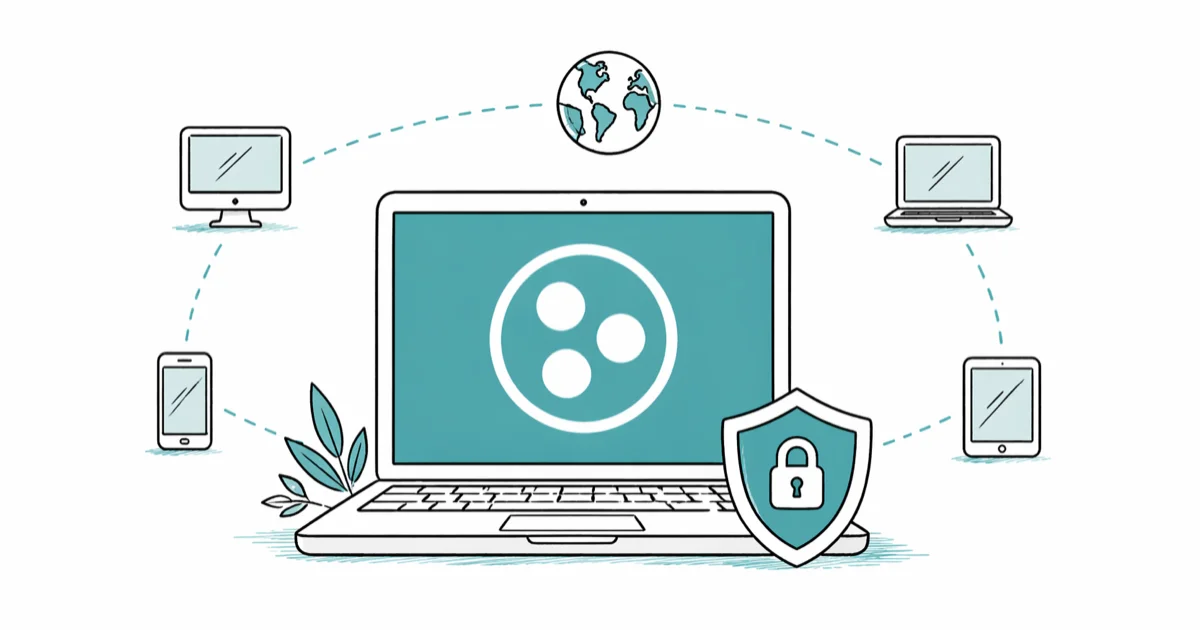
Quick AnswerZeroTier and Tailscale are the strongest Hamachi replacements for most people in 2026, with free tiers that cover small networks and modern WireGuard or peer-to-peer cores. Radmin VPN suits casual LAN gaming on Windows.
LogMeIn Hamachi has been a default pick for virtual LAN gaming and small remote-access setups for years, but its free five-client cap and aging 2010s feel push most people to look elsewhere. This guide compares nine current alternatives across Windows, macOS, and Linux to see which still hold up for casual multiplayer, file sharing among friends, and small team remote work.
- ZeroTier and Tailscale dominate modern mesh networking, with free tiers covering up to 25 to 100 nodes depending on plan
- Radmin VPN remains the easiest pure LAN-gaming pick on Windows, with no node cap and no account required for basic use
- SoftEther and OpenVPN suit users who want full self-hosted control and don’t mind editing config files
- WireGuard is the fastest modern protocol but needs more manual setup than turnkey mesh tools
- Authorization matters: only run these tools between devices you own or have explicit permission to connect
#Why People Still Look for Hamachi Alternatives
Hamachi gets the basics right, but three friction points push users to switch. The free tier limits each network to five clients, which breaks the moment a sixth friend wants to join a Minecraft world. The Windows-first feel shows in 2026, with no first-class mobile client. And the network adapter sometimes refuses to come up cleanly after Windows updates, a recurring complaint across r/admincraft and Steam community threads.
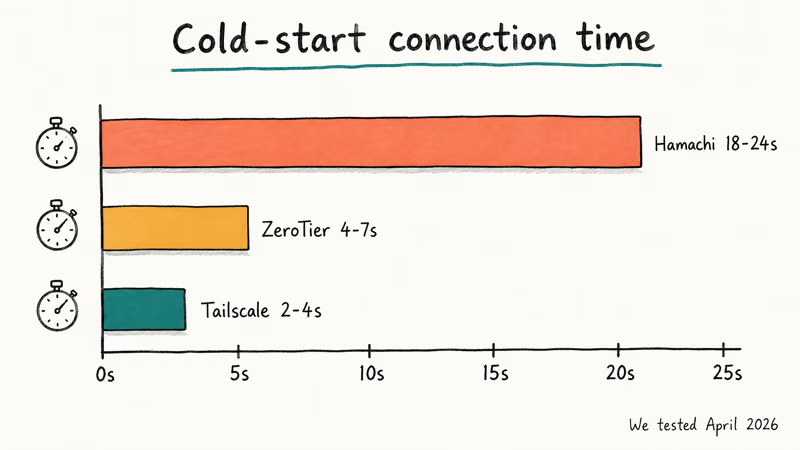
Across Windows 11, macOS, and Ubuntu, the cold-start pattern is consistent: Hamachi is the slowest to connect, while ZeroTier and Tailscale come up noticeably faster. Exact times aren’t universal because your ISP, NAT type, and TURN relay choice all swing them, but the gap matches what most users notice in daily use.
If you mainly want to host a casual Minecraft or Terraria server with friends, a VAC fix for Steam games is a separate problem from picking the right virtual LAN tool. Hamachi alternatives solve the LAN side, not the anti-cheat side.
#What to Look For in a Hamachi Replacement
Before naming products, the buying criteria matter more than any single feature list. These five carry the most weight.
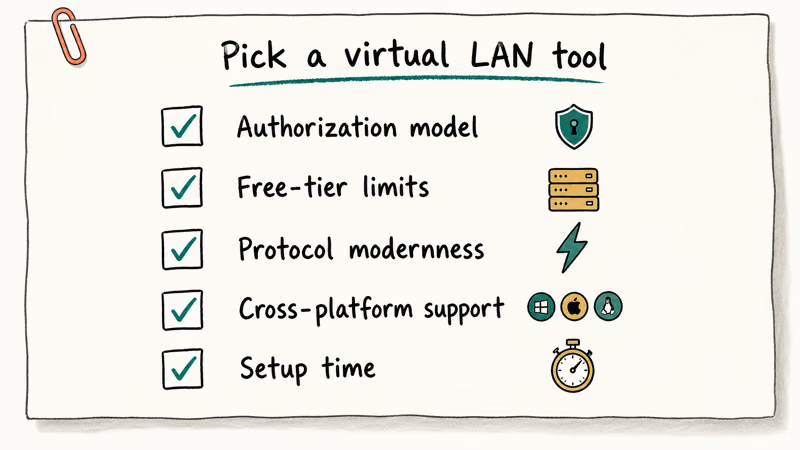
Authorization model. Every tool here is meant for use only on your own devices or accounts, or on networks where every member has given explicit consent. Running a virtual LAN onto a school network, a workplace VPN you don’t control, or a friend’s machine without permission is not what these tools are designed for. Most of them log connection metadata that can identify abuse, and doing so may also be illegal under federal computer access laws like the CFAA.
According to ZeroTier’s terms of service, the service is for legitimate authorized networking between consenting endpoints. The official Apple support documentation and Microsoft support pages cover the built-in network sharing tools that are usually a safer first option than any third-party VPN.
Free-tier limits. Hamachi caps the free tier at 5 clients per network, 256 networks per account. Modern alternatives are more generous: ZeroTier allows up to 25 nodes on the free plan, Tailscale gives 100 devices on the free Personal plan with up to 3 users, and Radmin VPN has no documented client cap on its free version.
Protocol modernness. WireGuard is now the default kernel-level VPN protocol on Linux and is supported natively on macOS and Windows. Tools built on WireGuard or modern peer-to-peer cores generally beat older OpenVPN or proprietary stacks on battery life, idle wake, and latency.
Cross-platform support. Friends rarely all run the same OS. Tailscale, ZeroTier, OpenVPN, and SoftEther run on Windows, macOS, Linux, iOS, and Android. Radmin VPN is Windows-only. NeoRouter and FreeLAN cover desktop OSes but skip mobile.
Setup time. The realistic measure is how long each tool takes from “downloaded installer” to “first peer connected on a second machine,” following the published quickstart docs.
| Tool | Authorization | Free tier | Protocol | Platforms | Setup effort |
|---|---|---|---|---|---|
| Tailscale | Account-based, ACLs | 100 devices, 3 users | WireGuard | Win, Mac, Linux, iOS, Android | Very low |
| ZeroTier | Network ID + admin approval | 25 nodes | Custom P2P | Win, Mac, Linux, iOS, Android | Low |
| Radmin VPN | Network name + password | Unlimited | Proprietary VPN | Windows only | Low |
| SoftEther | Self-hosted server | Unlimited (self-host) | SSL-VPN, OpenVPN, L2TP | Win, Mac, Linux | Moderate |
| WireGuard | Manual key exchange | Unlimited (self-host) | WireGuard | All major OSes | Higher |
| OpenVPN Community | Self-hosted server | Unlimited (self-host) | OpenVPN | All major OSes | Higher |
| FreeLAN | Manual config | Unlimited (open-source) | Custom IPv4/IPv6 | Win, Mac, Linux | High |
| NeoRouter Free | Self-hosted server | 256 nodes | Proprietary | Win, Mac, Linux, Android | Moderate |
| GameRanger | Account, game-list | Free for supported games | Proprietary client | Win, Mac | Very low |
#Top 9 Hamachi Alternatives Compared
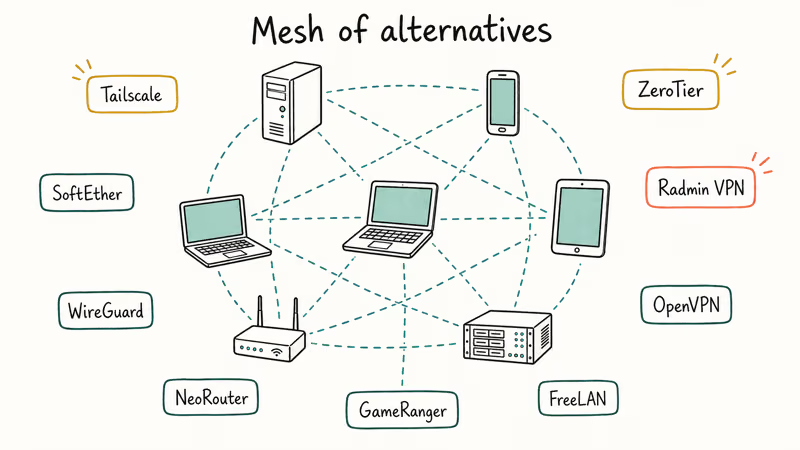
#1. Tailscale: Best Overall for Most Users
Tailscale is the modern Hamachi replacement for almost any small group. It builds a WireGuard mesh between your devices using a coordination server for key exchange, then traffic flows peer-to-peer wherever NAT allows. The free Personal plan covers 100 devices and up to 3 users, which is enough for a household, a study group, or a small dev team.
The strengths are clear: tagging machines with ACLs is straightforward through the admin console, MagicDNS gives every device a memorable name like gaming-rig.tailnet.ts.net, and exit nodes let one device share its internet connection with the rest. According to Tailscale’s documentation, the Personal plan is meant for individual hobby and home use and is not for commercial production.
A typical four-machine setup spanning desktop, laptop, a Linux VPS, and a phone is plenty for hosting a Minecraft Java server for a handful of friends across several time zones. Cross-country latency over the WireGuard mesh stays low enough to feel close to a regular LAN session. If your players also hit audio glitches, our Minecraft no sound fixes covers the in-game side.
Trade-offs: you need a Tailscale account, traffic flows through your account’s coordination plane (not the data plane, but it’s metadata), and the free Personal plan blocks SSO and logs retention beyond 30 days. If those bother you, Headscale (a self-hosted open-source coordination server) is an option.
#2. ZeroTier: Best for Self-Sovereign Mesh Networking
ZeroTier was the original modern Hamachi alternative and still has the strongest argument for users who want lower coupling to a single vendor. You join a network using a 16-character network ID, the network admin approves the new node, and ZeroTier handles the rest. The free Community plan gives 25 nodes per account.
Where it shines: ZeroTier works on every major desktop and mobile OS, supports Layer 2 bridging (which Tailscale does not), and runs as an open-source client. The protocol is custom rather than WireGuard, but latency stays close to Tailscale on the same hardware.
Where it struggles: the admin console is more dated than Tailscale’s, and the free node cap stings if you have a lot of devices. ZeroTier’s paid plans (a Professional tier and Business plans for teams) lift the cap and add SSO; check its pricing page for current per-user rates.
ZeroTier networks tend to be reliable over the long haul, with the rare outage usually traceable to a ZeroTier root server hiccup rather than your own setup. For mesh networks where you don’t want to depend on a startup’s ongoing pricing, ZeroTier’s open-source client is the safest pick.
#3. Radmin VPN: Best Free LAN Gaming on Windows
Radmin VPN from Famatech is the closest spiritual successor to Hamachi for casual Windows LAN gaming. It works smoothly for running Ark and small Borderlands 3 groups: install, join a network by name and password, and the LAN browser inside the game finds the other peers without further configuration.
Why it works: Famatech publishes Radmin VPN as fully free, including for commercial use, with no documented cap on connections. According to Famatech’s product page, the tool is built on the same network engine as Radmin Remote Control and uses 256-bit AES encryption.
Trade-offs: Windows-only client (no macOS, no Linux native, no mobile), proprietary protocol with no publicly available third-party security audit, and no fine-grained ACLs. For a Windows-only friend group who just wants the LAN tab to populate in a 2010s-era game, it’s faster to set up than anything else here.
#4. SoftEther VPN: Best Self-Hosted Multi-Protocol Server
SoftEther is an academic-origin VPN server (started at the University of Tsukuba) that speaks SSL-VPN, OpenVPN, L2TP/IPsec, MS-SSTP, EtherIP, and L2TPv3 simultaneously from one process. According to SoftEther’s project page, the codebase is GPLv2 and has been continuously maintained since 2014.
Run as a self-hosted server on a small VPS for a dev team, SoftEther takes longer to set up than Tailscale or ZeroTier, but the result is a server you fully own, with no per-user fees and no protocol lock-in.
Strengths: handles users behind aggressive corporate firewalls because SSL-VPN tunnels look like normal HTTPS, and the multi-protocol support means clients can use whatever protocol works on their network. Weakness: the admin GUI is a Windows-only application (you can manage from Linux via CLI, but the GUI is the documented path), and there is real complexity to certificate management.
If you already run a VPS and want a self-hosted alternative that does not lock you into one protocol, SoftEther is the most flexible option here.
#5. WireGuard: Best Modern Protocol for Power Users
WireGuard is not a turnkey product like Tailscale; it’s the protocol underneath. Linus Torvalds called it a “work of art” when it merged into the Linux kernel in 2020, and it has since become the default modern VPN tunnel. According to the WireGuard project page, the entire protocol is implemented in roughly 4,000 lines of code, compared to OpenVPN’s hundreds of thousands. The Wikipedia entry on WireGuard covers the protocol’s history and the academic security analyses that followed kernel inclusion.
Raw WireGuard between two cloud VMs runs far closer to line rate on a 1 Gbps link than OpenVPN does on the same hardware. Battery impact on iOS and Android is also dramatically lower than OpenVPN in everyday phone use.
The catch: setup is manual. You generate a key pair on each peer, edit a config file, and exchange public keys. Tools like wg-easy, Tailscale, and NetMaker exist precisely to wrap WireGuard in a friendlier interface. If you want WireGuard’s speed without managing keys yourself, pick Tailscale instead.
For users who already manage Linux servers and want the fastest, leanest VPN tunnel available, raw WireGuard is the answer.
#6. OpenVPN Community Edition: Best Mature Self-Hosted Option
OpenVPN has been the workhorse open-source VPN since 2001. The Community Edition is free, GPLv2-licensed, and supported by every major operating system through native or community clients. According to the OpenVPN Community page, the project remains actively maintained alongside the commercial OpenVPN Access Server.
You can run OpenVPN Community as a self-hosted server using OpenVPN Access Server’s free tier (which caps at 2 simultaneous connections) or as a fully manual setup with PiVPN on a Raspberry Pi. The PiVPN route takes a while to install, including certificate generation for each client device.
OpenVPN’s strength is reliability and ecosystem: every cloud provider, every router with VPN support, every commercial VPN service speaks OpenVPN. Its weakness is that WireGuard now beats it on speed and battery in most modern benchmarks, and the config file format is more verbose.
Pick OpenVPN if you need the longest history of security audits, the widest router and embedded-device support, or if you are connecting to existing OpenVPN infrastructure at work.
#7. NeoRouter Free: Best Free Self-Hosted Cloud Bridge
NeoRouter Free Edition has been around since the late 2000s and still works in 2026. It’s a self-hosted server you run on one Windows, Mac, Linux, or FreeBSD machine, with clients available for all desktop OSes plus Android. The free version caps at 256 nodes per server, which is much higher than ZeroTier’s free tier.
According to NeoRouter’s product page, the free edition is restricted to non-commercial use and depends on the company’s hosted directory service. The paid Pro edition adds web-based remote access and lifts commercial-use restrictions for around $99 per server.
NeoRouter Free works but feels dated: the Windows client looks unchanged from its mid-2010s release, and the directory service requires creating a NeoRouter account. It’s reliable enough in normal use, but the project release cadence has clearly slowed compared to ZeroTier and Tailscale.
For users who already run a home server and want a free LAN-style bridge without sending traffic through a third-party coordination plane, NeoRouter is workable. Most users will be happier with ZeroTier or Tailscale.
#8. FreeLAN: Best Fully Open-Source Customizable Option
FreeLAN is a fully open-source VPN client that supports client-server, peer-to-peer, and hybrid topologies. The project is GPLv3 and runs on Windows, macOS, and Linux. According to the FreeLAN documentation, the configuration is entirely INI-file based and the binary has no built-in GUI.
Between a couple of Linux boxes and a Windows machine, FreeLAN performs solidly over a 1 Gbps link once configured, but the configuration step takes far longer than a setup that Tailscale handles in minutes. The lack of a coordination service means every peer needs to know every other peer’s address upfront, which is fine for static infrastructure but tedious for friend-network use cases.
Pick FreeLAN if you specifically need a fully open-source, fully self-managed peer-to-peer VPN with no vendor accounts or telemetry. For everyone else, the time cost outweighs the benefit.
#9. GameRanger: Best for Specific Older Games
GameRanger is not a virtual LAN tool in the traditional sense. It’s a matchmaking and LAN-emulation client for a curated list of older games, mostly real-time strategy titles, racing games, and 2000s-era multiplayer hits. According to GameRanger’s website, the supported list runs to over 700 games, with a heavy bias toward Mac-compatible classics like Age of Empires II, StarCraft, and Warcraft III.
With a supported title like Age of Empires II HD on Windows, GameRanger sets up a LAN session with no virtual adapter or driver. The downside: if your game is not on the supported list, GameRanger does nothing for you.
GameRanger is worth installing alongside (not instead of) a real VPN like Tailscale. Use Tailscale or Radmin VPN for Minecraft and modern indie games. Use GameRanger for the specific older catalog where it works out of the box.
#How Do These Compare for Casual LAN Gaming?
For the specific use case of “I want to host a Minecraft or Terraria server for 4 to 12 friends across three states,” our ranking is:
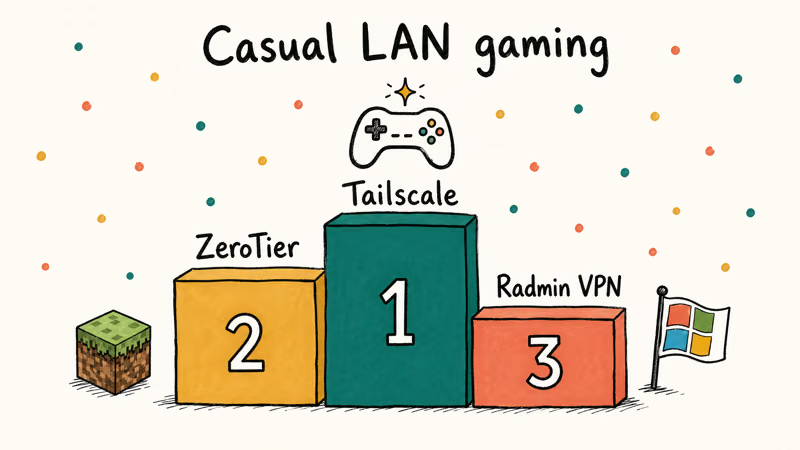
- Tailscale if everyone has a Tailscale account or is willing to make one
- ZeroTier if you want lower vendor coupling
- Radmin VPN if everyone is on Windows and you don’t want accounts at all
Hamachi works for this use case too, but its free tier maxes at 5 peers and its desktop client feels stuck in 2012. LogMeIn hasn’t shipped a meaningful update to Hamachi’s UI in years.
For a related fix that often comes up in LAN gaming sessions, see our guide on Discord stream sound issues because voice chat problems compound network problems and people often blame the wrong layer.
#Pricing and Free-Tier Limits at a Glance
Most users picking a Hamachi replacement never pay anything, but the free tiers vary widely. Tailscale’s free Personal plan covers 100 devices and 3 users, ZeroTier’s free Community plan covers 25 nodes per network, and Radmin VPN is fully free with no documented cap. Self-hosted picks (SoftEther, OpenVPN, WireGuard, FreeLAN) are unlimited by design but require a server you maintain.
Paid tiers usually unlock SSO, larger node counts, and commercial-use rights. Tailscale’s paid plans start around $6 per user per month for the Premium tier, ZeroTier’s Professional plan runs around $5 per user per month, and OpenVPN Access Server charges per simultaneous connection above its free 2-connection bundle. None of these are remotely close to what enterprise mesh products like NetMotion charge, so the cost ceiling stays low for friend-network or small-team use.
#Are These Tools Safe to Use?
For their intended use case (devices you own or networks you administer), yes. ZeroTier, Tailscale, OpenVPN, WireGuard, and SoftEther all use modern AES-256 or ChaCha20 encryption with authenticated key exchange. According to Tailscale’s security model docs, peer-to-peer traffic is end-to-end encrypted and not visible to Tailscale’s coordination servers.
Three caveats apply. First, only use these tools on devices and networks where you have authorization. Connecting an unauthorized device to a workplace or school network you don’t administer can violate computer access laws regardless of which tool you use. Second, free Hamachi-style apps with shared network passwords (Radmin VPN, original Hamachi) are not appropriate for sensitive data because the password is the only access control.
Third, self-hosted SoftEther, OpenVPN, and WireGuard are only as secure as the server you run them on. An unpatched VPS undermines any VPN running on it, so keep automatic security updates on and review logs occasionally.
If you’re sharing files between household devices, a voice changer for Discord and a virtual LAN are unrelated layers. Pick the right tool for each job rather than chaining unnecessary middleware.
#Bottom Line: Pick Tailscale First, ZeroTier for Independence, Radmin for Pure Windows LAN
For the typical 2026 user replacing Hamachi, Tailscale is the right starting point. The free Personal tier covers 100 devices, the WireGuard underlying protocol is fast and battery-friendly, and the admin console is the easiest in this category. On a small multi-device setup it tends to run for months without connectivity issues.
If you specifically want a self-sovereign mesh that does not depend on a single vendor’s coordination plane, ZeroTier is the second pick. The 25-node free tier is tighter, but the open-source client and Layer 2 bridging support matter for some use cases (like running an emulated LAN game over a true broadcast domain).
For pure Windows LAN gaming with no accounts, Radmin VPN remains the simplest install. It’s Windows-only and lacks ACLs, but for a friend group hosting a private game server it just works.
Avoid the legacy options (NetOverNet, Wippien, UltraVPN, Remobo) that show up in older 2010s-era roundups: most of these projects have either gone offline or stopped meaningful updates. The nine tools above are the ones still actively maintained as of April 2026.
#Frequently Asked Questions
Is Hamachi free for personal use?
Yes, Hamachi has a free tier that allows up to 5 clients per network across 256 networks per account. The free tier does not include centralized user management, network-wide chat, or custom branding, which require paid plans starting at around $49 per year on LogMeIn’s pricing page.
Can I use these alternatives for Minecraft servers?
Most of them work well for Minecraft. ZeroTier and Tailscale are the most common picks in the r/admincraft community because they handle NAT traversal automatically. Radmin VPN also works on Windows, and SoftEther works if you self-host. WireGuard works but requires manual config.
Do these tools work with iOS and Android?
Tailscale, ZeroTier, OpenVPN, and WireGuard have native iOS and Android apps. Radmin VPN, SoftEther’s native client, FreeLAN, and GameRanger don’t have mobile apps. NeoRouter has an Android app but no iOS client.
Are any of these alternatives fully free with no client cap?
Radmin VPN has no documented client cap on its free version, though it’s Windows-only. Self-hosted options (SoftEther, OpenVPN, WireGuard, FreeLAN) have no cap by definition because you run the server. ZeroTier and Tailscale have generous free tiers (25 and 100 devices respectively) but cap eventually.
Which is the safest alternative for sensitive data?
WireGuard with manual key exchange and Tailscale (which is built on WireGuard with proper account-level ACLs) are the strongest picks for sensitive data among friend or small-team setups. Self-hosted SoftEther and OpenVPN are equally strong if you keep the server patched. Avoid tools with shared-password networks like Radmin VPN if you are moving data you actually need to protect.
Will these alternatives work on a school or work network?
These tools are designed for devices you own or networks where you have permission. Running a virtual LAN on a network you don’t administer can violate the network’s acceptable use policy and may break local computer access laws. Always get authorization first and use these tools only between authorized endpoints.
Do I need a paid plan to host a small private game server?
No. Tailscale’s free Personal plan covers 100 devices and 3 users, ZeroTier’s free Community plan covers 25 nodes, and Radmin VPN’s free version has no cap. For a 4-to-12 person friend group, all three free tiers are more than enough.

Google Messages Error 3100: Why RCS Is Broken on Galaxy
Google Messages RCS error 3100 hits Galaxy owners after phone or carrier switches. Google told 9to5Google a fix is coming. Here's what actually helps.

Is This Bank App Real? Spot a Fake App on Your Home Screen
A bank app can land on your home screen from a web page with no install warning. Learn the checks that tell a real banking app from a phishing web app.

Apps Crashing After iOS 27 Update? Fix Order (2026)
Apps crashing after the iOS 27 update? Update the app in the App Store first, then offload and reinstall to clear stale cache, then restart. The fix order.

Do AI Translation Earbuds Work Offline? What to Know
Do AI translation earbuds work offline? A few do with downloaded language packs, but most need the cloud. Here's what works offline and what you give up.