Best Game Console for Kids: Parental Buying Guide 2026
Choosing the best game console for kids? Compare Nintendo Switch, PS5, Xbox Series S, Switch Lite and LeapFrog with 2026 parental control specifics.
Quick AnswerFor most families, the Nintendo Switch OLED is the best game console for kids because it pairs a huge E-rated library with Nintendo Switch Parental Controls that lock playtime, chat, and purchases from a phone.
Choosing the best game console for kids in 2026 comes down to three things: a family-safe game library, parental controls you can actually drive from your phone, and a form factor that survives a nine-year-old’s backpack. This guide compares the Nintendo Switch OLED, PlayStation 5, Xbox Series S, Nintendo Switch Lite, and LeapFrog LeapPad Academy against those three priorities.
-
Nintendo Switch OLED is the all-family default for ages 6 to 12.
-
PlayStation 5 and Xbox Series S fit kids age 10 and up.
-
Switch Lite is the durable pick for children under 8, under $200.
-
Every modern console has free parental controls that cap daily minutes.
-
Budget for 1 to 2 extra games per year plus a paid online service.
#Why the Right Console Matters More Than the Specs
Kids don’t care about teraflops. They care about whether Mario Kart loads before snacks are gone. The research on gaming is mixed but useful. That’s why three buying criteria matter more than raw performance: age-appropriate library (how many E, E10+, and educational titles exist today), parent-facing controls (free, phone-driven, easy to change), and durability and fit (does the controller survive a seven-year-old grip).
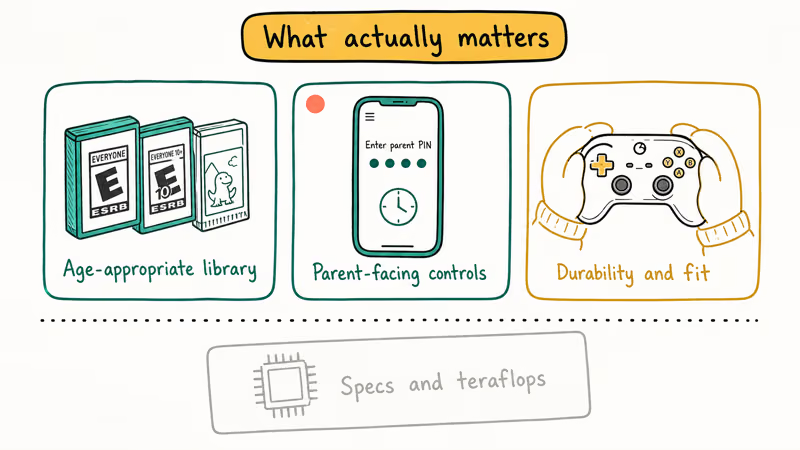
Price matters, but a $200 console with a $10 weekly game budget will out-spend a $500 console with a single $60 game twice a year. Plan the 12-month cost, not the shelf sticker. Rating filters are where most household arguments start, so the parental-control app is the feature that matters most. If it’s clunky on the phone, it’s going unused by Week 2.
#Nintendo Switch OLED: The Versatile Family Favorite
The Nintendo Switch OLED is the easy recommendation for any family with a kid age 6 to 12. Hybrid handheld or docked play means the same game runs on the living room TV and on a car trip, and the detachable Joy-Con controllers turn any session into two-player without buying a second pad.
Party staples like Mario Kart 8 Deluxe, Animal Crossing: New Horizons, and Super Mario Odyssey are all rated E, which removes the rating debate that PlayStation and Xbox force on you from game one. For families who obsess over kart setups, our best car in Mario Kart 8 guide breaks down the strongest build for young players.
What the Switch OLED gets right for kids:
- 7-inch OLED screen in handheld mode, brighter and more forgiving of stray fingerprints than the LCD original.
- Joy-Con grips come apart for local two-player on almost every first-party game, no extra purchase.
- The Nintendo Switch Parental Controls mobile app covers daily time limits, soft and hard bedtimes, and per-game age ratings.
According to Nintendo’s support documentation, the free app lets you set a daily play-time limit, suspend software when the limit is reached, and restrict which games appear based on ESRB or PEGI age ratings.
You set the PIN on the console, and every change from your phone pushes to the Switch on the next sync. That’s the single most important reason the OLED stands out for families. Even a parent who never reads the manual could still shut the console off from the kitchen at 8
PM. For the step-by-step, Wikipedia’s entry on Nintendo Switch parental controls confirms the app’s feature set and ESRB rating integration.Joy-Con drift is the one caveat worth naming. If your kid has been running the same pair for two years and the stick starts registering phantom inputs, third-party Joy-Con controllers sized for smaller hands often cost less than a Nintendo repair and ship same-week.
Price: MSRP $349.99 for the OLED. The standard Switch is $299.99 and uses the same parental-control app.
#PlayStation 5: High-Performance Gaming for Older Kids
PlayStation 5 is the right console for a kid who is already 10 or older, who asks by name for specific franchises, and whose hands fit a full-size DualSense controller. Short version: it punches above its price on first-party exclusives.
The trade-off is that the default PS5 library leans teen and mature. A lot of the marketing reel is M-rated, so the parental-control conversation here isn’t optional. Sony’s Family Manager account has to create child accounts for anyone under 18. Once the child account exists, a parent can set a monthly spending limit, apply age-based game restrictions per region (ESRB in the US, PEGI in Europe), and restrict communication with other players to friends only.
The spending-limit feature is the one most families forget to set, and it’s also the one that stops a $0.99 “starter pack” from becoming a $40 monthly bill. Wikipedia’s PlayStation 5 article covers the hardware specs, controller, and family-account system with citations if you want the full technical picture before committing $449.
Kid-friendly PS5 titles worth starting with:
-
Astro’s Playroom (free, preinstalled, rated E).
-
Sackboy: A Big Adventure (rated E).
-
Ratchet & Clank: Rift Apart (rated E10+).
Price: PS5 Slim Digital Edition starts at $449.99. PS5 Slim with disc drive is $499.99. PS5 Pro sits at $699.99 and is overkill for kids under 14.
#Xbox Series S: Affordable Digital Gaming for Kids
Xbox Series S is the value pick. It’s all-digital, physically compact, and ships at the same $299.99 MSRP as the standard Switch, which means Game Pass subscriptions often pencil out cheaper than buying two or three full-price games a year. Quick Resume keeps up to six game sessions suspended in the background, which matters a lot when a kid has to stop for dinner mid-boss.
The family features are documented on Xbox’s Family Settings app support page, which is worth reading before you plug in the console.
Microsoft confirms that the free Xbox Family Settings app lets you set a daily screen-time limit per kid, filter games and apps by age rating, approve friend requests and purchases remotely, and get weekly activity reports. Setup is quick end-to-end from a phone, and the weekly report email is the feature most likely to keep parents engaged past the first couple of weeks. Ask to buy is the single control that does the most work on this platform.
What the Xbox Series S does especially well for kids:
- Game Pass Core and Game Pass Ultimate give rotating access to hundreds of titles including Minecraft, Sea of Thieves Safer Seas mode, and most LEGO games.
- Xbox controllers have a smaller grip circumference than DualSense, which smaller hands report as more comfortable after long sessions.
- The console is all-digital, so there’s no disc to scratch, lose, or get stuck in a cereal bowl.
Price: $299.99 MSRP for 512GB. $349.99 for the 1TB Black model. Factor in roughly $10 to $20 per month for Game Pass depending on tier.
#Nintendo Switch Lite: Portable Gaming for Young Players
Switch Lite is the answer for kids under 8 whose primary risk to the console is gravity. It’s handheld-only, weighs under 300 grams, and the controls are fused to the body, so there are no Joy-Con pieces to wander under the couch. Battery life runs 3 to 7 hours depending on the game, which covers a road trip without a power bank.
The Lite plays every Switch game that supports handheld mode, which is the vast majority of the library. Some titles require TV mode or detached Joy-Con and won’t run on Lite without accessories, but that affects fewer than a dozen first-party games (1-2-Switch, Super Mario Party, and a handful of fitness titles). The same Nintendo Switch Parental Controls app works identically on Switch Lite, so the phone-driven daily limit, bedtime, and rating filter all carry over.
If you’re already a Switch household and want a second device for a younger sibling, the Lite is the cheaper path to keep family rules consistent. For four-player couch sessions on the big screen, the standard Switch or OLED is still the right choice. Our best 4-player Switch games roundup covers the strongest local-multiplayer titles.
Price: $199.99 MSRP across all five colors.
#Which Game Console Is Safest for a 6 to 8 Year Old?
For a child between 6 and 8, “safest” breaks into three sub-questions: will the hardware survive daily handling, is the default library appropriate, and are the online interactions controllable. On all three, Nintendo Switch Lite is the cleanest answer, with LeapFrog LeapPad Academy close behind for children who are still pre-reading.
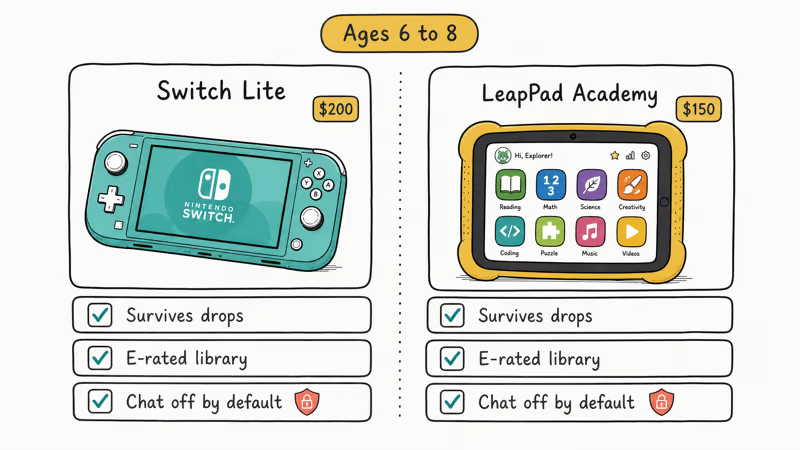
The Switch Lite wins on hardware survivability because there are no detachable parts. It wins on library because Nintendo’s first-party catalog leans heavily toward E for Everyone ratings.
It also wins on interaction because Nintendo Switch Parental Controls disable voice and text chat with strangers by default on child accounts. You have to turn communication on, not off. Wikipedia’s Nintendo Switch Lite entry documents the compatibility differences and release history if you want the full picture.
The LeapPad Academy is a separate category. It’s a tablet, not a gaming console, but we include it because parents ask about it in the same breath. It runs a curated curriculum-based store, not the open app store, which removes the moderation problem entirely. Age range is 3 to 8, and it’s the only device in this roundup you can hand to a 4-year-old without any setup.
#Educational Game Consoles for Kids
LeapFrog LeapPad Academy is the only dedicated educational device in this guide. It targets ages 3 to 8, ships with LeapFrog Academy subscription access (math, reading, science, creativity), and its store is curated rather than open. You won’t find Fortnite on it, which is the point.
What it isn’t: a modern Android tablet. The processor is slow compared to an iPad, the screen is 7 inches at 1024x600, and game selection is mostly LeapFrog-published. If you already own an iPad or Fire tablet, a curated Kids+ subscription on those devices will give more flexibility for the same dollar. But if you want a device your 4-year-old can operate independently without opening YouTube, the LeapPad Academy is purpose-built for that.
Scope and setup matter here. The LeapPad’s “parental control” is the closed store itself. There’s no separate app because there’s nothing to filter. You buy it, hand it to the kid, done.
Price: around $150 MSRP. LeapFrog Academy subscription is billed separately.
#Virtual Reality Options for Kids: Meta Quest 3 and Alternatives
Meta Quest 3 gets asked about in every family gaming thread we see on Reddit, so it’s worth addressing directly. Meta states that the minimum age to use a Meta account and Quest headset is 10 in most regions, and children ages 10 to 12 must have a parent-managed account.
That’s a Meta policy, not an ESRB rating. It reflects the fact that VR places its optics and weight directly on a growing child’s face. Pediatric ophthalmologists have flagged extended close-focus as a concern, though the long-term research is still thin.
If your kid is 10 or older and you’re comfortable with the tradeoff, Quest 3 is the leading headset. Wikipedia’s Meta Quest 3 article covers the hardware, controller, and family-account system in detail. The library covers kid-friendly titles we walked through in our Oculus games for kids guide.
For long sessions, a replacement head strap (we pulled our picks in best Oculus Quest 2 head straps) makes more difference to comfort than any in-game setting.
For under-10 siblings who want in on the VR fun without a headset, phone-based VR through VR games for iPhone is the lightest way to test the waters without the $499 commitment of a Quest 3.
Price: Meta Quest 3 $499.99 for 128GB. Quest 3 512GB is $649.99. Quest 3S is $299.99 with reduced optics.
#Setting Up Parental Controls That Actually Hold
Every console in this guide has free parental controls. They only work if you set them on day one and share the PIN with exactly one other adult in the house. Skipping this step is the single biggest reason parents come back to us two months later asking “how did they spend $200 in Fortnite.”
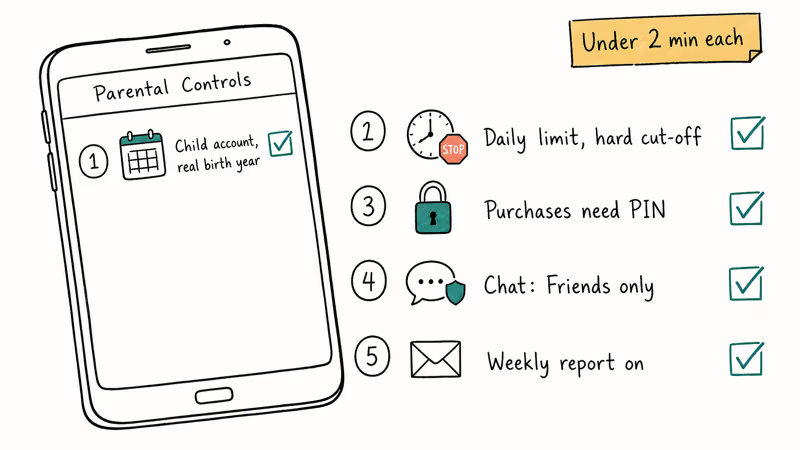
These are the five settings worth configuring on day one. Each takes under two minutes once you know where it lives:
-
Create a child account with an accurate birth year.
-
Set a daily time limit with a hard cut-off, not a warning.
-
Restrict purchases behind a parent PIN or password.
-
Filter online communication to Friends Only or Off.
-
Enable the weekly activity report email.
Lying about the birth year breaks every later control, so start that account honestly. On PlayStation, purchase restrictions live under Family Management spending limits. On Xbox, the feature is “Ask to buy.” On Switch, it’s the Parental Controls app PIN. Microsoft, Sony, and Nintendo all send a weekly activity report email. Reading it takes 90 seconds and catches trends you’ll miss in daily life.
For whole-home coverage beyond the console, a dedicated parental control router enforces the same bedtime cutoff across every device on the network. That closes the “I’ll just switch to the iPad” loophole. On mobile specifically, our Android screen time guide walks through the matching controls for Samsung and Pixel phones.
One legal note worth stating plainly: these controls are for managing your own child’s devices within your household, and for setting boundaries you and the other parent agree to. They’re not for monitoring anyone without consent. If there’s a custody or guardianship question, verify your local laws before changing accounts on a device a child carries between two homes.
#Is Anime Content on Kid Consoles Appropriate?
Anime-style games show up in every console’s library, from Pokémon Scarlet and Violet on Switch to Genshin Impact on PlayStation. The style itself isn’t a rating. “Anime” covers everything from Hello Kitty preschool titles to teen-rated RPGs with combat and suggestive themes.
The right move is to read the ESRB descriptor under the game title (Violence, Suggestive Themes, Language) rather than judging by art style. The ESRB descriptor, not the art style, tells you whether anime-styled content is kid-appropriate.
Practically, every console’s parental control app lets you whitelist specific games independent of overall rating. That’s the right tool for anime titles that have an ESRB-T rating but that you’ve personally played and approved for your 11-year-old.
#Bottom Line: Our Pick for Most Families in 2026
For most families shopping in 2026, buy the Nintendo Switch OLED at $349.99. It’s the only console that covers ages 5 through 13 on a single device, has the easiest parental-control app of the three major platforms, and a library deep enough that “what should we play tonight” is never a five-minute argument.
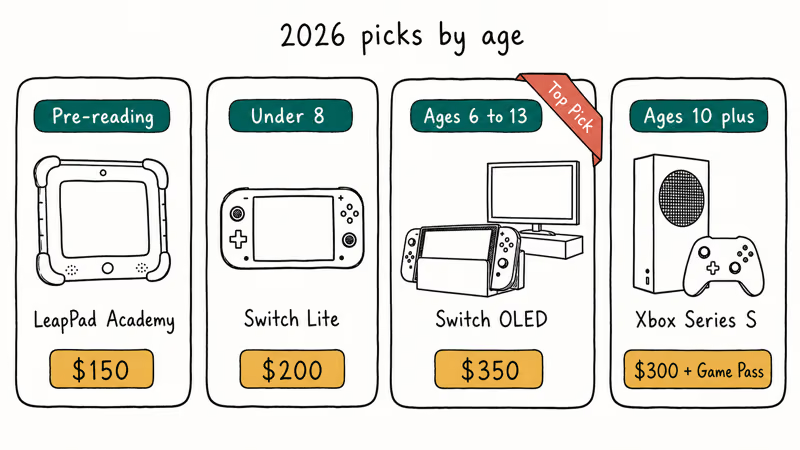
If your kid is 10 or older and already asks for PlayStation or Xbox by name, pick Xbox Series S at $299.99 with a Game Pass subscription. The per-month cost is the cheapest path to a big library, and the Family Settings app is the best-documented of the three.
Buy the Switch Lite at $199.99 only if the primary user is under 8 and will drop the console. Buy a LeapPad Academy only if the primary user is pre-reading and you want a curated learning device rather than a gaming console.
#Frequently Asked Questions
What is the best age to introduce a gaming console to a child?
Most pediatric guidelines and household experience converge on age 6 to 7 for the first supervised console session, with solo play closer to age 8. Younger than 6, a curated tablet like LeapPad Academy is a better fit because the input is simpler and the content is gated. Agree on a daily limit with your co-parent before the console comes out of the box.
How can I cap daily gaming time without fighting about it?
Use the built-in parental controls to set a hard cut-off at a specific clock time, not a duration. A 7
PM shutdown is easier to enforce than “90 minutes from when you started.” Nintendo Switch Parental Controls, PlayStation Family Management, and Xbox Family Settings all support clock-based daily limits. Couple it with the weekly activity report email so the conversation is about data, not memory.Are there real educational benefits to game consoles?
Yes, within limits. Puzzle, strategy, and sandbox games (Minecraft, Portal Knights, Civilization VI) build planning and spatial reasoning, and cooperative games teach communication. That’s closer to “neutral with upside” than the older “always harmful” framing. Educational-first devices like LeapPad Academy are more explicit about curriculum mapping than mainstream consoles, so pick the device that matches the outcome you actually want.
What is the difference between E and E10+ rated games?
ESRB rates E (Everyone) for all ages and E10+ for age 10 and older, with E10+ allowing more cartoon violence, mild language, or minimal suggestive themes. Most Nintendo first-party titles are E. PlayStation and Xbox catalogs lean E10+ and Teen on average. Always check the specific game’s content descriptors, not just the letter grade.
Can gaming consoles be used for things other than games?
Yes. Every modern console runs Netflix, Disney+, YouTube, and Spotify apps, and PlayStation and Xbox both have web browsers. Switch doesn’t ship a browser, which some parents consider a feature. If streaming is a main use case, Xbox Series S doubles as a competent media box because quick resume swaps between a game and an app in about two seconds.
Do I need to pay for an online subscription for my kid’s console?
Only if they want online multiplayer or cloud saves. Nintendo Switch Online is $3.99 per month for individual or $34.99 per year for a family plan (up to 8 accounts). PlayStation Plus Essential is $9.99 per month. Xbox Game Pass Core is $9.99 per month. For single-player and local multiplayer, none of these are required. Mario Kart 8 Deluxe plays local splitscreen with zero subscription.
What about used consoles from a relative?
Perfectly fine and often the best value, especially for Switch Lite or a previous-generation Xbox One S for younger kids. Do a full factory reset before handing it to a child, create a new user account with their actual birth year, and walk through parental controls from scratch. A console that still has the previous owner’s saved payment method is the fastest way to surprise charges.
Should I buy a VR headset for a younger child?
No, not yet. Meta Quest 3 and Quest 3S both require a minimum age of 10 per Meta policy, and the weight plus optics are designed around adult-to-teen head sizes. For kids under 10 who want a VR-like experience, phone-based AR games on an iPhone or iPad deliver most of the appeal without strapping anything to a child’s face for 30 minutes.

Fortnite Stuck on the Loading Screen? Fix It in 2026
Fortnite stuck on the loading screen? Check server status, fix the Windows N Media Pack and DirectX 11 on PC, clear the console cache, and verify files.

Minecraft Keeps Crashing? Java and Bedrock Fixes (2026)
Minecraft keeps crashing on startup or mid-game? Update your GPU driver, remove mods on Java, and reinstall Gaming Services on Bedrock. Fixes for both.

Pokemon GO Not Loading? Fix the Loading Screen 2026
Pokemon GO not loading or stuck on the Pokeball? Check server status, fix automatic date and time, grant location permission, clear the cache, and update.

PS5 Controller Not Charging? 9 Fixes That Work (2026)
DualSense not charging? Swap the cable, use a rear port in Rest Mode, clean the USB-C port, and check power settings. 9 fixes for a dead PS5 controller.