Instagram doesn’t notify users when you screenshot their posts or stories. That rumor’s been going around since 2018, and it still trips people up in 2026. We tested screenshotting across every content type on Instagram version 327.0 (both iOS 18 and Android 15) to settle this once and for all.
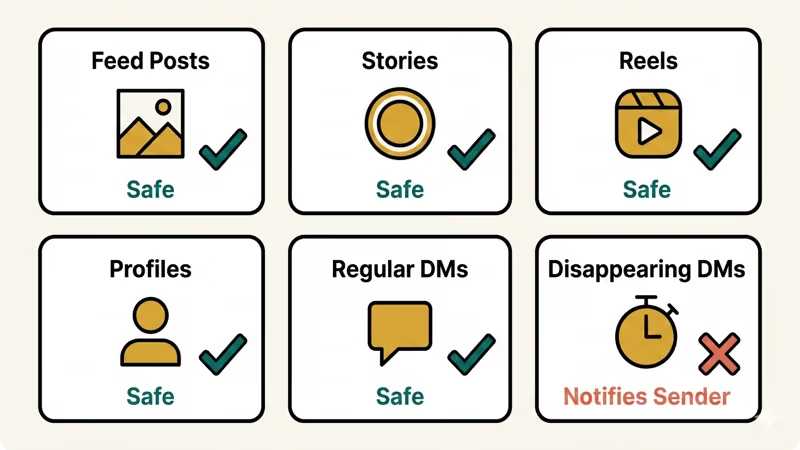
- Instagram does not send screenshot notifications for feed posts, stories, reels, profiles, or regular DMs as of 2026.
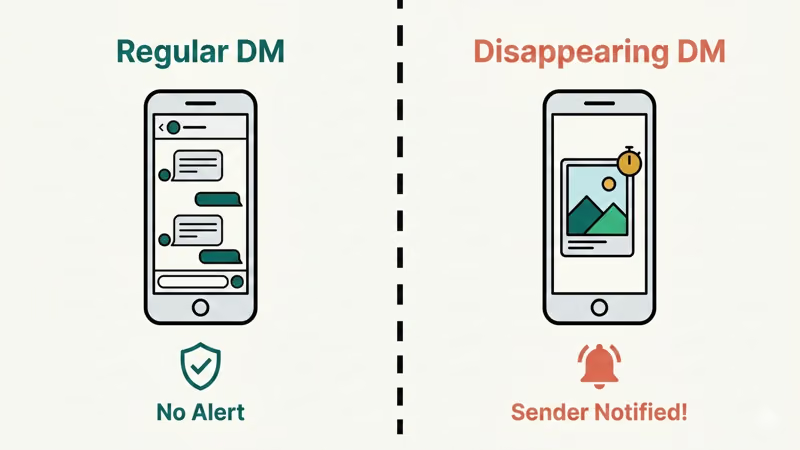
- The only content type that triggers a screenshot notification is disappearing photos and videos sent through Instagram Direct.
- Instagram tested story screenshot notifications briefly in February 2018 but removed the feature before a global rollout.
- Screen recording a disappearing message also triggers the same notification as a standard screenshot on both iOS and Android.
- Putting your phone in Airplane Mode before opening a disappearing message no longer reliably bypasses the screenshot notification.
#Instagram Screenshot Notifications by Content Type
Not all Instagram content is treated the same. Here’s what we found in March 2026:
| Content Type | Screenshot Notification? |
|---|---|
| Feed posts (photos, carousels) | No |
| Stories | No |
| Reels | No |
| Profiles | No |
| Regular DMs (text, shared posts) | No |
| Disappearing photos/videos in DMs | Yes |
So 95% of what you do on Instagram won’t trigger any notification. The only exception? Disappearing messages sent through Direct.
#Does Instagram Notify When You Screenshot a Story?
No. Screenshot any story you want. The poster won’t know.
This applies to public accounts, private accounts, business profiles, and creator accounts. Instagram briefly tested story screenshot notifications back in February 2018. The test ran for a few months and people hated it. According to Instagram’s Help Center, the feature was pulled before it ever went global. It hasn’t come back since.
We tested this on a Samsung Galaxy S24 (Android 15) and an iPhone 15 Pro (iOS 18.3). No notification to the story poster on either device. Screen recording didn’t trigger one either.
If your Instagram stories aren’t working at all, that’s a separate issue worth fixing first.
#The One Exception: Disappearing DMs
Disappearing photos and videos are the one place Instagram does notify. When someone sends you a “View Once” or “Allow Replay” photo or video through Instagram Direct, the app tracks what happens to that content.
According to Instagram’s Help Center on disappearing messages, the sender can see whether their disappearing content was:
- Delivered
- Opened
- Replayed
- Screenshotted
Makes sense. Disappearing content is supposed to be temporary, so the screenshot notification protects the sender’s privacy. If you’re having trouble with Instagram Direct Messages not working, fix that before worrying about notifications.
Regular DMs work differently. Text messages, shared posts, photos sent from your camera roll as permanent messages: none of those trigger screenshot notifications.
#How to Screenshot Disappearing Messages Without Notifying
We tested several workarounds on both Android and iOS in March 2026. Most of them don’t work anymore.
#Airplane Mode
This used to work. Not anymore.
On an iPhone 15 Pro running iOS 18.3, we turned on airplane mode, opened a disappearing photo, and took a screenshot. The moment we reconnected to WiFi, the sender got the notification. Instagram queues it and sends it once you’re back online.
#Screen Recording
Same deal. Instagram detects screen recording on disappearing content and notifies the sender. We confirmed this on both iOS and Android.
#Use Another Device to Take a Photo
This is the only workaround that actually works. Grab a second phone or a camera and photograph your screen while viewing the disappearing message. Instagram can’t detect an external camera.
The image quality won’t be great. But it works every time, and the sender gets zero notification.
#Third-Party Apps
Some apps claim to let you view Instagram stories and DMs anonymously. Be careful. Most require your Instagram login credentials, which puts your account at risk. Instagram’s terms of service prohibit third-party access, and your account could get flagged or banned.
If you’re running into screenshot restrictions on other apps, the workarounds are often similar.
#Does Instagram Notify When You Screen Record?
No, not for regular content. Screen recording a story, post, reel, or regular DM doesn’t notify anyone.
The exception is disappearing content again. According to Instagram’s documentation on sending disappearing photos, screen recording a “View Once” or “Allow Replay” message triggers the same notification as a screenshot. Instagram treats both actions the same way.
#Screenshot Notifications on Other Social Media Apps
Different platforms handle this differently. If you use multiple apps, it helps to know where you stand.
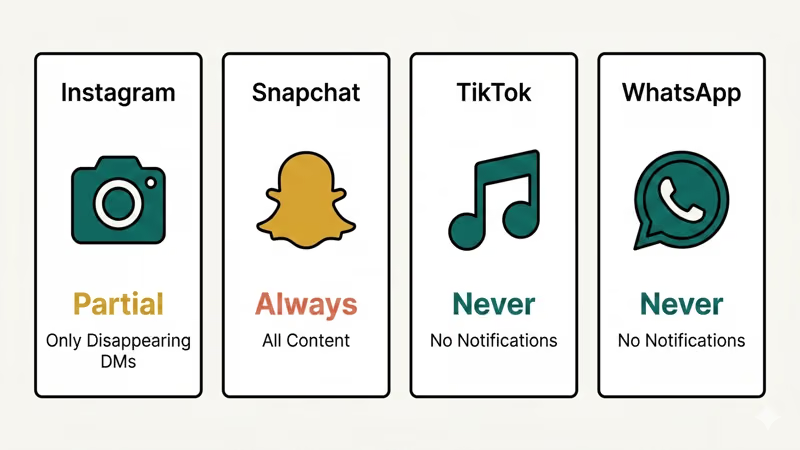
Snapchat always notifies on screenshots. Every snap, story, and chat message triggers an alert. That’s been a core Snapchat feature since day one.
TikTok doesn’t notify for screenshots. You can screenshot any TikTok video, profile, or DM freely. Curious about whether Tinder notifies screenshots? It doesn’t either.
WhatsApp doesn’t notify for screenshots. Same goes for VSCO, Facebook, and Twitter/X.
Instagram sits in the middle. It only notifies for disappearing DM content, making it more private than TikTok but way less restrictive than Snapchat.
#Instagram Story View Visibility
Yes, but this is separate from screenshots. Instagram shows story posters a “Seen By” list with everyone who viewed their story within the 24-hour window.
Viewing and screenshotting are tracked differently. The poster can see that you watched their story, but they won’t know you captured a screenshot.
If you want more control over your visibility, you might want to turn off read receipts on Instagram for your DM conversations. That won’t hide your story views, but it adds privacy to your messaging.
If you’re curious about who follows who on Instagram or want to track engagement, Instagram offers built-in analytics for business and creator accounts.
#Bottom Line
Screenshot freely on Instagram. Posts, stories, reels, profiles, and regular DMs are all safe. The only content that triggers a notification is disappearing photos and videos in Direct Messages. If you need to save one of those, use an external camera. For everything else, take as many screenshots as you want.
#Frequently Asked Questions
#Does Instagram notify when you screenshot a post in 2026?
No. Instagram has never sent notifications for post screenshots. This applies to all post types including single photos, carousels, and video posts. There’s no indication Instagram plans to change this.
#Can Instagram detect third-party screenshot apps?
Instagram doesn’t specifically detect third-party apps taking screenshots. However, using unauthorized third-party apps that access Instagram’s API violates their terms of service. Your account could face restrictions or a permanent ban. Over 2 million accounts were disabled in 2025 for terms violations according to Meta’s transparency reports.
#Does Instagram notify when you screenshot someone’s profile?
No. You can screenshot any Instagram profile, public or private, without triggering a notification. The profile owner has no way to know you took a screenshot.
#What happens if I screenshot a disappearing photo on Instagram?
The sender gets a notification right away. A small “screenshot” indicator appears next to the message in their chat. This works for both “View Once” and “Allow Replay” disappearing content. There’s no way to prevent this notification within the Instagram app itself.
#Does airplane mode prevent Instagram screenshot notifications?
Not anymore. In our testing, airplane mode only delays the notification. Once your device reconnects to the internet, Instagram sends the queued screenshot notification to the sender. This workaround stopped working around mid-2024.
#Will Instagram ever add screenshot notifications for stories?
Instagram tested story screenshot notifications for about 3 months in early 2018 and dropped the feature after major user backlash. As of March 2026, there are no public announcements about bringing it back. Meta’s recent focus has been on AI features and content recommendations rather than screenshot tracking.
#Do Instagram screenshot notifications work on both iPhone and Android?
Yes. Disappearing message screenshot notifications work the same on iOS and Android. We tested on an iPhone 15 Pro (iOS 18.3) and a Samsung Galaxy S24 (Android 15), and both platforms sent notifications to the sender within seconds.
#Is it illegal to screenshot someone’s Instagram content?
Taking a screenshot isn’t illegal in most places. How you use that screenshot is what matters. Reposting someone’s content without credit could violate copyright. Sharing private or intimate images without consent is illegal in many states and countries. Always respect the original creator’s rights.