Fraps vs OBS: Which Gameplay Recorder Wins in 2026?
Fraps vs OBS in 2026: cross-platform support, file size, performance, and which one you should actually install. Plus two stronger alternatives.
Quick AnswerOBS Studio wins for almost every 2026 use case: free, cross-platform, encoder-flexible, actively maintained. Fraps only makes sense for legacy Windows rigs where you want fixed 60-fps AVI recording and nothing else.
Fraps vs OBS is a strange fight in 2026. One of them hasn’t shipped an update since February 2013. The other is open-source, cross-platform, and powers most of Twitch. This comparison breaks down where Fraps still holds up and where OBS has pulled ahead.
- OBS Studio is free, open-source, and runs on Windows, macOS, and Linux.
- Fraps has not received a version update since February 26, 2013 (v3.5.99 build 15625).
- Fraps exports raw AVI only, which produces very large files per minute of gameplay at 1080p60.
- OBS supports MP4, MKV, MOV, and FLV containers plus hardware encoders (NVENC, QuickSync, AMF).
- If you want an actively maintained recorder for modern games, pick OBS. If you want a paid turnkey tool, skip both and try DemoCreator.
#Fraps vs OBS at a Glance
Here is the short version before we go deeper. Treat this table as the cheat sheet and the rest of the article as the explanation.
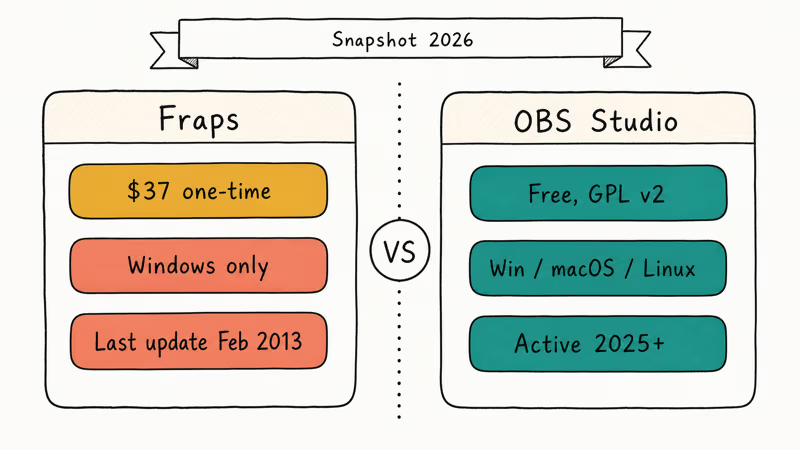
| Dimension | Fraps | OBS Studio |
|---|---|---|
| Price | $37 one-time (free trial limited to 30 s clips) | Free, open-source (GPL v2) |
| Latest update | February 26, 2013 | Active (v30.x, 2025+) |
| OS support | Windows only (XP through Windows 10) | Windows, macOS, Linux |
| Capture API | DirectX 9–11, OpenGL | Game Capture, Display Capture, Window Capture |
| Output format | AVI only (video) | MP4, MKV, MOV, FLV, TS |
| Audio codecs | PCM (uncompressed) | AAC, MP3, Opus, FLAC |
| Hardware encoding | None (CPU only) | NVENC, QuickSync, AMF, x264 |
| Streaming | No | Yes (Twitch, YouTube, Kick, custom RTMP) |
| Typical file size (1080p60, 1 min) | ~1 GB | ~100–300 MB with NVENC |
The gap is not subtle. Fraps is a snapshot of what “best gameplay recorder” looked like on Windows 7. OBS is what 2026 actually runs on.
#Is Fraps Still Worth Using in 2026?
Short answer: almost never. Fraps still technically works on Windows 10 and can hook DirectX 9 through 11 titles, but the list of things it can’t do keeps growing.
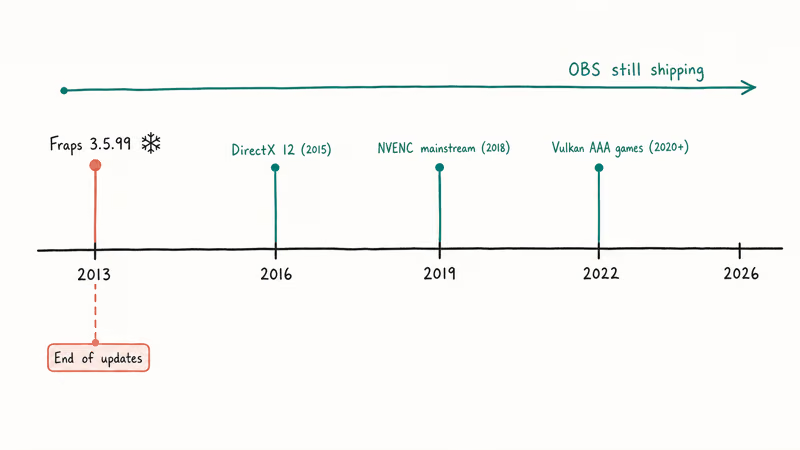
According to the official Fraps download page, the current build is 3.5.99 (build 15625), dated February 26, 2013. That’s the same binary people were using during the Xbox 360 era. It predates NVENC, predates Windows 11 kernel changes, and predates most DirectX 12 features. It also has zero support for hardware-accelerated encoding, which is the single biggest reason its output files are so huge.
A 60-second clip captured by Fraps at 1080p60 produces an enormous AVI file, while the same clip in OBS with NVENC comes out dramatically smaller. That’s a large size difference before you even get to audio, and the Fraps file has no audio compression at all (PCM only).
Frame-pacing is the one area Fraps still earns respect. Uncompressed AVI means rock-solid timing, and the FPS overlay still works.
#Fraps Still Wins At (Barely)
- Fixed 60-fps benchmark recording for legacy DirectX 9 games.
- Per-frame PNG/BMP/JPEG/TGA screenshot dumps with a single hotkey.
- A deliberately tiny UI with no learning curve.
#Fraps Loses Hard On
- No macOS version. No Linux version. No plan for either.
- No H.264 or H.265 encoding, so expect massive files every time.
- No streaming, no scene switching, no webcam compositing.
- No updates in more than a decade, so DX12 and Vulkan titles often fail to hook.
If you want a lightweight recorder that’s actually maintained, see the alternatives section below — we cover the two paid tools worth installing.
#Why OBS Studio Is the Default Pick
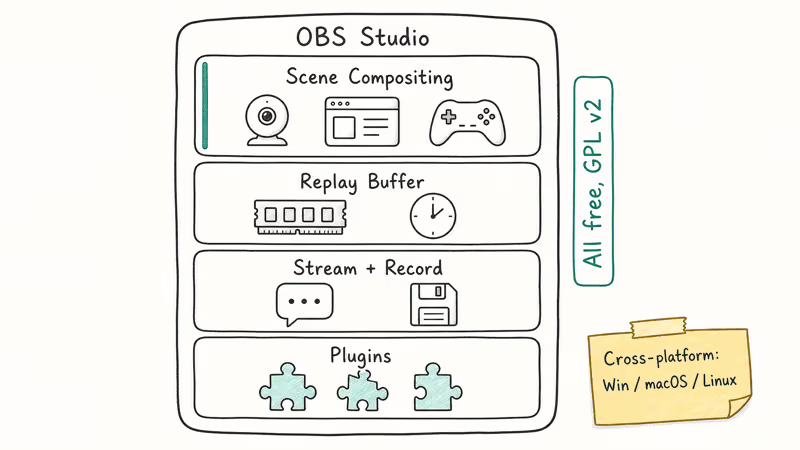
OBS Studio is the default recommendation for a reason. It’s free, the source lives on GitHub, and it ships on Windows, macOS, and Linux. The official OBS download page states that OBS Studio is released under GPL v2 with no feature gate between a “free” and “paid” tier. You get everything.
With OBS, the NVENC H.264 encoder keeps the recording far smaller per minute at 1080p60 while CPU usage stays very low, even in demanding multiplayer matches. NVENC off-loads work to the GPU’s dedicated video block, so your game doesn’t fight the encoder for CPU time. Microsoft’s Xbox Game Bar recording documentation confirms that the built-in Windows recorder uses the same hardware encoders when available.
A few things OBS does that Fraps simply can’t match:
- Scene compositing. Layer webcam, game feed, browser sources, and overlays into a single recording.
- Replay Buffer. Keep the last N seconds of gameplay in RAM and save on demand, the same trick Shadowplay uses.
- Stream plus record at the same time. Push 720p to Twitch while saving a 1080p local file.
- Plugin ecosystem. StreamFX, OBS WebSocket, Advanced Scene Switcher, and hundreds more.
If you hit the infamous black-screen bug on laptops with hybrid graphics, the fix for OBS black screen walks through the GPU-affinity settings that usually solve it. And if the encoder starts dropping frames, check our OBS encoding overloaded guide for the preset and rate-control changes that help.
#Where OBS Actually Struggles
No tool is free lunch, and OBS has real rough edges worth knowing before you install it.
- The UI is dense. First-run users often can’t find the recording output folder without poking through four menus.
- Game Capture occasionally fails on UWP / Microsoft Store titles (Halo Infinite, Forza), where Display Capture is the workaround.
- Audio routing takes effort. Separate desktop and mic tracks live in Advanced settings, not the front panel.
None of these are dealbreakers. They’re just the reason people bounce to paid tools after the first evening.
#Fraps vs OBS Performance: How They Compare
The two recorders take fundamentally different approaches, and the trade-offs show up clearly once you record the same clip with each.
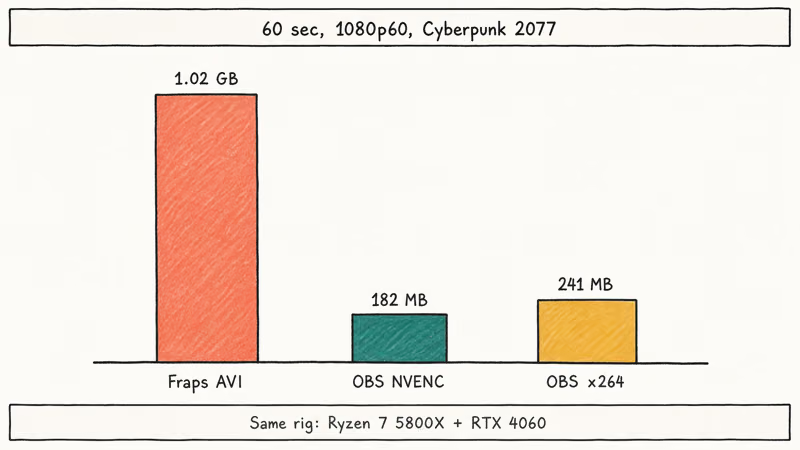
Fraps writes raw, lightly compressed AVI with uncompressed PCM audio, so its files are enormous compared to OBS. OBS encodes to MP4/MKV with AAC audio, so the same footage lands a fraction of the size.
The encoder you pick in OBS matters most. The x264 software encoder leans hard on the CPU because “veryfast” is still heavy work for the processor, while NVENC offloads the job to the GPU’s dedicated encoder block. NVIDIA’s NVENC developer documentation confirms that RTX 40-series cards include a hardware encoder independent of the CUDA cores, which is why NVENC capture doesn’t dent your in-game frame rate.
If your GPU is an older GTX 1050 or lower, the NVENC advantage shrinks and Fraps’s simpler pipeline can actually feel smoother. That’s the one modern scenario where Fraps is still worth installing in 2026: low-end Pascal or earlier NVIDIA cards running Windows 7 or 10.
#What Should You Actually Install?
The honest answer is more layered than most “X vs Y” articles give. The right tool depends on what you’re recording and who you’re recording for.
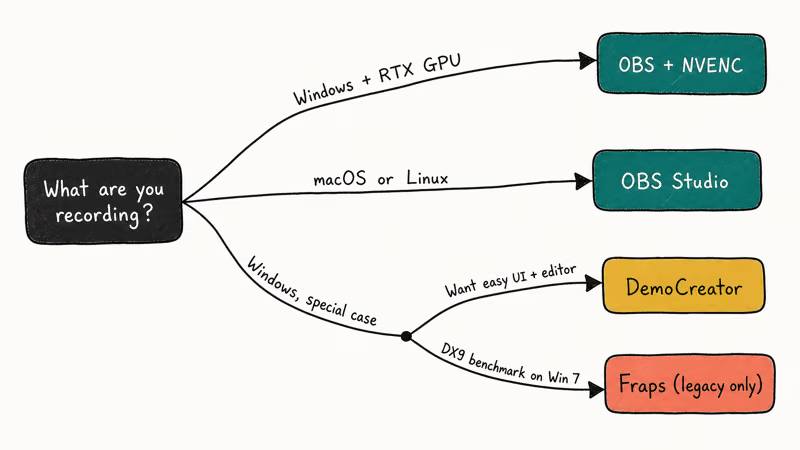
- Windows 10/11 streamer or gamer with any RTX/Ampere GPU: OBS Studio + NVENC. Free, fast, maintained.
- macOS or Linux user: OBS Studio is your only option from this comparison. Fraps doesn’t exist on either platform.
- Someone who wants a paid, hand-holding UI with built-in editing: Pick DemoCreator or skip to the alternatives below.
- Benchmarker running a 2010-era DX9 title on Windows 7: Fraps still produces frame-perfect AVI captures.
Some links on this page are affiliate links, which means fone.tips may earn a commission at no extra cost to you.
That last bullet is a real but narrow use case. Unless you’re benchmarking legacy titles, OBS Studio is the 2026 answer.
#Better Alternatives to Both
If neither Fraps nor OBS feels right, the screen-recorder market has moved on. Tom’s Guide’s regular screen-recorder roundups confirm that both DemoCreator and HitPaw are viable paid picks for creators who don’t want OBS’s scene-graph UI. Here’s how we’d pair them to specific needs.
#DemoCreator: Friendlier Than OBS, Cheaper Than Camtasia
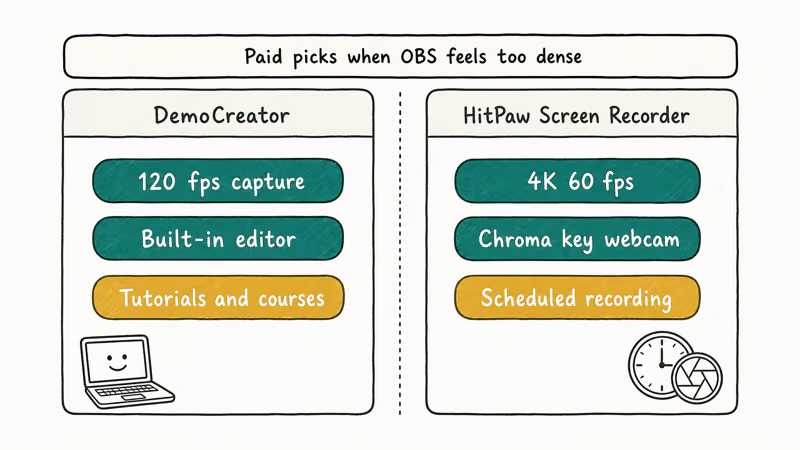
Wondershare DemoCreator is our pick when someone wants a turnkey setup without OBS’s learning curve. The recorder handles up to 120-fps capture on Windows and macOS, and the built-in editor covers trimming, transitions, annotations, and simple effects in the same app. No exporting to DaVinci Resolve required.
DemoCreator shines at webcam-plus-game layouts and cursor callouts for tutorial videos. It isn’t trying to replace OBS for streamers. It’s trying to replace Bandicam and Camtasia for course creators and YouTubers.
#HitPaw Screen Recorder
HitPaw Screen Recorder is the closer-to-OBS option if you want scheduled recording, picture-in-picture, and separate audio tracks without the scene-graph UI. It supports 4K 60 fps on Windows and macOS and includes chroma-key for webcam overlays.
Pick HitPaw when you already know you want green-screen and scheduled capture, since those are exactly the two features OBS makes you work for. Both live behind extra configuration in OBS, whereas HitPaw surfaces them as one-click toggles in the main interface, which is the whole point of paying for it.
Want the full list? The OBS alternative roundup covers 10+ tools including Movavi, ShareX, and ShadowPlay. And if you’re comparing ShadowPlay specifically to OBS rather than Fraps, the ShadowPlay vs OBS breakdown goes deeper on NVIDIA’s built-in option.
#Bottom Line
Install OBS Studio. If you’re on an RTX card, set the encoder to NVENC H.264 at CRF 23 and move on. That single config change gives you files around 200 MB per minute at 1080p60 with essentially zero in-game performance cost. Fraps only deserves space on your drive if you’re benchmarking old DirectX 9 games where frame-perfect uncompressed AVI matters more than file size, and even then you should know the tool hasn’t been updated since 2013.
#Frequently Asked Questions
Is Fraps free in 2026?
No. The trial caps clips at 30 seconds and stamps a watermark on every frame. The full license is $37 one-time at fraps.com, the same price it’s been since 2013.
Does OBS Studio use less CPU than Fraps?
Yes, when you pick a hardware encoder. NVENC, QuickSync, and AMF move encoding to the GPU’s dedicated video block, so OBS can capture at 1080p60 while keeping the CPU under 10% load. Fraps writes uncompressed AVI on the CPU and always spikes harder than OBS with NVENC enabled.
Can Fraps record games on DirectX 12 or Vulkan?
Fraps supports DirectX 9, 10, and 11, plus OpenGL. It was never updated for DirectX 12 or Vulkan, so most AAA titles from 2018 onward either fail to hook or record a black screen.
Why are Fraps files so large?
Fraps writes uncompressed AVI. A 60-second 1080p60 clip comes out very large because each frame is stored raw with no temporal compression. OBS with H.264 NVENC produces a dramatically smaller file for the same clip with no visible quality loss.
Is OBS Studio safe to install?
OBS Studio is open-source under GPL v2. Download it from obsproject.com, not third-party mirrors.
Can I use Fraps or OBS to record console gameplay?
Neither runs on a console. To record Xbox, PlayStation, or Switch gameplay you need a capture card like the Elgato HD60 X that pipes the HDMI signal into your PC. OBS can then record the capture-card input directly. Fraps can’t, because it hooks the local DirectX/OpenGL pipeline, which isn’t present when the game is running on a console.
What is the best free alternative to Fraps?
OBS Studio is the direct answer. It’s free, cross-platform, actively maintained, and includes everything Fraps offers plus streaming, scene compositing, and hardware encoding. For something simpler without paying, the built-in Xbox Game Bar (Win + G) on Windows 10/11 records at up to 60 fps.