Your voicemail is locked and you don’t remember the PIN. It happens. The good news: most people get back in within 5 minutes without calling anyone.
Start with your phone’s built-in settings. If the option is grayed out or missing, move straight to your carrier’s reset method. The carrier methods work even if you’ve never set a password or if you’re locked out after too many wrong attempts.
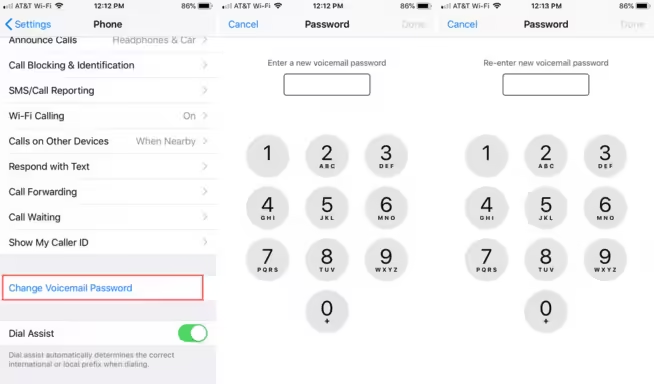
- iPhone users can reset their voicemail PIN in Settings > Phone > Change Voicemail Password without knowing the old password.
- T-Mobile users can reset instantly by dialing #793# from their phone, which resets the PIN to the last 4 digits of the phone number.
- If the “Change Voicemail Password” option is missing on iPhone, turning off Wi-Fi Calling in Settings > Phone restores it.
- Most carriers default the voicemail PIN to the last 4 or last 7 digits of your phone number if you never set a custom one.
- Resetting your voicemail password does not delete saved messages; the PIN only controls access, not storage.
#Reset Voicemail Password on iPhone
This is the fastest path. It works on iOS 16 and later, and it does not require you to know the old password.
#Through iPhone Settings
- Open Settings
- Tap Apps (iOS 18) or scroll down to Phone (iOS 17 and earlier)
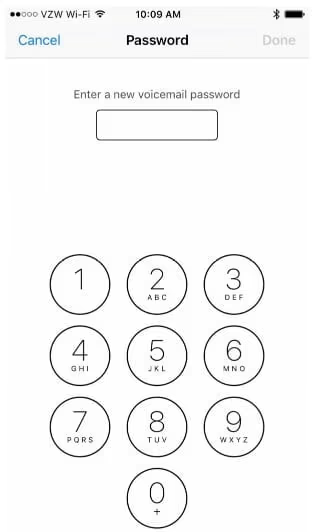
- Tap Phone then tap Change Voicemail Password
- Enter a new 4–10 digit PIN and confirm it
That’s it. No verification of the old PIN. Apple’s support page confirms this option is carrier-dependent, so if you don’t see it, your carrier controls voicemail and you’ll need to use their reset method below.
One thing worth knowing: this option disappears when Wi-Fi Calling is active. Turn off Wi-Fi Calling (Settings > Phone > Wi-Fi Calling) and the menu item comes back.
#Set Up Visual Voicemail from Scratch
If you’re on AT&T or Verizon and use Visual Voicemail, the iPhone’s Phone app has a direct reset path:
- Open the Phone app and tap the Voicemail tab
- If you see Set Up Now, tap it and create a new PIN
- If you’re already set up but locked out, tap Greeting at the top. This sometimes prompts for a new PIN
If your iPhone goes straight to voicemail regardless of what you do, sort that call-forwarding issue first before tackling the PIN.
#Reset Voicemail Password on Android
Android doesn’t have a universal path. It depends on your phone maker and carrier. Samsung, Pixel, and OnePlus all put this in slightly different spots.
#Google Pixel and Stock Android
- Open the Phone app
- Tap the three-dot menu (top right) > Settings
- Tap Voicemail > Advanced Settings > Setup
- This dials your voicemail. Follow the audio prompts to change the PIN
#Samsung Galaxy
- Open the Phone app
- Tap the three-dot menu > Settings > Voicemail
- Select Change PIN or Manage Voicemail
- Enter the new PIN twice to confirm
If the PIN change option is missing entirely, your carrier has locked that setting. Jump to the carrier section below.
Having trouble with Visual Voicemail being unavailable on Android? That’s a separate issue from the password, but fixing it first will make PIN changes easier.
#AT&T: Reset Voicemail Password
AT&T gives you three ways to reset. The website method is usually fastest.

#Option 1: att.com Account Page (Recommended)
- Go to att.com/myatt and sign in
- Navigate to My Devices & add-ons
- Select your device and tap Manage my device
- Under Device options & settings, tap Reset voicemail password
- Follow the prompts. Your new temporary password is usually the last 7 digits of your phone number
#Option 2: Call 611
Dial 611 from your AT&T phone (free call). Say “reset voicemail password” and follow the automated system. You’ll verify your account with your billing zip code or last 4 digits of your SSN.
#Option 3: AT&T PREPAID
If you’re on AT&T PREPAID, the website path above won’t work. Call 1-800-901-9878 (that’s the prepaid customer line). You can also reach carrier support by dialing 611 from your mobile, which routes to AT&T’s automated system for free.
#Verizon: Reset Voicemail Password
Verizon has a dedicated support page for locked voicemail accounts, which is more useful than the generic reset flow.

#Option 1: My Verizon App
- Open the My Verizon app and sign in
- Tap Account > Account settings
- Tap Manage voicemail password (or Security & privacy > Voicemail password)
- Set a new 4–7 digit PIN
#Option 2: My Verizon Website
The Verizon support page for voicemail password reset walks through the same steps online. Useful if you don’t have the app.
#Option 3: Dial *611
Call *611 (free from your Verizon phone) and say “reset voicemail.” The automated system can do the reset without waiting for a human.
Verizon voicemail passwords are 4–7 digits. If you’re locked out after too many wrong tries, Verizon’s locked-out page walks through the unlock process, which requires account verification.
For other Verizon voicemail not working issues beyond just the password, that guide covers signal, app, and setup problems.
#T-Mobile: Reset Voicemail Password
T-Mobile has the easiest reset of any major carrier. One code, done.
#Dial #793#
From your T-Mobile phone, open the dialer, type #793# and hit call. Your voicemail PIN resets immediately to the last 4 digits of your phone number. Then call your voicemail (*86) and change it to something you’ll remember.
That’s the whole method. No app, no website, no hold music.
If you’re on a T-Mobile MVNO like Metro by T-Mobile, this code doesn’t always work. Call 1-888-863-8768 (Metro customer service) instead.
#Smaller Carriers
Sprint merged into T-Mobile in 2020. If you’re still on a legacy Sprint number, you’re now on T-Mobile’s network. The #793# code works.
For other carriers:
- Cricket Wireless: Call 611 or go to cricketwireless.com, sign in, and look under My Account > My Phone > Voicemail Password Reset
- Consumer Cellular: Call 1-888-345-5509. They’ll reset it after verifying your account
- Tracfone/Straight Talk: Call 1-800-867-7183
#What If Your Phone Has No Voicemail Password Option?
Some phones and carriers have removed traditional voicemail in favor of visual voicemail or third-party apps like YouMail or Google Voice. This is especially common if you recently switched carriers or unlocked your phone to move to a new network. If you use one of those:
- YouMail: Reset password at youmail.com/forgot-password
- Google Voice: Reset via your Google Account at myaccount.google.com
- Carrier visual voicemail apps (AT&T ActiveArmor, Verizon Visual Voicemail): Password is your Google/Apple account, not a voicemail PIN
If your iPhone won’t ring and calls are going straight to voicemail without ringing, that’s a different problem entirely. Check call forwarding settings first.
#Bottom Line
Start with your phone’s settings. On iPhone it’s Settings > Phone > Change Voicemail Password. On Android it’s the Phone app’s settings menu. If that option is missing or grayed out, go straight to your carrier: T-Mobile’s #793# takes 10 seconds, AT&T’s website takes 2 minutes, and Verizon’s My Verizon app is equally fast. You’ll need to verify your identity with your account info in all three cases.
#Frequently Asked Questions
#Can I reset my voicemail password without calling my carrier?
Yes — for most people. iPhone users can reset directly in Settings > Phone > Change Voicemail Password with no old password needed. T-Mobile users can dial #793# in seconds. AT&T and Verizon both offer website resets through their account portals. You only need to call customer service if those options fail or if your account is locked after too many wrong attempts.
#What is the default voicemail password if I never set one?
Most carriers set it to the last 4 digits of your phone number. Some use the last 7 digits (AT&T sometimes does this). Try both before calling in. If neither works, your carrier may have prompted you to set a custom PIN when you activated the line.
#How many wrong attempts before voicemail locks?
Verizon locks after 3–5 wrong attempts and requires identity verification to unlock. AT&T and T-Mobile are more lenient (typically 10 attempts), but the threshold isn’t published. If you’re already locked, use the carrier’s locked-out reset flow rather than guessing again.
#Does resetting the voicemail password delete saved messages?
No. Your saved voicemail messages stay intact through a password reset. The PIN only controls access; it’s not tied to your message storage. The only way to lose voicemail messages is if you delete them manually, the mailbox expires from inactivity, or you cancel service.
#The “Change Voicemail Password” option is missing on my iPhone. Why?
Two common reasons: Wi-Fi Calling is turned on (disable it in Settings > Phone > Wi-Fi Calling and the option reappears), or your carrier has disabled in-device password management. If turning off Wi-Fi Calling doesn’t fix it, your carrier controls the PIN and you’ll need to reset through their app or website.
#Can I access voicemail without any password?
Some carriers let you skip the PIN when calling from your own number. They recognize your caller ID and skip authentication. Try calling your voicemail from your own phone without entering anything. This “mailbox bypass” feature is on by default for some carriers but not all. If it’s off, you’ll always need a PIN.
#My voicemail says the mailbox is full, not that my password is wrong. Is this related?
No. These are separate issues. A full mailbox just means you’ve hit your storage limit and need to delete old messages. You can still log in with your PIN to clear space. If you also forgot your PIN, reset it using the methods above, then delete old messages to free up space.