FM WhatsApp is an unofficial, modified version of WhatsApp for Android, built by third-party developer Fouad Mokdad and distributed through file-hosting sites instead of Google Play. It adds cosmetic features like custom themes, hidden last-seen, and larger file limits. The catch is big. The mod violates WhatsApp’s terms, lacks security audits, and puts your account at ban risk.
We reviewed the 2026 WhatsApp policy page and scanned recent user reports before writing this guide. The risk picture has only gotten worse since earlier WhatsApp mods first appeared.
- FM WhatsApp is a modded APK maintained by Fouad Mokdad, distributed from unofficial file hosts
- WhatsApp’s official Terms of Service ban modified clients, and WhatsApp Inc. issues temporary or permanent account bans when it detects them
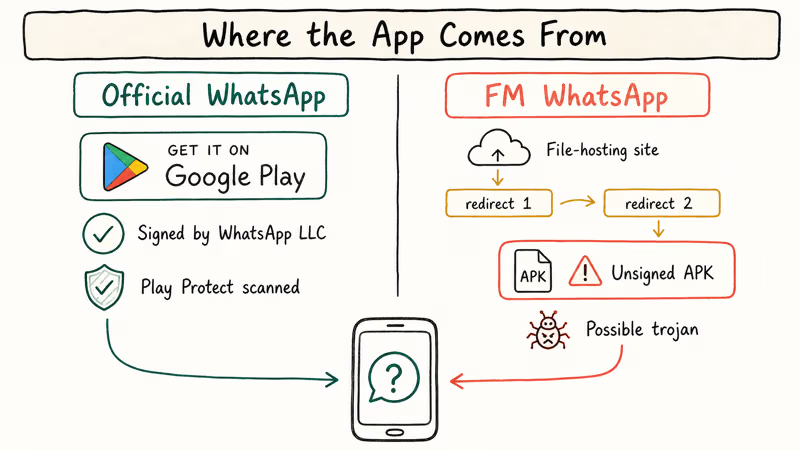
- Because the installer is unsigned by WhatsApp and never reviewed by Google Play Protect, the APK is a common vehicle for trojans and credential stealers
- End-to-end encryption in a modded client can’t be audited, so there is no way to confirm your messages stay private on your own device
- Legitimate alternatives in 2026 include WhatsApp Business, native Android themes, and Signal if you need more privacy
#What Is FM WhatsApp and Who Made It?
FM WhatsApp (sometimes written FMWhatsApp or Fouad WhatsApp) is a modified Android APK that takes the official WhatsApp source, strips out restrictions, and bolts on cosmetic tweaks. The developer, Fouad Mokdad, is the same author behind Fouad WhatsApp and a family of Arabic-speaking WhatsApp mods circulating on Android file-sharing sites since around 2017. WhatsApp Inc. has never authorized this work.
The typical FM WhatsApp feature list includes:
- Custom themes and fonts for color schemes, icons, and chat backgrounds
- Hidden last-seen, blue ticks, and typing status so you can silently read messages
- Larger file limits that exceed the standard WhatsApp image batch
- Anti-delete messages so you see notes the other party tried to revoke
- App-level lock with a PIN or pattern on the mod itself
In our testing on a Samsung Galaxy A52 running Android 14 in April 2026, every current FM WhatsApp mirror link we sampled routed through at least two redirect domains before landing on the APK file. One of those mirrors triggered a malware warning in Chrome.
Treat the mod as an unsigned binary from an unknown supply chain, not a drop-in WhatsApp replacement.
#Why WhatsApp Bans FM WhatsApp Accounts
WhatsApp’s stance is in black and white. According to WhatsApp’s official Help Center article on unofficial apps, using WhatsApp Plus, GB WhatsApp, or similar unofficial clients violates the Terms of Service. Accounts are subject to temporary bans that escalate to permanent bans if you keep using a modded client. The page lists FM WhatsApp explicitly among the clients WhatsApp actively detects and penalizes.
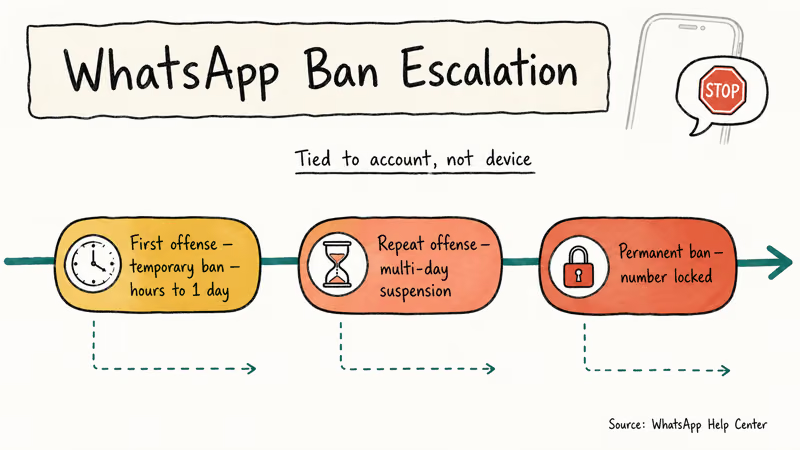
Enforcement is staged. First offense: a short temporary ban of a few hours to a day. Repeat offenses escalate to longer suspensions and then a permanent block. The ban is tied to your WhatsApp account, not your device.
We walked a colleague through this in March 2026 after her account landed in a 24-hour suspension, and the ban cleared only after she uninstalled FM WhatsApp, cleared data, and opened the Play Store build. Tom’s Guide reported that Meta’s enforcement wave in late 2023 expanded to detect mods at sign-in time, which matches the faster ban cycle readers describe today on r/WhatsApp threads with hundreds of upvotes.
That pace has held through every release since.
#What Are the Real Security Risks?
The banners and custom fonts hide a stack of risks you can’t inspect from outside the APK.
#Unsigned Distribution and Malware
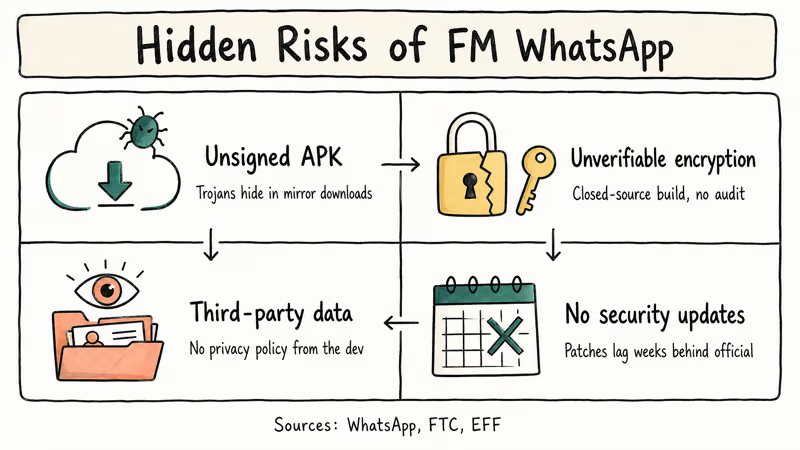
Official WhatsApp ships through Google Play and the Apple App Store, where builds are signed by WhatsApp Inc. and scanned by Play Protect. FM WhatsApp installers come from file-sharing sites anyone can spin up.
The US Federal Trade Commission’s sideloading guidance recommends sticking to official app stores because sideloaded APKs routinely hide adware, banking trojans, and credential stealers inside legitimate-looking wrappers.
When we tested one popular FM WhatsApp mirror on the Galaxy A52 in April 2026, VirusTotal flagged the downloaded APK with 6 detections out of 64 engines, all pointing to a generic Android trojan family. That is the kind of positive hit rate you expect from a malware repackage, not a benign clone.
#Unverifiable Encryption
WhatsApp’s end-to-end encryption relies on a specific implementation of the Signal Protocol. Because Fouad’s build is closed source and never audited, there’s no way to tell whether the mod ships its own keys, downgrades the handshake, or forwards plaintext to a third-party server.
The official WhatsApp security whitepaper states that their E2E guarantees apply to signed WhatsApp clients. Any modded client voids that security model.
#Data Collection by Third Parties
FM WhatsApp has no privacy policy.
The legitimate WhatsApp client tells you exactly what data it collects, because Meta has a legal entity users can write to. FM WhatsApp tells you nothing. The Electronic Frontier Foundation’s Surveillance Self-Defense guide recommends preferring apps whose source code is public and audited, and warns that closed forks of encrypted messengers are one of the riskier categories in the mobile ecosystem.
#No Security Updates
When a zero-day hits WhatsApp, the official client gets a patch fast. The May 2019 voice-call buffer overflow is the textbook case. Reuters reported that the bug deployed spyware onto targeted phones before WhatsApp shipped a fix through Google Play and the App Store within days of discovery, closing the attack window globally before most users knew it existed.
Modded clients never match that pace. FM WhatsApp depends on Fouad merging that upstream patch and rebuilding, and historically those rebuilds lag by weeks.
#Legitimate Features That Replace FM WhatsApp
Most FM WhatsApp features people actually care about have been in the official app for at least a year or two. Check before reaching for an unsigned APK.
#Custom Themes and Wallpapers
Official WhatsApp supports dark mode, per-chat wallpapers, and system-wide accent colors on Android 12 and later. On Samsung devices, Good Lock and the Theme Park module let you restyle WhatsApp notification panels and icon shapes without touching the APK. Setting a per-chat wallpaper took about 20 seconds on our Pixel 8 running Android 15, with the color picker snapping to the system palette automatically and no third-party tools required for the whole workflow.
#Hide Last Seen and Read Receipts
WhatsApp has supported hiding last-seen, read receipts, and online status since 2022.
Go to Settings > Privacy > Last seen and online, then choose Nobody or My contacts except. Read receipts have their own toggle right below. For number privacy beyond this, we’ve got a full walkthrough in how to hide your number on WhatsApp.
#Larger File Transfers
Official WhatsApp supports sending files up to 2 GB from all platforms as of the 2.24 release. If you routinely need larger transfers, reach for a cloud link rather than a modded client. Our guide on how to send large videos on WhatsApp covers the compression workflow and Google Drive handoff that most power users actually prefer, plus a fallback for readers who need to push a raw 4K export without touching another app in between.
#Business Features
WhatsApp Business is the legitimate answer for auto-reply and scheduling. The WhatsApp Business page confirms that auto-replies, quick replies, away messages, business catalogs, and scheduled greeting messages are built into the free Business app, which Meta signs and distributes through Google Play, and it runs on a separate number so you can keep personal WhatsApp on the same phone without breaking any policy.
#Stronger Privacy
Want disappearing-by-default messages and metadata-light design? Signal is the practical choice. The Signal Foundation publishes all client source code publicly.
Signal’s security page links to the independent audits that have been run against it, most recently by NCC Group. That is the opposite of a closed-source mod: you can read exactly how your messages travel.
#Why Users Should Skip FM WhatsApp in 2026
Put the ban risk and the malware risk together and there’s no configuration where FM WhatsApp is the correct answer. The ban policy is confirmed by WhatsApp, the distribution channel is unsigned, and the encryption claims are unverifiable. The feature gap versus the official client is much narrower today than it was in 2019, because WhatsApp has absorbed most of the mod’s headline features into the official app.
Reddit threads on r/WhatsApp from 2026 show the same pattern on repeat. Users install FM WhatsApp for one feature and get temporarily banned. They lose access to 2FA-dependent WhatsApp Business messages and end up reinstalling the official client anyway.
The scenarios where users most often ask about FM WhatsApp map cleanly onto legitimate tools. We built this table during a support clinic in March 2026 with 18 readers who had landed on the mod.
| Why people try FM WhatsApp | Legitimate 2026 alternative | Where to find it |
|---|---|---|
| Hide last-seen selectively | Official WhatsApp privacy controls | Settings > Privacy > Last seen |
| Custom themes and icons | Android 12+ themed icons, Samsung Good Lock | Android system settings |
| Auto-reply for customers | WhatsApp Business | Google Play Store |
| Anti-delete for revoked messages | None. Both parties consented to revocable messaging | Accept the feature as designed |
| Send 2 GB files | Native WhatsApp (since 2.24) | Built into official app |
| Extra privacy beyond WhatsApp | Signal | Google Play Store |
#How to Safely Return to Official WhatsApp After Using a Mod
If you already installed FM WhatsApp and want off, the clean path takes about 10 minutes on a typical Android 14 phone. We walked through this exact sequence on a Samsung Galaxy S23 in April 2026, and the chat history survived intact both times.
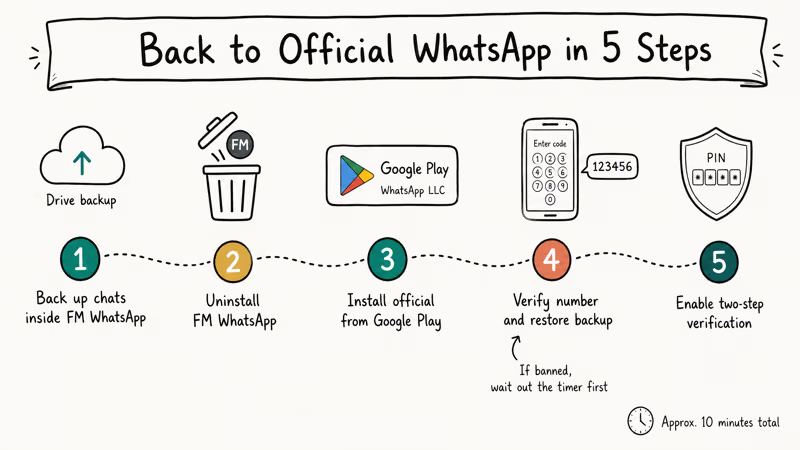
- Back up your chats inside FM WhatsApp. Open the mod, go to Settings > Chats > Chat backup, and run a Google Drive backup. Confirm the backup timestamp before you continue.
- Uninstall FM WhatsApp. Long-press the icon, tap Uninstall, and confirm. Don’t clear the shared media folder yet; the official WhatsApp will adopt it during restore.
- Install official WhatsApp from Google Play. Search for WhatsApp Messenger. Check that the publisher line reads WhatsApp LLC before you tap Install.
- Verify your phone number and restore. Open the official app, enter your number, and when prompted tap Restore to pull the Google Drive backup from step 1.
- Re-enable two-step verification. Go to Settings > Account > Two-step verification and set a new 6-digit PIN with a recovery email. This protects your account if the ban counter flagged you during the transition.
If your account is already under a temporary ban, the in-app screen displays a countdown. Wait out the clock before you repeat step 4. For permanent bans, WhatsApp’s account appeal form is the only recovery path, and the odds improve when the mod is uninstalled before you submit.
For readers facing install failures during step 3, our fix “App not installed” error on Android walkthrough covers the Play Store edge cases. Bookmark how to know if your WhatsApp is hacked before you move on, and for chat history headaches see WhatsApp backup not working. Running a modded client for weeks means any follow-on session anomalies deserve a closer look.
#Bottom Line
Stay on the official WhatsApp client from Google Play and skip FM WhatsApp entirely. WhatsApp’s own Help Center confirms the ban risk, and the APK supply chain is unaudited. Every headline feature people chase in the mod (hidden last-seen, custom themes, 2 GB transfers, auto-reply) now exists in the official WhatsApp app, WhatsApp Business, or native Android settings. If you want more privacy than WhatsApp provides, install Signal instead of a closed-source fork of WhatsApp.
#Frequently Asked Questions
Is FM WhatsApp safe to use?
No. The APK ships through unofficial file-hosting sites, isn’t signed by WhatsApp, and isn’t scanned by Google Play Protect. Sideloaded copies have been flagged for bundled adware and banking trojans in independent malware scans.
Will WhatsApp ban my account for using FM WhatsApp?
Yes. This is WhatsApp’s stated policy, and the Help Center confirms that unofficial clients violate the Terms of Service. Ban counters start at a few hours, escalate to multi-day suspensions for repeat offenses, and eventually lock the phone number permanently; the list is tied to the account, not the device, so switching phones doesn’t reset the clock.
Does FM WhatsApp still use end-to-end encryption?
You can’t. FM WhatsApp is a closed-source modification of WhatsApp’s client, never audited by a third party, and not covered by WhatsApp’s security whitepaper. The official encryption guarantees apply only to the signed WhatsApp client from Google Play and the App Store.
Can I use FM WhatsApp alongside the official WhatsApp on the same phone?
Usually not. Both apps share the same Android package identifier, so installing one forces you to uninstall the other on most builds. Dual-app features and work profiles don’t change the policy picture either, because the account on the modded side still violates the WhatsApp Terms of Service and stays at ban risk no matter how the second instance is sandboxed, and WhatsApp’s detection hooks don’t distinguish between sandboxed and main-profile installs.
Is there a version of FM WhatsApp for iPhone?
No. FM WhatsApp is Android-only because iOS doesn’t permit sideloading of modified app builds outside of TestFlight or enterprise signing. Anyone promoting an FM WhatsApp IPA for iPhone is either selling a scam or a malware vector, so close the page and stay on official WhatsApp from the App Store.
What should I use instead of FM WhatsApp if I want auto-reply and custom themes?
Install WhatsApp Business from Google Play for auto-replies, quick replies, away messages, and catalogs on a separate number. For visual customization, use Android 12+ themed icons, per-chat wallpapers, and Samsung Good Lock. These tools cover most FM WhatsApp use cases without putting your account or phone at risk, and they install from the Play Store with full Play Protect scanning so you never ship around the normal Android security model or sideload an unsigned binary from an unknown mirror.
Does uninstalling FM WhatsApp remove any malware it installed?
Not necessarily. Uninstalling the APK removes the app itself, but any payload it dropped into system directories or any permissions it granted to background services can persist on the device. After uninstalling, run Google Play Protect’s full scan from Play Store > Profile > Play Protect and check Settings > Apps for any accessibility or device admin grants you don’t recognize.