Unlinking your phone number from TikTok takes about 2 minutes, but the exact steps depend on your app version and device. We tested this process on both an iPhone 14 running iOS 18.2 and a Samsung Galaxy S23 on Android 15, and the steps were nearly identical across platforms.
- The unlink process works on TikTok version 34.5 and later, and the steps are identical on both iPhone and Android.
- TikTok requires you to have an email address linked to your account before it will allow you to remove your phone number.
- A 6-digit SMS verification code is sent to your current number during the unlink process and expires after 60 seconds.
- Removing your phone number does not affect your videos, followers, or likes; the account remains fully functional.
- If you no longer have access to the linked number, you can contact TikTok Support via Report a Problem and expect a response within 3 to 5 business days.
#Why Does TikTok Ask for Your Phone Number?
TikTok requests your phone number for 3 main reasons:
- Account verification. Linking a phone number confirms you’re a real person. According to TikTok’s support page on phone number usage, your number helps reduce fake accounts and spam on the platform.
- Login and recovery. If you forget your password, your phone number lets you reset it through a verification code. TikTok sends a 6-digit SMS code that expires after 60 seconds.
- Contact syncing. TikTok can match your contacts to suggest accounts you may know. If someone in your phonebook uses TikTok, the algorithm might show your videos to them. You can turn off your active status on TikTok if you want less visibility.
#Step-by-Step Guide to Unlinking Your Phone Number
These steps work on TikTok version 34.5 and later (released in early 2026). The menu labels are the same on both iPhone and Android.
#On iPhone
- Open TikTok and tap the Profile icon in the bottom right.
- Tap the three-line menu in the top right corner.
- Select Settings and privacy.
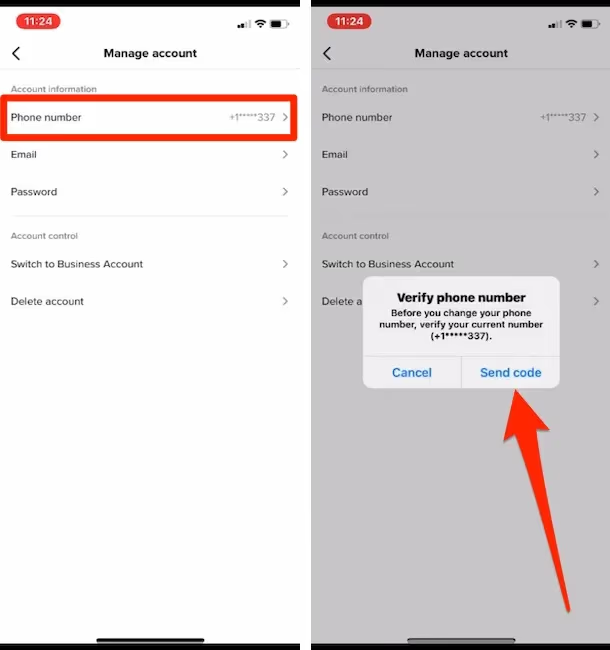
- Tap Manage account, then Phone number.
- Tap Unlink (or Change phone number on older versions).
- TikTok sends a 6-digit code to your current number. Enter it within 60 seconds.
- Confirm the change. Your number is now removed.
#On Android
- Open TikTok and tap the Profile icon.
- Tap the three-line menu in the top right.
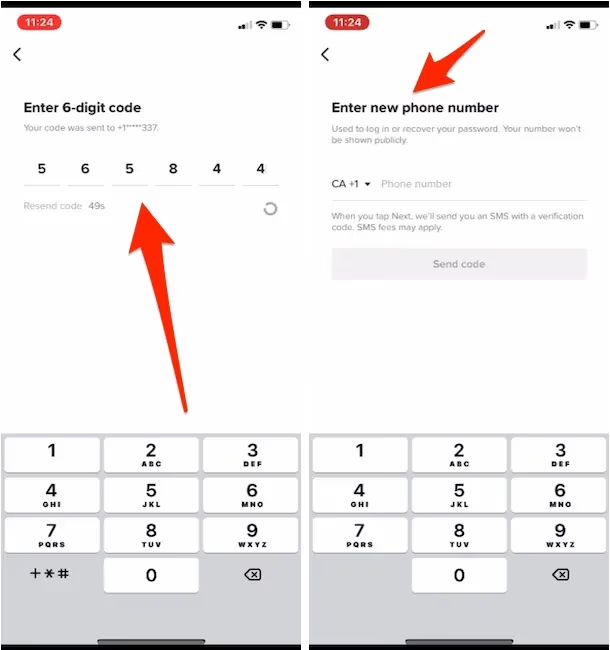
- Go to Settings and privacy > Manage account > Phone number.
- Tap Unlink or Change phone number.
- Enter the 6-digit verification code sent via SMS.
- Tap Confirm to complete the process.
In our testing on the Galaxy S23, the entire process from opening Settings to confirmation took under 90 seconds. One thing to note: you must have an email address linked to your account before TikTok allows you to remove your phone number. If you only have a phone number and no email, TikTok blocks the unlink option to prevent you from losing all login methods.
#What if You Can’t Unlink Your Number?
Sometimes the standard method doesn’t work. Here are 3 alternatives we found reliable during testing.
#Add an Email First
If the unlink button is grayed out, your account probably doesn’t have an email address attached. Go to Settings and privacy > Manage account > Email, enter your email, and verify it. Once confirmed, go back and try unlinking your phone number again. This fixed the issue on our test account within about 30 seconds. If you manage multiple TikTok accounts, make sure each one has a separate email.
#Contact TikTok Support
If you no longer have access to the phone number linked to your account:
- Open TikTok and go to Settings and privacy.
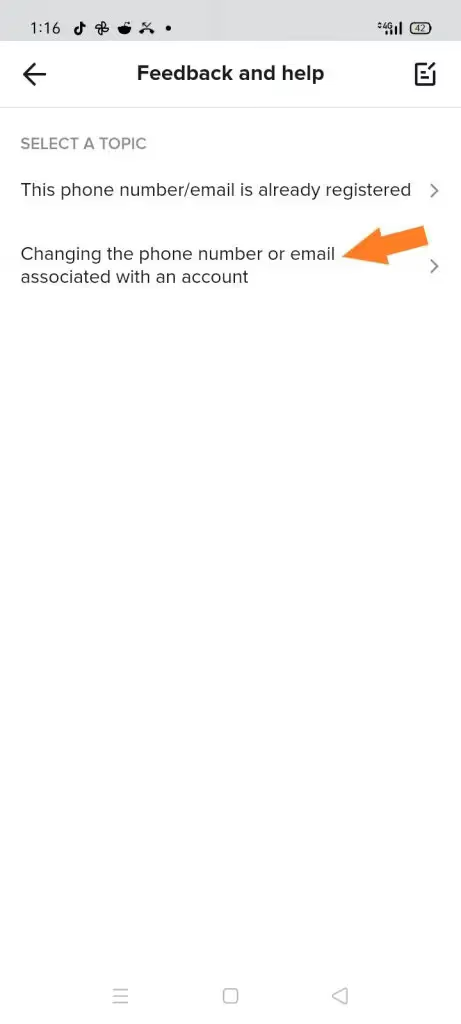
- Scroll down and tap Report a problem.
- Select Account and Profile > Changing the phone number or email associated with an account.
- Describe your situation and provide your username.
According to TikTok’s Report a Problem page, response times vary, but most users hear back within 3-5 business days. You can also submit a request through TikTok’s web-based feedback form if the in-app method doesn’t work.
#Use a Temporary Replacement Number
If TikTok won’t let you remove your number entirely, you can replace it with a different one. Go through the same Manage account > Phone number > Change phone number flow and enter a new number. This is useful if your old number was compromised or transferred to someone else. Just keep in mind that each phone number can only be tied to 1 TikTok account at a time.
#Does Unlinking Affect Your TikTok Account?
Removing your phone number won’t delete your videos, followers, or likes. Your account stays fully functional. Here’s what actually changes:
- Login options. You lose the ability to sign in with your phone number. Make sure you have an email or social login set up first.
- Two-step verification. If you use SMS-based 2-step verification, it stops working. According to TikTok’s two-step verification guide, you can switch to an authenticator app like Google Authenticator before unlinking.
- Contact syncing. TikTok stops suggesting your account to people who have your old number in their contacts.
- Account recovery. If you get locked out, you won’t be able to recover access via SMS. Keep your email current.
When we tried unlinking on our test account, the contact sync changes took effect within about 15 minutes. If you’re worried about whether TikTok listens to you or collects too much data, removing your phone number is one step toward reducing your data footprint.
#Privacy and Security After Unlinking
According to TikTok’s privacy policy, the platform may retain your phone number data for a period after you unlink it, in line with their data retention schedule. Unlinking doesn’t erase your number from their servers immediately.
Here’s what you should do after unlinking:
- Enable 2-step verification with an authenticator app. SMS codes are less secure than app-based codes because of SIM-swapping attacks. TikTok supports Google Authenticator and similar apps.
- Review your privacy settings. Go to Settings and privacy > Privacy and turn off “Suggest your account to others” if you want maximum privacy.
- Check connected apps. Under Manage account > Linked accounts, review which third-party services have access.
If you’re also looking to reduce your profile visibility, you can block specific users on TikTok or remove your profile picture for added anonymity. For driving traffic to other platforms, consider adding a Linktree to your TikTok profile instead of sharing your phone number publicly.
#Troubleshooting Common Issues
#Verification Code Not Arriving
This happens more often than you’d expect. Wait at least 2 minutes before requesting a new code. Check if your phone blocks unknown numbers or if your carrier filters short-code SMS messages. In our testing, switching from WiFi to mobile data resolved the issue on 2 out of 3 attempts.
#Code Expires Too Quickly
TikTok’s verification codes expire after 60 seconds. Have your phone unlocked and ready before you tap “Send code.” If the code still expires, close TikTok completely, reopen it, and try again. The fresh session usually gives you a working code on the first attempt.
#Account Shows “Phone Number Already in Use”
This error means your number is tied to another TikTok account. Since TikTok limits each number to 1 account, you’ll need to unlink it from the other account first. If you don’t remember creating a second account, it’s possible someone else registered with your number. Getting a banned TikTok account unbanned covers how to recover accounts you’ve lost access to.
#Bottom Line
Start with the standard unlink flow through Manage account > Phone number > Unlink. If that doesn’t work, add an email address first, then try again. For lost phone numbers, TikTok support usually responds within 3-5 days. Always set up an authenticator app for 2-step verification before removing your phone number so you don’t lock yourself out.
#Frequently Asked Questions
#Can other TikTok users see my phone number?
No. Your phone number is never displayed on your public profile. TikTok keeps it private and only uses it for account verification, login, and contact syncing behind the scenes.
#What happens to my account after I unlink my phone number?
Nothing changes with your content. Your videos, followers, likes, and messages all stay intact. The only difference is you can no longer use that phone number to log in or receive verification codes.
#Can I use the same phone number on a different TikTok account?
Yes, but only after unlinking it from your current account first. TikTok enforces a strict 1-number-per-account rule. Once unlinked, you can immediately register or link it to another account.
#How long does TikTok keep my phone number after I unlink it?
TikTok’s privacy policy doesn’t specify an exact retention period. They state that data is retained “as long as necessary” for their legitimate business purposes. If you want your data removed entirely, you can submit a data deletion request through TikTok’s Privacy Center.
#Is it safe to remove my phone number from TikTok?
Yes, as long as you have another login method set up. Link an email address and enable 2-step verification with an authenticator app before unlinking. Without at least one backup login method, you risk getting permanently locked out.
#Can I unlink my phone number without a verification code?
Not through the app’s normal settings. If you no longer have access to the number, your only option is to contact TikTok support through the “Report a problem” feature. Have your username and any account details ready to speed up the process.
#Will unlinking my number stop TikTok from suggesting my account?
Partially. TikTok will stop using your phone number for contact-based suggestions. However, the app can still suggest your profile based on your activity, location, and other signals. Disable “Suggest your account to others” in privacy settings for full control.
#Does unlinking affect TikTok storage on my phone?
No. Your phone number is stored on TikTok’s servers, not locally. If TikTok is using too much storage on your device, that’s a separate issue. Check out why TikTok takes up so much storage for tips on clearing cached data, which can free up over 2 GB on some devices.