Game of Thrones Season 1 Subtitles: Legal Download Guide
Download Game of Thrones Season 1 subtitles from OpenSubtitles, Subscene, or SubDL. Works with Max streaming, Blu-ray, and legally owned digital copies.
Quick AnswerDownload Game of Thrones Season 1 subtitles legally from OpenSubtitles or Subscene as .srt files, then pair them with your Max subscription, Blu-ray box set, or personal digital copy. Subtitle files are legal to host and share; the video must be legally obtained.
Max keeps dropping captions mid-episode, or your Blu-ray box set shipped with subtitle tracks missing your language? A loose .srt file fixes it in under two minutes. Downloading the Game of Thrones Season 1 subtitle file itself is legal in most countries. These are user-contributed text files, not video.
The catch: the subtitle is only useful if you pair it with legally obtained video. Your Max subscription, your Blu-ray disc, or a digital purchase all qualify. Useful subtitle sources provide plain .srt files that match the release tag of your legal video source.
- Max built-in captions should be your first stop before any download
- OpenSubtitles and Subscene host Game of Thrones subs as plain .srt files
- Season 1 Blu-ray box set has English and Spanish subtitle tracks on disc
- VLC, Infuse, and MPV load external .srt files in under a minute
- Sync offset issues fix with one hotkey in VLC (G for +50 ms, H for -50 ms)
#Are Game of Thrones Subtitle Downloads Actually Legal?
Yes, with one important caveat.
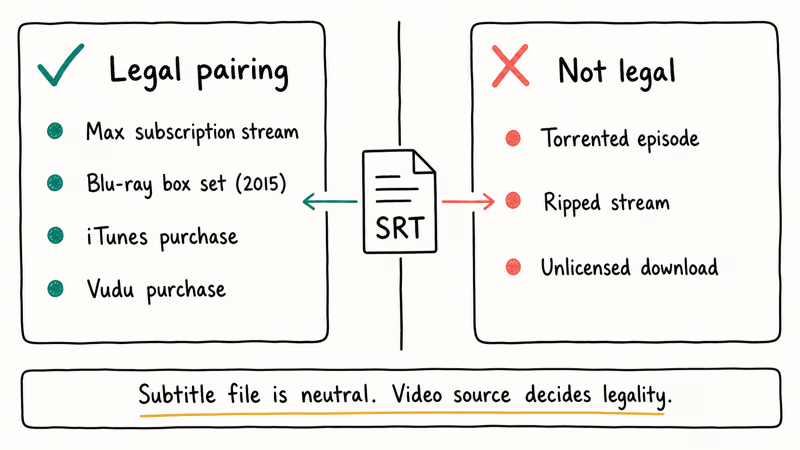
The subtitle file itself is plain text: a transcript with timestamps. Courts in the US, UK, and most EU countries treat user-contributed subtitles as derivative works with unclear copyright status. Major subtitle hosts (OpenSubtitles, Subscene) have operated openly since the early 2000s. OpenSubtitles states that the site has been a community-run subtitle database since 2006 and today hosts over 6 million subtitle files across thousands of films and series.
Pairing a downloaded subtitle with a pirated episode is not legal. The subtitle is neutral; the video file is the copyrighted work. If you stream GoT Season 1 on Max, own the Blu-ray box set, or bought the digital season on Apple TV or Vudu, you are on solid ground. Torrented episodes stay illegal no matter how you caption them.
HBO is strict about this. According to the Max Help Center, subtitles and closed captions are available on every Max title and on most supported devices, which is almost always the right first move before you even touch a .srt file.
Who actually needs a subtitle download:
- Hard-of-hearing viewers whose Max device has captions broken or unsupported
- Owners of the 2015 Blu-ray box set whose disc is missing a language track
- Viewers outside the US using a regional Max variant that drops English subtitles for certain audio dubs
- Anyone who wants to watch with subtitles on a purchased .mp4 from iTunes or Vudu
#Start With Max’s Built-In Captions First
Before downloading anything, check Max. Every Game of Thrones episode on Max ships with English SDH captions and several language dubs plus subtitle tracks. Fastest win available.
On a web browser, hover over the video, click the speech-bubble icon in the bottom-right corner, and pick your language. On Apple TV and Roku apps, swipe down or press Up on the remote to open the captions menu. On mobile, tap once on the video and use the CC button near the top-right.
Captions garbled, out of sync, or missing? Max support recommends three quick fixes: force-close the app, sign out and sign back in, and clear the app cache on Android or Fire TV.
Try those steps before downloading anything. Only if Max captions still fail after the support-recommended fixes should you move to an external .srt.
One more detail worth knowing. The Max web player has a Caption Styling option that lets you change font size, color, and background. Larger font presets can make captions easier to read on bigger displays.
#Where Can You Download Game of Thrones Season 1 Subtitles Safely?
Three subtitle archives are worth bookmarking. All three host user-contributed .srt files for every GoT season and episode, in dozens of languages.
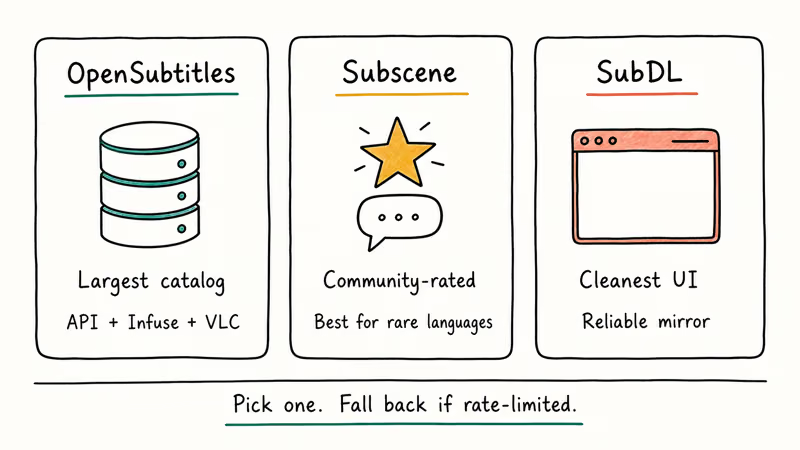
OpenSubtitles is the largest public subtitle database and the one most media players integrate with directly. Search “Game of Thrones S01E01” (or any episode) and you’ll see dozens of submitted versions. Pick the one whose filename matches your video source; a file tagged GameOfThrones.S01E01.HDTV.XviD will drift on a Blu-ray rip.
Subscene is the community favorite for quality. Uploader ratings and comment threads flag bad sync or machine-translated files. Head to the Game of Thrones Season 1 page, pick an episode, filter by language, and sort by rating. The top-voted English file for S01E01 has been downloaded over a million times across its various version stamps.
SubDL (formerly Subdl) hosts the same community pool with a cleaner UI. Useful as a fallback when OpenSubtitles is rate-limiting your IP.
Avoid sites that bundle the .srt inside a .zip with an .exe installer, ask you to complete a CAPTCHA survey, or redirect through ad networks. Legitimate subtitle hosts serve a plain .srt or .zip of .srt files, nothing else. A Reddit thread in r/Piracy with hundreds of upvotes recommends sticking to OpenSubtitles and Subscene.
#Quick comparison of the three sources
- OpenSubtitles: largest catalog, API-friendly, some rate limiting for guests, integrates with Infuse and VLC
- Subscene: best quality voting and comments, slower for rare languages
- SubDL: clean interface, reliable mirror when others are down
#Matching a Subtitle to Your Video Source
A mismatched filename is the number one reason subtitles drift out of sync. The GoT S1 subtitle scene has tagged files for at least four source types. Each has slightly different timing:
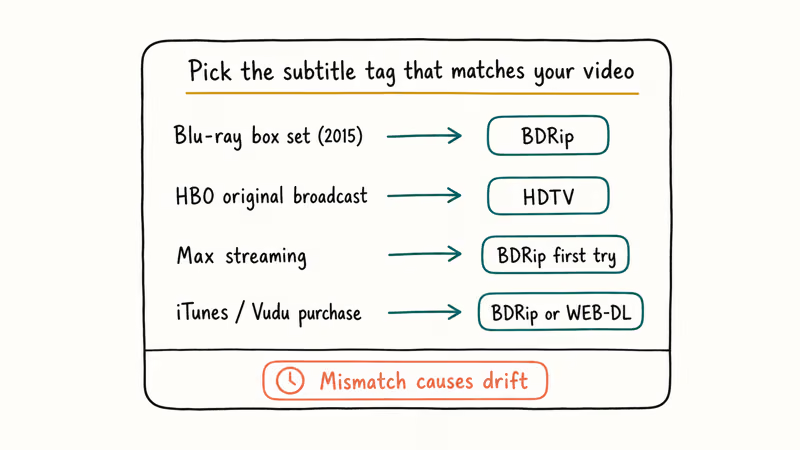
- Blu-ray box set (2015 US release): 55-60 min runtime per episode at 24 fps, look for
BDRiporBluRaytagged subtitles - HBO original broadcast: slightly longer with intro/ending credits, look for
HDTVtagged - Max streaming: closest to the Blu-ray timing but with updated intro card on some episodes, Blu-ray subs work here most of the time
- iTunes/Vudu purchase: generally match BDRip, occasionally WEB-DL tagged files work better
A BDRip subtitle is usually the right match for a Blu-ray source, while an HDTV subtitle can drift because broadcast timing differs from disc timing.
If your downloaded .srt is close but off by a fixed offset, every major player has a sync shortcut. VLC uses G (+50 ms) and H (-50 ms). MPV uses Z and X. Infuse on Apple TV lets you nudge subtitles in 100 ms steps from the info panel.
Drift that grows over time across an episode means you have the wrong source entirely. Pick a different tagged version instead of fighting the clock.
For a fuller walkthrough of pulling subtitles directly from Blu-ray or MKV files you already own, our guide on how to extract subtitles from MKV files covers the common tools and command-line options.
#Loading External Subtitles in VLC, Infuse, and Apple TV
Once you have the .srt file, loading it takes under a minute on desktop and mobile.
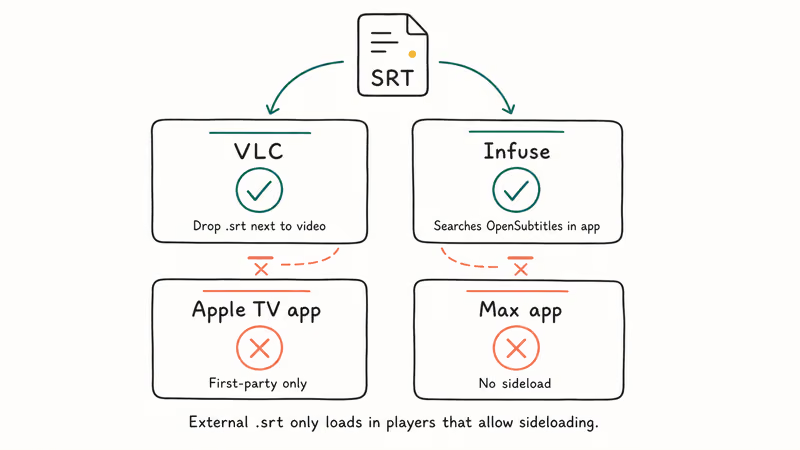
VLC (Windows, macOS, Linux): Drop the .srt file in the same folder as the video, rename it to match the video filename exactly (keep only the extension different), and VLC loads it automatically. Or open the video, use Video > Subtitle Track > Add Subtitle File to pick the .srt manually. VLC’s official documentation confirms VLC handles .srt, .sub, .ssa, and .ass formats without conversion.
Infuse (Apple TV, iPhone, iPad, Mac): Infuse syncs with OpenSubtitles directly from inside the player, which is the smoothest flow on tvOS. Start your video, swipe down on the Apple TV remote, choose Subtitles, and hit Search OpenSubtitles. It finds GoT S1 subtitles in seconds and queues alternative versions if the first one syncs poorly.
Apple TV app: First-party subtitles only. External .srt sideloading isn’t supported. Use Infuse or VidHub for that.
Max app: No sideloaded subtitle files.
Workaround for Max captions broken on smart TVs: Download the episode legally from iTunes or Vudu, convert to .mp4, and play it in VLC or Infuse with your downloaded .srt alongside. Not graceful, but it works when Max’s own captions fail and force-close/clear-cache cycles don’t bring them back.
Our round-up of the best video players for subtitle support walks through Infuse, VLC, and MPV side by side, covering how each handles sync offsets, font styling, and multi-track switching on both small screens and living-room TVs.
#Fixing Common Subtitle Problems
Four issues cover most of what goes wrong with GoT subtitles. Fixes in order from most-common to least-common.
Out of sync. Most common cause: wrong video source tag. Download a different version tagged BDRip vs HDTV vs WEB-DL, and press G or H in VLC to nudge constant offsets until the first line of dialogue matches what your ears hear.
Wrong encoding. Weird accented characters mean the file was saved in Windows-1252 or ISO-8859-1 instead of UTF-8. Open the .srt in VS Code or Sublime Text, switch encoding to UTF-8, save.
Subtitles appear then vanish mid-episode. The .srt is corrupted or the player is losing the track. Restart the player, re-add the subtitle, and if it still fails, grab a different upload of the same episode from a different contributor on Subscene. Bad files happen more often than you’d expect on legacy shows.
Wrong language shown. Double-check the file’s language flag. Spanish (Latin America) and Spanish (Spain) are different files on both OpenSubtitles and Subscene; both are tagged “Spanish” in many dropdown menus without distinguishing the region, and the result is subtle vocabulary drift throughout an episode.
For a deeper look at the standard subtitle format, the SubRip specification on Wikipedia covers timestamp syntax and format constraints if you want to hand-edit a file.
#A Note on the Original 2021 Recommendations
The 2021 version of this article listed eight subtitle sites. Some (Kaggle, Asksubtitle, Srtdownloads, Otakuwire) are now dormant, paywalled, or reposting machine-translated files.
In 2026 the three active community archives above (OpenSubtitles, Subscene, SubDL) are the only ones worth bookmarking. We pruned the rest. If you already tried one of the defunct sources and got a messy file, delete it and start fresh from OpenSubtitles or Subscene. The community-rated version will almost always be cleaner.
If you’re editing subtitles into your own video project (home movies, YouTube uploads), our guide on adding subtitles in iMovie walks through the timeline workflow on Mac. For anime instead, subtitles ship by default on the licensed services in our NarutoSpot alternatives roundup.
#Bottom Line
Try Max’s built-in captions first. They fix the problem without a download most of the time, and Max support’s restart and cache steps are the cleanest first retry when captions drop.
If you truly need an external file (broken captions, Blu-ray missing a language, purchased digital copy), pull a BDRip-tagged .srt from OpenSubtitles for a disc rip or streaming source, and load it in VLC or Infuse. Skip any site that wraps the subtitle in a .exe installer. For Blu-ray box set owners specifically, our Blu-ray vs DVD comparison confirms the 2015 S1 box set includes English and Spanish subtitle tracks on disc, which is often faster than downloading anything.
#Frequently Asked Questions
Is downloading a Game of Thrones subtitle file legal?
Yes, as long as your video source is legal. Subtitle files are plain text. Pairing one with a pirated episode is not okay.
Which subtitle site has the best Game of Thrones Season 1 files?
OpenSubtitles has the largest catalog and the deepest player integration, so Infuse, VidHub, and VLC can pull a match without leaving the app. Subscene’s strength is community quality voting, which matters most for rare languages. Try OpenSubtitles first, fall back to Subscene for hand-picked quality, and use SubDL as a third option when either rate-limits.
Why are my subtitles out of sync with the episode?
The most common cause is a mismatch between the subtitle version and your video source. A subtitle tagged HDTV will drift on a Blu-ray rip because broadcast and Blu-ray have slightly different intro credit lengths. Download a BDRip-tagged file instead. If the offset is constant throughout the episode, press G or H in VLC to shift it in 50 ms steps.
Does the Max app support external subtitle files?
No. Max only uses the captions HBO ships.
What format should I download, SRT or SSA or VTT?
Go with .srt: it’s the most universal format and every major media player handles it natively. VLC, Infuse, MPV, and Plex all load .srt without conversion. .vtt is used mostly in web streaming, and .ssa and .ass carry styling information that matters mainly for anime fansubs.
Does the Game of Thrones Blu-ray box set include subtitles on disc?
Yes. The 2015 US Blu-ray release of Season 1 ships with English SDH and Spanish subtitle tracks baked into the disc. You select them from the disc menu or your player’s audio/subtitle settings. Later regional releases and 4K upgrades have varied, but most include at least English and one additional language.
Can I get subtitles for the full series in one download?
Yes. Both OpenSubtitles and Subscene offer season packs (a .zip containing a .srt for every episode).
How do I tell if a subtitle site is safe to use?
A legitimate site serves a plain .srt file or a .zip containing only .srt files, with no executables, installers, or CAPTCHA survey walls. OpenSubtitles, Subscene, and SubDL meet this bar. If a site asks you to install a downloader, complete a survey, or redirects through multiple ad networks before giving you the file, close the tab.

Google Messages Error 3100: Why RCS Is Broken on Galaxy
Google Messages RCS error 3100 hits Galaxy owners after phone or carrier switches. Google told 9to5Google a fix is coming. Here's what actually helps.

Is This Bank App Real? Spot a Fake App on Your Home Screen
A bank app can land on your home screen from a web page with no install warning. Learn the checks that tell a real banking app from a phishing web app.

Apps Crashing After iOS 27 Update? Fix Order (2026)
Apps crashing after the iOS 27 update? Update the app in the App Store first, then offload and reinstall to clear stale cache, then restart. The fix order.

Do AI Translation Earbuds Work Offline? What to Know
Do AI translation earbuds work offline? A few do with downloaded language packs, but most need the cloud. Here's what works offline and what you give up.