Is Linktree Safe? Privacy and Security Review (2026)
Is Linktree safe in 2026? A fair review of Linktree's privacy policy, security history, scam risk, 2FA settings, and the strongest alternatives.
Quick AnswerLinktree itself is a legitimate, GDPR-compliant Australian platform with HTTPS, 2FA, and account alerts, but the links posted on a Linktree page are only as safe as the creator who set them up. Treat each Linktree page like an open redirect: scan the destination URL before tapping.
Is Linktree safe? The short version is yes for the platform itself and it depends for the links inside any given page. Linktree is a publicly traded link-in-bio service hosted on AWS infrastructure under Australian law, and its setup follows the same link-in-bio pattern covered in how to add Linktree to TikTok. The risk almost always lives in user-generated destinations, not in the Linktree wrapper.
- Linktree is a real Australian SaaS company (ASX-listed parent: Linktree Pty Ltd) with HTTPS by default, 2FA, login alerts, and a public privacy policy aligned with GDPR and Australia’s Privacy Act 1988.
- The biggest risk is scam links posted by other creators, not Linktree’s own infrastructure; anyone with a free account can host a
linktr.ee/...page. - Linktree does not preview destination URLs on mobile, so phishing or affiliate-cloaking links can hide behind generic button labels like “Shop now.”
- Strong account hygiene matters: turn on 2FA in
Account>Security, set login alerts, and rotate passwords if you reuse them across platforms. - If you want more privacy or self-hosted control, Carrd, Beacons, Bento, or a static site on Cloudflare Pages give you full ownership of the URL and analytics.
#What Linktree Actually Is (and Who Runs It)
Linktree is a hosted “link-in-bio” tool: you create one short URL (linktr.ee/yourname) and that page lists every link you’d otherwise spam into Instagram, TikTok, or YouTube bios. The company was founded in Melbourne in 2016 and reports roughly 50 million users on its homepage. The service sits behind Cloudflare and AWS, which means the static page itself is well-defended against the boring stuff (DDoS, basic injection). According to Wikipedia’s Linktree overview, Linktree provides a landing page for multiple links, so privacy and account settings matter when evaluating safety.
Linktree is free at entry tier and paid above.
Free and Pro pages share the same TLS certificate, headers, and redirect behavior. None of those tiers change the underlying security posture in a meaningful way for visitors.
#Linktree’s Privacy Policy at a Glance
The privacy policy is one of the cleaner ones in the link-in-bio category.
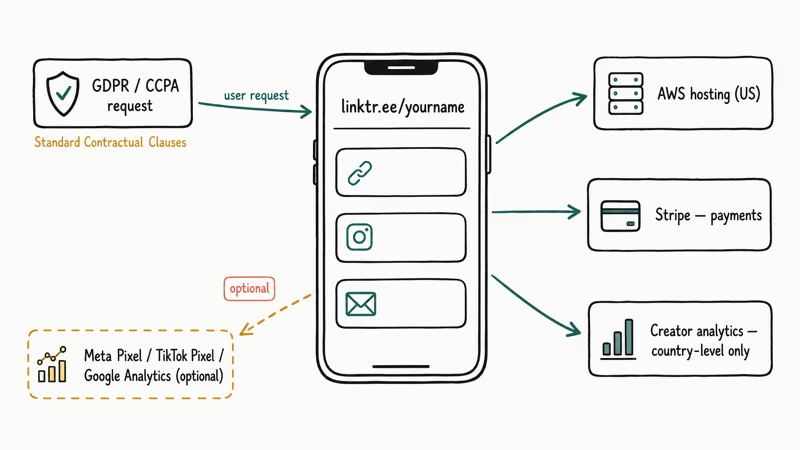
According to Linktree’s privacy policy, the company collects standard analytics (IP address, device fingerprint, browser, referrer), shares data with subprocessors like Stripe for payments and AWS for hosting, and lets EU and California users invoke GDPR and CCPA rights via a dedicated request form. Data is hosted in the United States, with cross-border transfers from EU users handled under the Standard Contractual Clauses framework that replaced Privacy Shield.
Two things to know if privacy is your main concern. First, every visit to a linktr.ee/... page is logged to the page owner’s analytics dashboard; the creator sees country-level visitor counts, not your personal identity. The Linktree platform itself sees more.
Second, the service integrates with Meta Pixel, TikTok Pixel, and Google Analytics if the creator turns those on, which means a Linktree click can re-identify you in those ad networks. If that bothers you, a tracker-blocking browser like Brave or Firefox with uBlock Origin blocks most of it at the source.
#Has Linktree Ever Been Hacked or Compromised?
Linktree itself has not had a publicly disclosed breach of user credentials at the platform level. The platform has faced the same problem every UGC service faces: account takeovers via password reuse and phishing.
Bleeping Computer reported that fake “Linktree login” phishing pages started circulating in 2022, and several high-follower creators lost their pages that way. The fix on Linktree’s side was rolling out account login alerts and recommending 2FA, which is now available to every plan tier including free.
The other recurring incident is scam links inside otherwise legit pages.
When a creator gets phished, the attacker swaps a real shop link for a fake one, and visitors who trust the creator follow it. According to the FTC’s consumer alerts page, this pattern, where an attacker leverages a trusted profile to push a malicious link, is one of the fastest-growing phishing vectors.
The pattern also appears in Atlas Earth scam reports. Linktree pages are not unique in this; the same applies to bio links on Instagram, X, and any unverified short URL.
#Can Anyone Post a Scam Link on a Linktree Page?
Yes, and this is the single most important answer in this article. A free Linktree account takes about 60 seconds to create and asks for nothing beyond an email address, no phone number, no ID check, and no verification that the person setting it up is who they claim to be, which is exactly why a linktr.ee URL alone tells you nothing about whether the links behind it are safe.
There is no review queue. There is no human verifying that “Free iPhone 15 giveaway” actually leads anywhere safe. A new account can publish external links quickly, and Linktree does not put every destination through a manual pre-publication review.
That means a linktr.ee/... URL is exactly as trustworthy as the Twitter, TikTok, or Instagram profile that posted it. If the profile is sketchy, treat the Linktree page like any other open redirect. Hover-preview on desktop is fine; on mobile, the only safe move is to long-press the link to copy the destination URL and check it before tapping. The safety checklist below covers that workflow.
#Account Security Features for Linktree Owners
If you run a Linktree page on your own account, the security knobs are decent but not extensive. These official tools live in the settings menu under Account > Security in the dashboard:
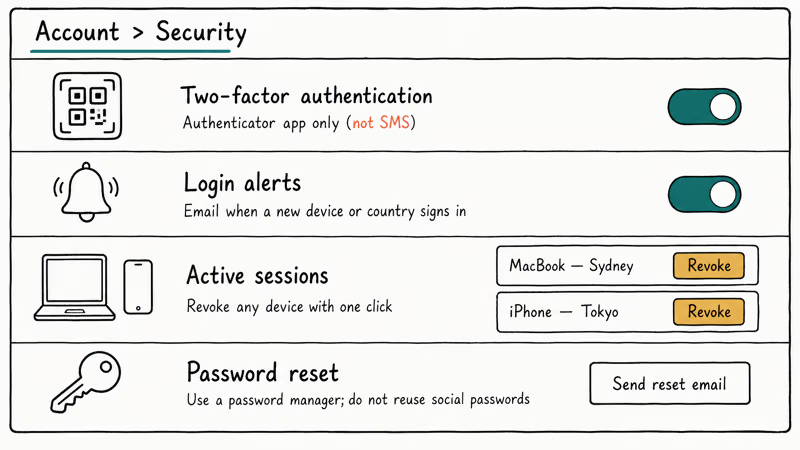
- Two-factor authentication. Authenticator-app based (Google Authenticator, Authy, 1Password). SMS 2FA isn’t offered, which is a feature rather than a bug, because SIM-swap attacks make SMS 2FA the weakest second factor.
- Login alerts. Email notifications when a new device or country signs in.
- Active sessions. A list of where your account is currently signed in, with a single-click revoke per device.
- Password reset. Standard email-based reset; combine it with a password manager so you’re not reusing the same password from your TikTok or Instagram account.
Enabling 2FA is a standard authenticator-app flow, and recovery codes should be stored in a password manager. That’s the same model most modern SaaS apps use. If you’re a creator with even a small audience, turning these on is the cheapest insurance you’ll buy this year. A hijacked Linktree page is a fast way for attackers to monetize your trust with your audience.
#Seven-Step Safety Check Before You Tap a Linktree Link
Treat every unfamiliar Linktree page the same way you’d treat any short URL. Here’s the seven-step check to use before opening a suspicious bio link:
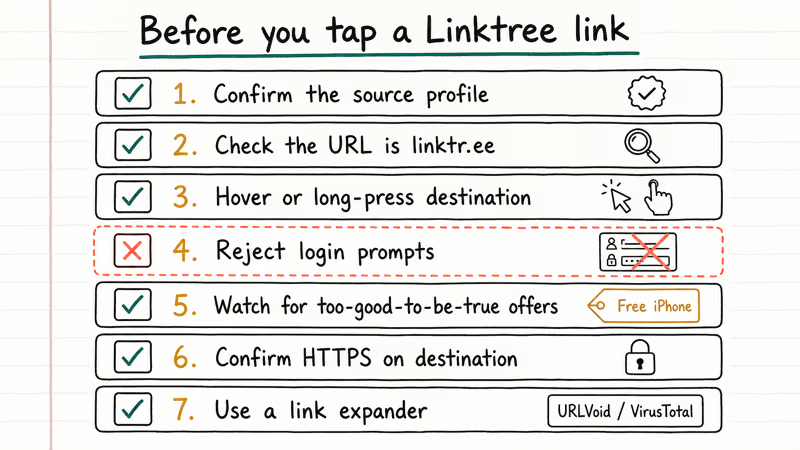
- Confirm the source profile. Is the Instagram, TikTok, or X account verified or established? If the profile is a week old with three followers, the linked Linktree page is suspect by association.
- Look at the URL. Real Linktree pages live on
linktr.ee/usernameor a paid*.bio.linkcustom domain. Lookalikes likelinktree-shop.comare phishing. - Hover or long-press destination buttons. Desktop browsers show the URL on hover; mobile users should long-press and pick “Copy link” to read the URL before opening it.
- Reject anything asking for login credentials. No legitimate creator routes you through a fake Instagram or banking login from their bio.
- Watch for too-good-to-be-true offers. Free iPhones, “exclusive” crypto airdrops, and surprise giveaways are the classic phishing bait that the FTC documents in detail.
- Check HTTPS on the destination. Linktree itself enforces HTTPS, but the page it sends you to may not. A locked padlock is the bare minimum.
- Use a link expander when in doubt. Tools like URLVoid or VirusTotal’s URL scanner check a destination against known malware and phishing databases before you click.
That checklist also applies to short URLs you encounter in DMs and comments, and the same logic appears in the social media search by phone number walkthrough for vetting unknown contacts.
#Stronger Alternatives if You Want More Privacy
Linktree is the default, not the only option. These alternatives cover the main privacy and ownership trade-offs:
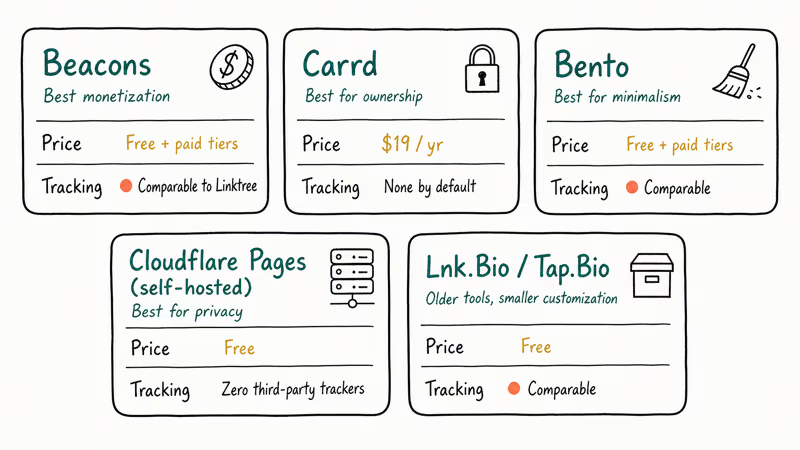
- Beacons. Closest competitor, similar UI, slightly better creator monetization tools (built-in tip jar, paid memberships). Privacy posture is comparable to Linktree.
- Carrd. Single-page sites for $19/year. You own the layout and there’s no platform branding. No analytics tracking by default, which is good if your audience cares about privacy.
- Bento. A newer entrant focused on minimalism and creator portfolios. Fewer integrations, cleaner default styling.
- Self-hosted on Cloudflare Pages or GitHub Pages. Free, full ownership, zero third-party tracking. The trade-off is you maintain your own HTML and DNS. Worth it if your audience includes anyone who cares about ad-tracking, or if you’re a journalist or activist.
- Lnk.Bio and Tap.Bio. Older tools, smaller customization but functional and free.
For most creators, Linktree or Beacons is the right call because the friction of self-hosting is real. If you’re picking between Linktree and a competitor purely for trust signaling, Linktree’s longer track record and public privacy policy still give it a slight edge in 2026.
#Mobile vs. Desktop Safety on Linktree
The platform itself works the same way on both, but the safety experience is meaningfully different. On desktop, hovering over any button shows the destination URL in the bottom-left of the browser, which is your single best phishing defense. On iOS and Android browsers, that hover preview doesn’t exist. Tapping a link takes you straight to the destination.
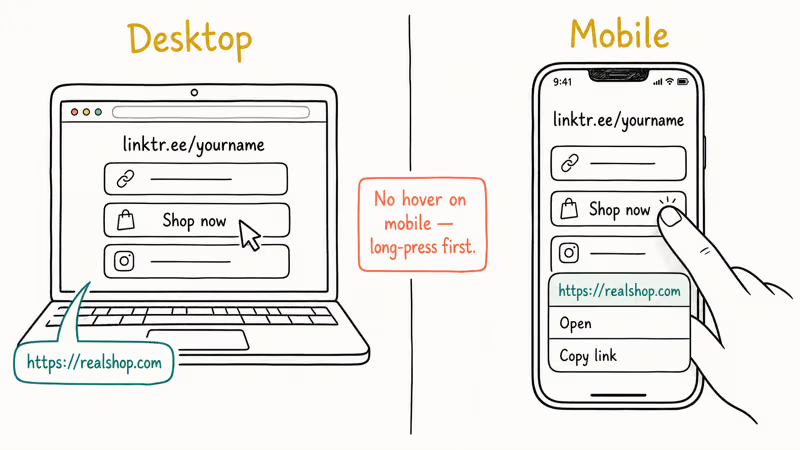
The mobile workaround: long-press the button (iOS Safari, Chrome, Firefox all support this) until a context menu pops up, then read the URL before tapping “Open.” If you use a password manager like 1Password or Bitwarden with the Watchtower feature, those tools also flag known-malicious domains in real time. Combined with 2FA on your own accounts, that closes most of the gap between desktop and mobile risk.
#Bottom Line
Is Linktree safe? Yes for the platform, conditional for the destination links inside any given page.
If you’re a visitor, the right move is to vet the source profile and preview the destination URL before tapping. If you run your own page, turn on authenticator-app 2FA tonight, store recovery codes in a password manager, and don’t reuse the email-and-password combo from your social accounts.
For maximum control over privacy and analytics, Carrd or a self-hosted Cloudflare Pages site beats every hosted competitor, at the cost of about 30 minutes of setup. For most people, Linktree’s free tier with 2FA enabled is a reasonable default.
If you’re auditing other “is this safe?” questions in the same family, the writeups on whether Z-Library is safe and whether the TikTok Shop is safe use the same structure.
#Frequently Asked Questions
Is Linktree safe to click on?
The Linktree wrapper is safe. The destination links inside the page are only as safe as the creator who posted them, so preview the URL before tapping.
Can Linktree pages contain viruses?
A Linktree page can’t host malware directly because the platform only stores text, images, and outbound links. The risk is that a button on the page can send you to a third-party site that does host malware, ads with drive-by downloads, or a phishing form. Hover-preview on desktop or long-press on mobile to read the destination URL first.
How do I report a malicious Linktree page?
Linktree publishes a report form at the bottom of every public page (the small flag icon). According to Linktree’s community guidelines, the team removes pages that violate its policies on phishing or impersonation, usually within a few business days. You can also report the underlying scam to the FTC at reportfraud.ftc.gov, which feeds the federal Consumer Sentinel Network used by state attorneys general and the FBI.
Does Linktree work without an account?
Yes for visitors. You only need an account to create your own page.
Is two-factor authentication free on Linktree?
Yes, free on every plan. Turn it on under Account > Security and scan the QR code with any authenticator app.
What happens if my Linktree account gets hacked?
The attacker can swap your real links for malicious ones, point your audience at phishing sites, and harvest credentials from your followers. Recovery flow: password reset, sign out all sessions, change to a unique password, and turn on 2FA before re-adding real links.
Are paid Linktree plans safer than the free tier?
The security baseline is the same: HTTPS, 2FA, login alerts, and active session management. Paid plans add audience analytics, custom branding, email capture, and link cloaking, but none of those change whether the platform protects your account or your visitors. The only safety-relevant paid feature is custom domain support, which makes phishing lookalikes slightly harder.
Does Linktree share my data with advertisers?
Linktree’s privacy policy states that the company does not sell personal data, but it does share data with service providers (Stripe for payments, AWS for hosting, analytics partners) and with creators who have enabled tracking pixels on their pages. If a creator turns on Meta Pixel or TikTok Pixel, your visit can be matched back to those ad networks. A tracker-blocking browser blocks most of this client-side.

Google Messages Error 3100: Why RCS Is Broken on Galaxy
Google Messages RCS error 3100 hits Galaxy owners after phone or carrier switches. Google told 9to5Google a fix is coming. Here's what actually helps.

Is This Bank App Real? Spot a Fake App on Your Home Screen
A bank app can land on your home screen from a web page with no install warning. Learn the checks that tell a real banking app from a phishing web app.

Apps Crashing After iOS 27 Update? Fix Order (2026)
Apps crashing after the iOS 27 update? Update the app in the App Store first, then offload and reinstall to clear stale cache, then restart. The fix order.

Do AI Translation Earbuds Work Offline? What to Know
Do AI translation earbuds work offline? A few do with downloaded language packs, but most need the cloud. Here's what works offline and what you give up.