InDesign vs Publisher: Which One Should You Pick in 2026?
Adobe InDesign vs Microsoft Publisher compared on price, output formats, and end-of-life timing. Includes 2026 migration paths and feature notes.
Quick AnswerPick Adobe InDesign for client work, magazines, and ebooks that need professional output. Pick Microsoft Publisher only for quick in-house flyers, but plan a switch because Microsoft retires Publisher in October 2026.
The InDesign vs Publisher choice used to come down to budget and skill level. In 2026 it’s mostly a question of timing. Microsoft is shutting Publisher down in October 2026, while Adobe InDesign keeps shipping monthly updates and pulling further ahead on typography, output formats, and platform reach. Here is how the two stack up on price, output, and longevity before you commit to either one.
- Microsoft Publisher reaches end-of-support in October 2026 and disappears from new Microsoft 365 installs after that date
- Adobe InDesign costs $22.99 per month as a single app or $59.99 per month inside the Creative Cloud All Apps plan
- Microsoft Publisher only runs on Windows; InDesign runs on Windows 10/11 and macOS 11 or later
- InDesign exports tagged PDF, EPUB, and HTML; Publisher exports PDF and XPS but no EPUB
- A multi-page magazine takes noticeably longer to lay out in Publisher than in InDesign because of its weaker typography controls
#What Is the Real Difference Between InDesign and Publisher?
Adobe InDesign is a professional page-layout app built for magazines, books, brochures, and any print or digital document where typography and color management matter. It uses paragraph styles, character styles, master pages, and a precise frame-based grid that designers expect from a tool aimed at agencies and publishers.
Microsoft Publisher is an entry-level desktop publishing tool bundled with classic Microsoft 365 desktop subscriptions on Windows. It lets people who already use Word stretch into flyers, newsletters, and small brochures without learning a new app. Different audience, different price, different ceiling.
The two products target different users. According to Adobe’s InDesign feature page, the app is built around master spreads, OpenType variable fonts, and live data merge for catalogs. Publisher, by contrast, is built around Office templates and click-and-place blocks, which is fine for a school newsletter but starts to break down once your document crosses about 16 pages, since per-document master-page support tops out at two.
Microsoft itself is calling time on Publisher. According to the official Microsoft 365 deprecation notice, Publisher reaches end-of-support in October 2026 and will be removed from Microsoft 365 after that date. Existing .pub files keep opening in older installs, but no new versions will ship.
#How Do InDesign and Publisher Compare on Price?
Pricing is the first place to get specific, so here are the current published rates.
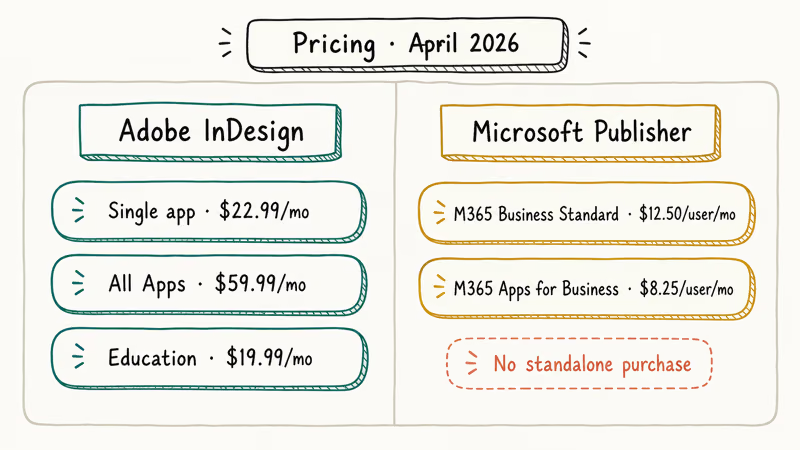
Adobe InDesign single-app subscription is $22.99 per month on a yearly plan, or $34.49 per month if you go month-to-month. Adobe’s InDesign plans page lists the same numbers, plus a $59.99 per month All Apps plan that bundles Photoshop, Illustrator, and 24 other Creative Cloud apps. Adobe still runs an education tier that drops All Apps to $19.99 per month for verified students.
Microsoft Publisher does not sell as a standalone app at all.
You get it inside Microsoft 365 Business Standard at $12.50 per user per month or Microsoft 365 Apps for business at $8.25 per user per month, and only on Windows. Microsoft’s Office 365 commercial plans page confirms Publisher is included in those tiers but not in any Mac or Personal plan, which means a Mac household that pays for Microsoft 365 Family every year is paying for a desktop publishing tool they can’t launch.
The math gets interesting once you add the end-of-life clock. Renewing a Microsoft 365 plan in 2026 still gives you Publisher, but you’re paying for an app that loses support in months. A better use of the same money is Microsoft 365 Personal at $9.99 per month plus layout work in a free InDesign alternative or a $22.99 InDesign subscription.
#Output Formats: Where the Gap Gets Obvious
Output is where the gap between the two apps gets obvious.
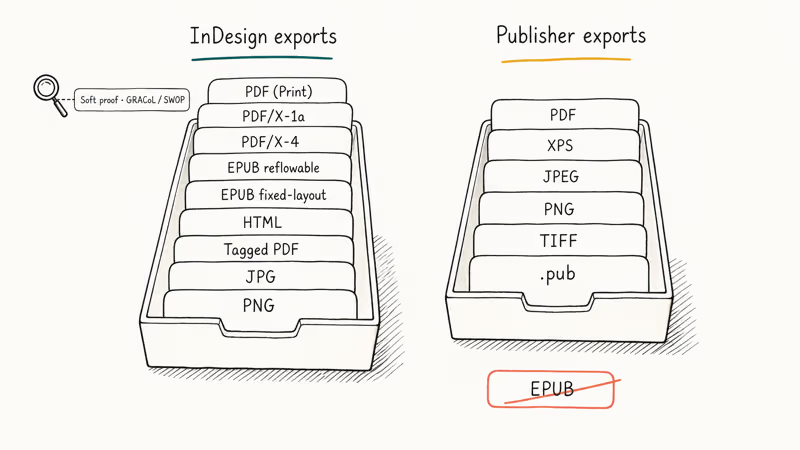
InDesign exports interactive PDF, print-ready PDF/X-1a and PDF/X-4, EPUB (both reflowable and fixed-layout), HTML, JPG, PNG, and tagged PDF for accessibility. Adobe’s InDesign export documentation walks through the EPUB workflow step by step, including how to map paragraph styles to HTML tags so the file passes screen-reader checks, which is the kind of detail that matters once a publisher asks for an accessible ebook deliverable.
Publisher exports PDF, XPS, JPEG, PNG, TIFF, and the legacy .pub format. It can’t export EPUB at all. If you need an ebook from a Publisher file, you save to PDF and run that PDF through a third-party converter, which usually breaks the layout. Converters commonly dump every image to the bottom of each chapter and lose all hyperlinks.
On print output, both apps produce clean PDFs at 300 dpi. The difference shows up in soft proofing.
InDesign lets you preview output on Coated GRACoL 2013 and US Web Coated SWOP profiles before exporting, while Publisher offers no ICC profile selection at all. For a flyer printed at home, that doesn’t matter; for a magazine sent to a commercial printer, it absolutely does, because a wrong color space at print time can mean reprinting thousands of copies on someone else’s clock.
If you need to round-trip between layouts and PDF, both apps benefit from a dedicated PDF editor. A tool like PDFelement on the Mac side can reflow extracted text, fix print-ready PDFs from outside vendors, and convert client-supplied .pub files into shapes InDesign can import.
Some links on this page are affiliate links, which means fone.tips may earn a commission at no extra cost to you.
#Operating System and Hardware Support
Adobe InDesign 2026 runs on Windows 10 (64-bit, version 22H2) or later, and macOS 11 Big Sur or later. Adobe’s InDesign system requirements page lists 8 GB RAM as the minimum and 16 GB as the recommended floor, with a 4 GB GPU for Display Performance.
Microsoft Publisher only runs on Windows.
There is no Mac version, no iPad version, no web version, and no Linux build. You also need a desktop install of Microsoft 365, since the web-only Microsoft 365 Basic plan does not include Publisher.
InDesign launches quickly and handles long magazine files without much wait on modern hardware. Publisher launches even faster because it shares the Office DLLs already in memory, but a large file converted from .pub can be slower to open and may stutter when scrolling between spreads.
#Typography and Layout Tools
This is where InDesign earns its monthly fee.
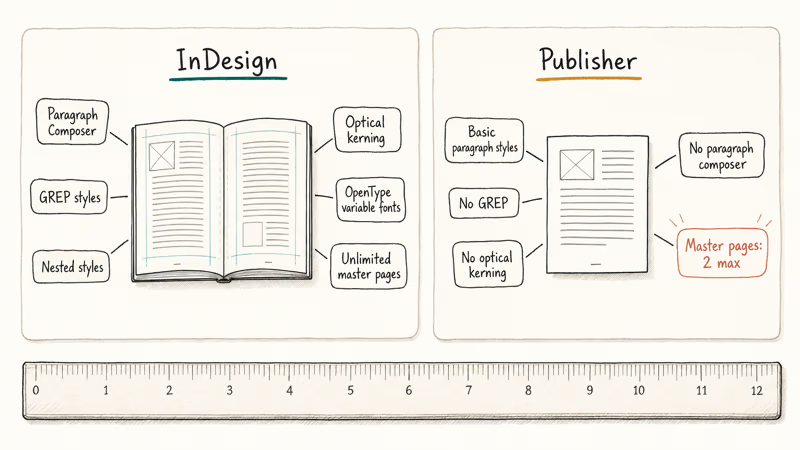
InDesign has true paragraph and character styles, nested styles, GREP styles, OpenType feature toggles, optical kerning, hanging punctuation, and a paragraph composer that sets entire paragraphs at once to balance line breaks. Master pages, multi-state objects, and conditional text round out the toolkit. According to Adobe’s typography overview, variable fonts and color fonts work natively in any InDesign document.
Publisher has paragraph and character styles too, but the controls are basic.
No GREP, no optical kerning, no paragraph composer, no nested styles. Master pages exist, but you can’t have more than two per document. A 16-page yearbook that needs three different chapter intros hits that limit fast, forcing you to duplicate the second master and edit the copy, which then drifts out of sync after every layout change.
For a one-page flyer, none of this matters. For anything multi-page, the Publisher limits compound fast, and the gap between the two apps stops being a matter of taste and becomes a matter of throughput. A long magazine can need several manual line-break fixes per spread in Publisher, against essentially none in InDesign once the paragraph styles are dialed in.
#Migration Path for Old .pub Files Before 2026 Ends
If you have a folder of .pub files and Microsoft is pulling Publisher off the shelf, you’ve got three migration options.
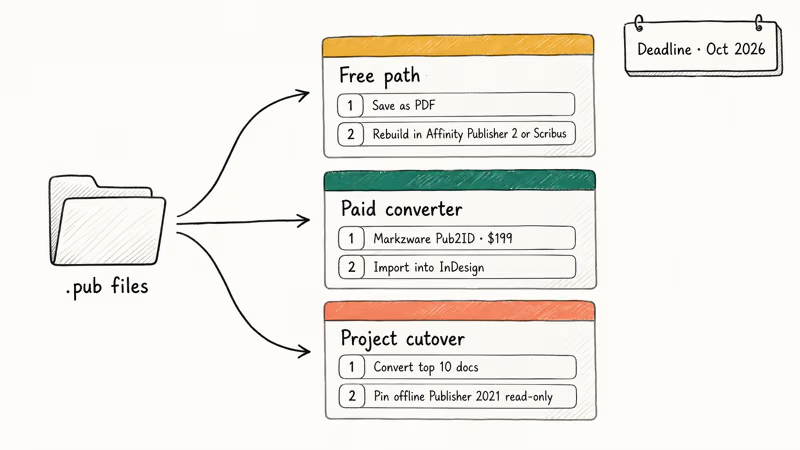
Free path: open each .pub file, save as PDF, then rebuild critical files in a free tool like Affinity Publisher 2 or Scribus. The PDF acts as a visual reference. Workable for a handful of files. Brutal past 20 documents.
Paid converter: use Markzware Pub2ID, which imports .pub files directly into InDesign. The current Pub2ID build is $199 for a single-user license, and it preserves text frames, fonts, and layered images. The conversion generally holds, though embedded WordArt blocks often have to be redrawn afterward.
Project cutover: budget two days, convert the top 10 documents into InDesign, retire the rest, and pin a copy of the last working Publisher install for read-only access. Microsoft confirms .pub files keep opening in offline copies of Publisher 2021 and earlier, but those installs lose security patches after October 2026 and shouldn’t be relied on for anything that touches the network or accepts external file imports.
If your work centers on PDF rather than print layout, you may not need a layout app at all. A capable PDF editor like PDFelement handles edits, form fields, and OCR on existing PDFs without rebuilding them in InDesign.
For people leaning toward InDesign, the best InDesign alternatives for Mac round-up shows the free and paid options that come closest to the InDesign feature set on macOS, including Affinity Publisher 2, Scribus, and a handful of subscription-free contenders worth a serious look before you commit to a monthly Adobe bill that compounds across years.
Once you commit to InDesign, the insert images in InDesign walkthrough and the how to resize an image in InDesign guide cover the two image tasks that trip up most newcomers.
#Bottom Line
If you publish anything for clients, sell ebooks, or care about typography on multi-page documents, pay for Adobe InDesign at $22.99 per month and move on.
If you only need the occasional school flyer or church bulletin and you already pay for Microsoft 365 on Windows, finish your current projects in Publisher but stop starting new ones, because the app loses Microsoft support in October 2026. Anyone with a backlog of .pub files should plan the migration this quarter, not next, and budget two days to handle it cleanly.
#Frequently Asked Questions
Is Microsoft Publisher really being discontinued?
Yes. Microsoft confirms Publisher reaches end-of-support in October 2026 and won’t appear in new Microsoft 365 installs after that date.
Can InDesign open .pub files directly?
No. Save the .pub to PDF first, or buy Markzware Pub2ID to import editable text into InDesign.
Is Publisher easier to learn than InDesign?
Publisher is easier on day one because the menus mirror Microsoft Word. InDesign has a steeper curve for the first week or two while you learn paragraph styles, master pages, and the frame-based grid. After that, InDesign is faster for any document longer than a few pages because the styles do the heavy lifting.
Does InDesign work on Mac?
Yes. Adobe InDesign 2026 runs on macOS 11 Big Sur or later, with native Apple Silicon builds for M1, M2, M3, and newer chips. Publisher has no Mac version, so Mac users have only ever had access to InDesign or alternatives like Affinity Publisher 2.
What is the cheapest legal way to get InDesign?
Adobe’s lowest InDesign price is the $19.99 per month All Apps education plan for verified students and teachers.
Can I use both InDesign and Publisher on the same project?
Technically yes, but it’s painful. A common workflow is to draft in Publisher because the team already knows it, export to PDF, then place that PDF inside InDesign for final typography polish and print-ready export. This isn’t worth it for anything longer than four pages because text changes have to happen in two places.
Are there free alternatives to both apps?
Yes. Affinity Publisher 2 has a one-time fee around $69.99 with no subscription. Scribus is fully free and open source, runs on Windows, Mac, and Linux, and exports PDF/X. Affinity feels closer to InDesign in workflow.
Do I need to keep Publisher installed after October 2026?
Only if you have legacy .pub files you can’t migrate. Offline installs of Publisher 2021 and the standalone Publisher 2024 release keep opening files after end-of-support, but they stop receiving security updates. Treat them as read-only archives, not daily drivers.