TikTok’s Activity Status shows a green dot on your profile whenever you’re online, and a timestamp when you were last active. If that feels a bit too visible, you can turn it off in about 30 seconds. Here’s exactly how to do it.
- Turn off Activity Status by going to Profile > three-line menu > Settings and Privacy > Privacy, then toggling off Activity Status.
- Disabling your own Activity Status also removes your ability to see anyone else’s green dot or last-active timestamp.
- The green dot only appears for mutual followers; someone who follows you but whom you do not follow back cannot see your status.
- If you want partial visibility, set “Who can see your online status” to Friends instead of turning the feature off entirely.
- The last-active timestamp disappears automatically 48 hours after your last activity, whether Activity Status is on or off.

#How to Turn Off Active Status on TikTok
This takes less than a minute. The setting is buried one level deeper than you’d expect, but once you find it, it’s a simple toggle.
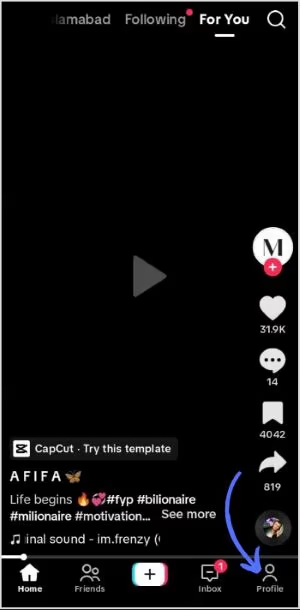
- Open TikTok and tap Profile at the bottom right.
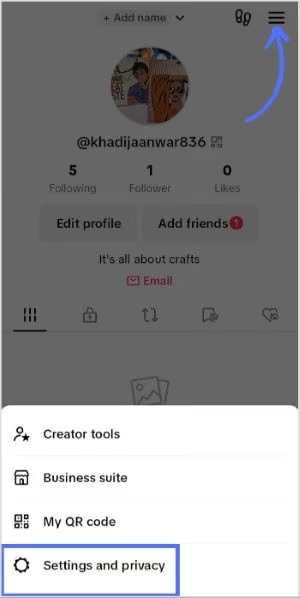
- Tap the three horizontal lines (menu icon) in the top right corner.
- Select Settings and Privacy.
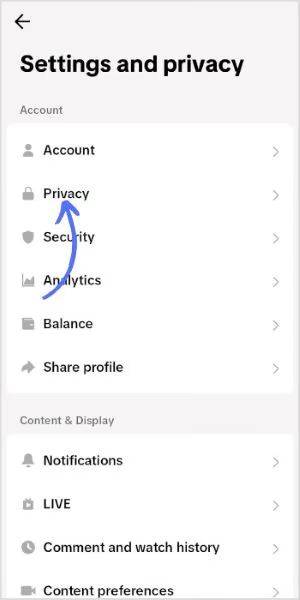
- Tap Privacy.
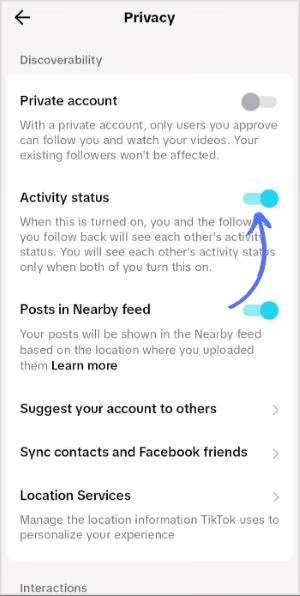
- Find Activity Status and toggle it off.
That’s it. The green dot disappears immediately. Anyone who could previously see when you were active will now see nothing.
One important trade-off: when you turn off your own Activity Status, you also lose the ability to see anyone else’s. It’s mutual. TikTok’s official support page confirms this is by design.
If you want to go further with your TikTok privacy, you can also watch TikTok anonymously without being logged in at all.
#What the Activity Status Actually Shows
Before you decide whether to turn it off, it helps to know what you’re actually hiding.
When Activity Status is on, TikTok shows a green dot on your profile picture in a few places: chat threads, the inbox, mutual followers lists, and when someone is tagging users to share a video. There’s also a “last active” timestamp visible to mutual followers.
The green dot only shows up for mutual followers, not just anyone who follows you. Both people need to have Activity Status turned on to see each other’s status. So if you’re worried about a specific person seeing you online, keep in mind they’d need to have the feature enabled too.
The timestamp disappears 48 hours after your last activity anyway. So if you haven’t opened TikTok in two days, your status goes invisible automatically, whether the feature is on or off.
For similar privacy controls on other platforms, the Dexerto guide on TikTok activity status covers the full picture of what each setting controls.
#Controlling Who Sees Your Status (Without Turning It Off)
Don’t want to go fully invisible? There’s a middle option.
Instead of toggling Activity Status off entirely, you can limit who sees it. Under Privacy, look for Who can see your online status. You’ll get two options: Friends or Off. Setting it to Friends means only people you mutually follow can see your green dot, which is usually the right balance for most people.
This is a better choice if you’re active on TikTok for work or growing an audience, since going fully invisible can make your account feel less approachable to people you actually want to connect with.
#Turning Off Direct Messages Too
If you’re going private, direct messages are worth thinking about separately. Activity Status and DMs are independent settings.
To control who can message you: go to Settings and Privacy > Privacy > Direct Messages, then choose Friends, No One, or Everyone. Setting it to No One disables inboxing entirely.
This pairs well with turning off activity status if you’re trying to reduce interruptions altogether. Some users on Reddit report doing both during content creation sessions to stay focused.
If you want to block someone on TikTok specifically rather than just hiding your status from everyone, that’s a separate setting that works more directly.
#Other TikTok Privacy Settings Worth Checking
While you’re in the Privacy menu, a few other settings are easy to miss.
Profile View History is a related feature. When enabled, it lets you see who visited your profile in the past 30 days, but it also means those people can see that you visited theirs. According to TikTok’s profile view history support page, this is also mutual, just like Activity Status.
Who can see your liked videos defaults to public on some accounts. If you’re liking content you’d rather keep private, change this to Only Me.
Suggest your account to others controls whether TikTok recommends your profile to people based on contacts, Facebook connections, and similar signals. Turning this off limits how easily new people find you.
The How-To Geek guide to TikTok privacy settings covers most of these in detail if you want a full privacy audit. It’s worth 10 minutes if you care about what TikTok surfaces about you.
You can also look into does TikTok listen to you for a broader breakdown of what data the app actually collects.
#Why People Turn Off Active Status
The most common reason is simple: people don’t want to feel obligated to respond to messages the moment they open the app.
If someone can see you’re online, they expect a reply. Turn off the status, and that pressure disappears. You can unfollow on TikTok people who are sending unwanted messages, but hiding your status is a softer first step.
Creators building an audience sometimes keep it on deliberately. The visibility creates a sense of accessibility. But for most casual users, turning it off means a more relaxed browsing experience. No green dots means no social obligations.
If you also want to keep your viewing activity private, learning how to see who likes your TikTok content is useful context, since that’s a different visibility layer from activity status.
#Bottom Line
Turn off Activity Status in Settings and Privacy > Privacy > Activity Status. It takes 30 seconds, and nothing about your actual TikTok experience changes. You can still post, comment, like, and message people. The only difference is nobody can see your green dot or your last-active timestamp.
If you want to stay partially visible, set “Who can see your online status” to Friends instead of turning it off entirely. That’s the better default for most people.
#Frequently Asked Questions
#Does turning off Activity Status affect my For You Page?
No. The For You Page algorithm isn’t connected to your Activity Status at all. Your feed works exactly the same whether the status is on or off.
#Can I turn off Activity Status for specific people only?
Not directly. TikTok gives you two options: visible to Friends, or off for everyone. There’s no way to hide your status from just one person while keeping it on for others. Blocking is the most direct solution for a specific person.
#Will people know I turned my Activity Status off?
No. When you disable it, your status just goes invisible. Nobody gets a notification, and there’s no indicator that you had it turned off versus just not being active. Your profile looks the same either way.
#What happens to the green dot after I turn it off?
It disappears immediately. Anyone who could see it before will see nothing. The last-active timestamp also stops updating, so people won’t see how long ago you were last on.
#If my Activity Status is off, can I still see other people’s status?
No. This is the main trade-off. According to TikTok’s support documentation, the feature is fully mutual. You have to have it on to see anyone else’s status. Turn it off, and you lose visibility both ways.
#Does Activity Status show to all my followers or just mutual followers?
Mutual followers only. Someone who follows you but who you don’t follow back cannot see your green dot or last-active time. Both sides need to follow each other for the feature to work.
#Can I set Activity Status differently on iOS versus Android?
The setting is tied to your account, not your device. If you turn it off on your iPhone, it stays off when you log in on Android, and vice versa. One toggle covers all your devices.
#Does TikTok still track my activity internally even if I turn this off?
Yes. Turning off Activity Status only hides your online status from other users. TikTok still logs your in-app activity internally for its own purposes. If broader data privacy is your concern, the ContentStudio breakdown of TikTok privacy covers what the app tracks beyond what other users can see.