Best Games to Play While Listening to Music (2026)
The best games to play while listening to music are open-world, racing, and roguelike titles. Here are 10 picks for PC, console, and mobile in 2026.
Quick AnswerOpen-world and arcade-racing games work best for listening to your own music while playing. They have no critical audio cues, so you can run your playlist at full volume without missing anything that affects gameplay.
Some games pair beautifully with your own playlist. Others fight it. The difference comes down to whether a game leans on audio cues, and that splits cleanly by genre across PC, console, and mobile when you swap the in-game soundtrack for your favorite Spotify mix.
- Open-world games pair best because exploration carries no audio cues that change outcomes
- Arcade racers like Dirt 5 let you mute in-game music in 30 seconds while keeping engine sounds intact
- Roguelikes turn music-friendly after 5 to 10 runs build early-level muscle memory
- Story RPGs and competitive shooters are a poor match because audio cues are core mechanics
- Android 14 and iOS 17 support multi-app audio without extra setup
#Which Game Genres Work Best With Your Own Music?
The deciding factor is simple. Does in-game audio carry information you actually need?
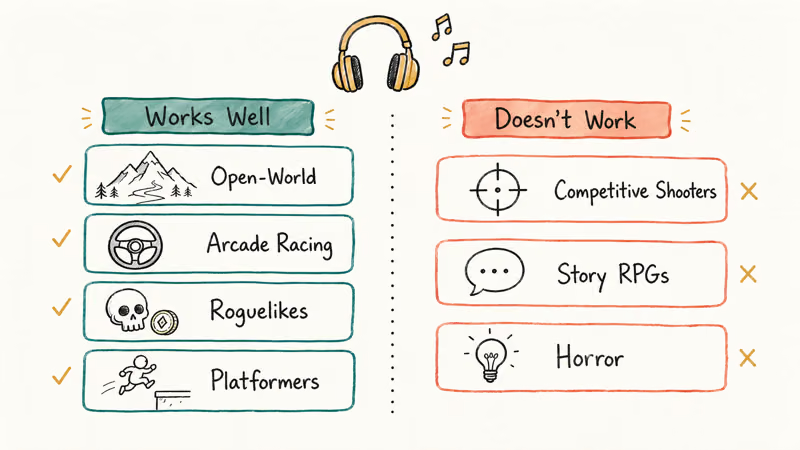
Works well. Open-world exploration and casual simulation titles spend long stretches with nothing audio-critical happening. Arcade racers let you swap the soundtrack with no functional loss. Roguelikes and platformers reward repetition; after 5 to 10 runs your hands run on autopilot, freeing your ears for music instead of processing fresh game information.
Doesn’t work. Competitive shooters use footsteps, reloads, and callouts as tactical data. Music covers those signals. Story RPGs have voice acting that competes directly with any playlist. Horror games depend on audio atmosphere as a core mechanic, and stripping that breaks the experience for most players in a way visual attention alone can’t replace.
The two ends of this spectrum behave differently: open-world titles pair well with music, while competitive matches suffer when you can’t hear audio cues.
#Open-World and Casual Games
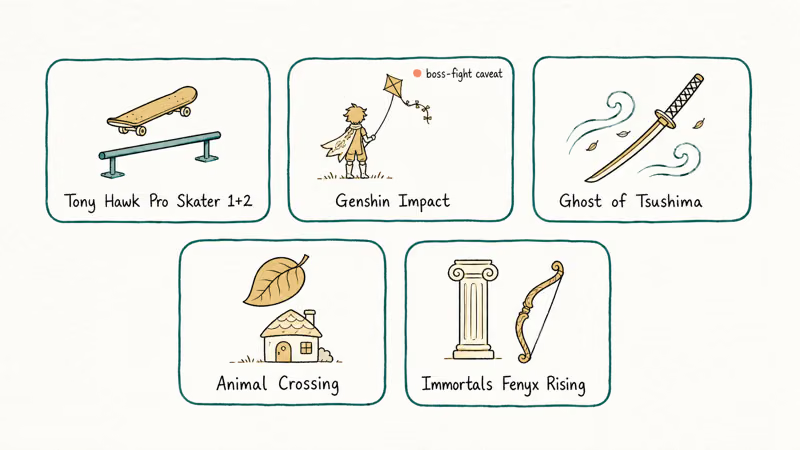
#Tony Hawk’s Pro Skater 1+2
Built for this.
Each 2-minute session has a clear loop: find the objectives, string combos, and hit the score target. Running your own playlist in the background costs you nothing, because none of that audio carries information that changes how you play.
Go to Settings > Audio > Music Volume and set it to zero. Your playlist fills the gap immediately. The skating physics are visual feedback first; you see the rail before you grind it.
#Genshin Impact
Long travel stretches pair well with music. Turn the playlist down for boss fights, where audio cues telegraph attacks.
On both phone and PC, most of the gameplay is music-compatible, with a smaller share of audio-critical boss encounters. For games like Genshin Impact with the same open-world structure, exploration is music-friendly and boss fights are not. That ratio holds across similar titles.
#Ghost of Tsushima
Ghost of Tsushima is one of the most visually driven games available. Wind guides you across the map. Visual indicators replace audio prompts for most traversal and side quest activities.
According to Sony’s PlayStation blog, the team built the wind navigation system in 2020 specifically as a UI alternative, which as a side effect makes the game almost entirely audio-independent during exploration. That’s a serious advantage for music listeners. Keep playlist volume low during the stealth sections though, since enemy footsteps still matter when you’re crouched in tall grass.
#Animal Crossing: New Horizons
Designed for distracted play. You log in, do daily tasks, then log out. No fail state, no urgency, no audio cues that matter.
With no fail state and no urgent audio cues, it pairs cleanly with something like a lo-fi hip-hop playlist from day one. It’s the easiest game on this list to pair with music and a natural pick for fans of best single-player Switch games. The in-game music is pleasant on its own, but the game runs identically with your own playlist running over the top.
#Immortals Fenyx Rising
Zero audio-critical sections outside major boss fights.
This Ubisoft open-world borrows the puzzle structure from Breath of the Wild with a lighter Greek mythology tone. Optional vault puzzles make up most of the content, and none of that requires audio attention. An energetic rock playlist sits comfortably over exploration without interfering. Combat uses telegraphed attack animations rather than audio cues, so the visual dependency helps when you’re listening to something energetic.
#Arcade Racing Games
#Dirt 5
Drop the in-game music in Settings > Audio > Music and your own playlist takes over without any gap. Engine and collision audio stay on, which gives you useful performance feedback.
Weather matters; music doesn’t. According to Codemasters’ Dirt 5 system overview, the dynamic weather system spans 4 distinct conditions across snow, rain, fog, and ice, but that feedback comes through engine audio and tire grip, not the soundtrack. Your playlist won’t compete with any information you need to drive well, and the music volume slider sits one click deep in Settings > Audio for easy access before each race.
#Dirt Rally 2.0
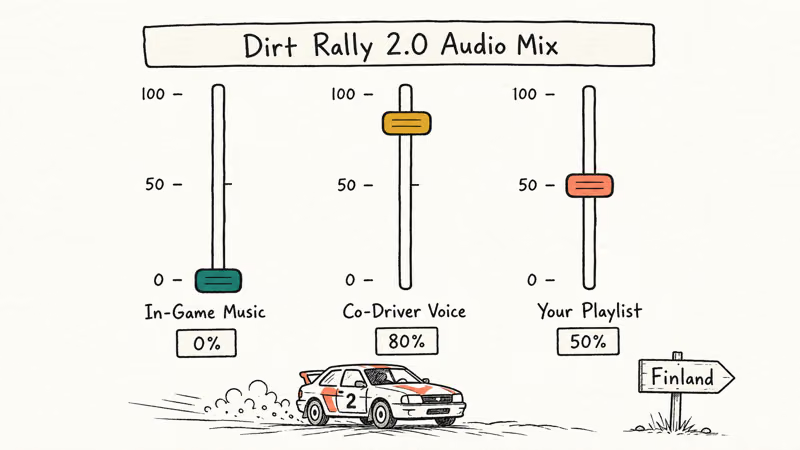
Works even better than Dirt 5 for music pairing because co-driver pace notes replace audio music cues entirely. You listen to your co-driver calling corners while your music runs underneath.
Once you’ve memorized the pace-note format, background music has little effect on your rally times. Drop in-game music to zero, keep the co-driver voice high (around 80 percent), and run your playlist at a moderate level so the pace notes stay audible over the top.
#Roguelikes and Platformers
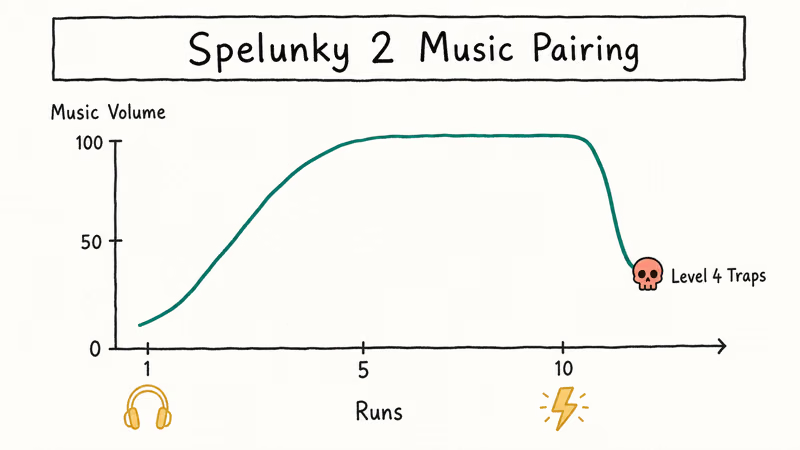
#Spelunky 2
Die. Start over. Repeat until the early stages run on autopilot.
That transition tends to land after a few hours of repetition. Skip music entirely during the learning phase, then switch from lo-fi instrumentals to higher-energy tracks once the mechanics are automatic. The energy boost helps keep engagement up through repeated early levels.
Trap audio cues still matter in deeper biomes, so drop your playlist volume to about 40 percent once you push past Level 4.
#How Do You Keep Music Playing While Gaming?
The setup differs by platform.
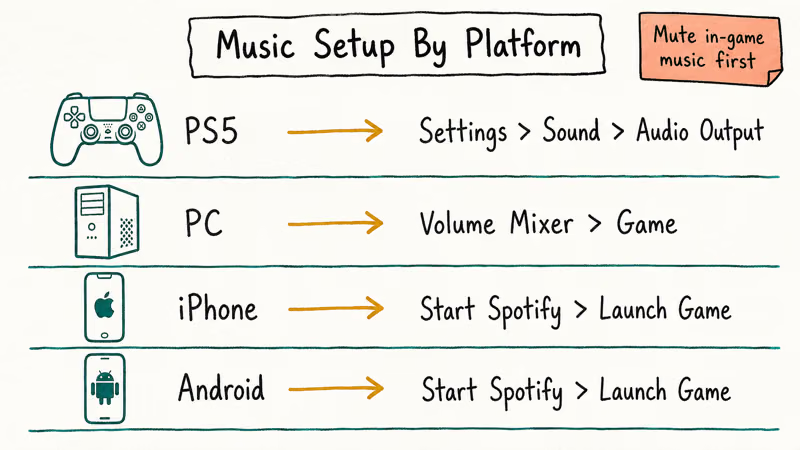
On PS5, go to Settings > Sound > Audio Output. Most games don’t override background audio sources like the Spotify app running on your phone connected via Bluetooth.
On PC, right-click the Windows 11 speaker icon, open Volume Mixer, and drop the game’s volume independently. Spotify runs at full volume alongside without touching the game’s audio bus.
On iPhone, start your music app first, then launch the game. Apple’s iOS 17 audio session documentation confirms that apps using the Ambient session mode allow background music to keep playing. If Spotify stops when you launch a game, that game claimed exclusive audio. Go into the game’s Settings and look for a “Background Audio” toggle.
On Android, the same process applies. Android 14 handles multi-app audio natively.
If you run into audio routing problems, check our guide on Discord stream no sound for troubleshooting steps that apply broadly to multi-app audio.
#Mobile and Casual Multiplayer Picks
Fall Guys rounds last 2 to 5 minutes with no critical audio cues, no voice acting, and no tactical sound signals. According to the official Fall Guys support page, the game runs on iOS and Android starting from the 2024 mobile launch. Run it alongside Spotify using split audio on Android 14, or by dropping Fall Guys’ volume in the iOS Control Center. The chaotic visual design keeps your eyes busy, leaving ears free for music.
For fans of games like Overwatch, Fall Guys is a far more forgiving multiplayer option for background-music gaming. The casual round structure means losing carries no lasting consequences, which removes the pressure that makes audio swapping feel costly in competitive titles.
If Spotify is not responding when you try to launch it alongside a game, fix that first before touching in-game audio settings. Audio routing usually fails one app at a time.
#Games Designed Around Your Own Music
Very few, but the ones that exist are worth knowing about.
Grand Theft Auto: San Andreas had a dedicated user music station built into the in-game radio back in the original 2004 PC release. Forza Horizon 5 includes a “your music” radio slot that replaces an in-game station with your local library. Most modern players just mute the in-game soundtrack and run a playlist separately through their phone or PC, since that flow works across every platform without needing the game to support it directly.
Headphones with multipoint Bluetooth help here. Pair the headset to both your phone and console at once, run music from the phone, run game audio from the console, and mix the two with the headset’s volume wheel.
#Bottom Line
Start with open-world titles and arcade racers like Ghost of Tsushima, Animal Crossing, and the Dirt series. For roguelikes like Spelunky 2, give yourself 5 to 10 learning runs before you bring in your playlist. Skip competitive shooters and story RPGs entirely; the audio cues are part of the game design.
#Frequently Asked Questions
Can I play music while gaming on PS5?
Yes. Go to Settings > Sound > Audio Output and adjust the balance.
The PS5 doesn’t ship with a native music app, so most players run Spotify on their phone over Bluetooth or use the Spotify console app linked to PlayStation Network. Both methods leave your game audio untouched while your playlist plays in parallel through whichever speaker or headset is set as the system output.
Does playing music while gaming hurt my performance?
In casual and single-player gaming, no. Background music has no measurable impact in open-world exploration, racing, or platforming games. Some research suggests it actually improves sustained focus during repetitive loops.
Competitive gaming is a different story. According to a 2019 study published in Frontiers in Psychology, task-irrelevant background music with lyrics caused the most distraction during tasks requiring auditory attention. Stick to instrumentals at minimum if you play music during competitive sessions, and drop the volume below 50 percent. Lyrics compete directly with callouts, footsteps, reload sounds, and any other tactical audio that gives you a real advantage in PVP titles.
What music genres work best for gaming sessions?
Instrumentals work best for mechanically demanding games. Lyrics compete with visual reading tasks like menus, subtitles, and objective text. For casual games like Animal Crossing or Fall Guys, any genre is fine.
Can I use Spotify while playing mobile games?
Yes. Start Spotify first, then launch your game. If Spotify pauses, the game claimed exclusive audio; check the game’s Settings > Audio for a “background audio” toggle.
Why do some games pause my music when I launch them?
The game is claiming exclusive audio focus. On iOS, this happens when the game uses the Playback session mode, which treats the game as the primary output and pauses everything else. Look for a background music or “allow other audio” toggle in the game’s own settings to reverse the behavior.
Does in-game music volume affect whether I can hear my own playlist?
Yes. Drop the in-game music volume to zero in audio settings, which removes the layering issue entirely. Keep sound effects at your preferred level since they carry actual gameplay information in most genres.
Is a gaming headset worth it for listening to music while playing?
Gaming headsets with hardware volume controls let you balance game audio and music in real time without pulling up a menu. Headsets with multipoint Bluetooth, pairing both your console and phone at once, are especially useful for this workflow. You run game audio on one channel, music on the other, and adjust the mix with the headset’s physical wheel.
Should I lower playlist volume during boss fights or stealth sections?
Yes. Even in music-friendly games like Genshin Impact and Ghost of Tsushima, certain sections still rely on audio cues. Drop your playlist by half during boss encounters or stealth segments where you need to react fast.

Fortnite Stuck on the Loading Screen? Fix It in 2026
Fortnite stuck on the loading screen? Check server status, fix the Windows N Media Pack and DirectX 11 on PC, clear the console cache, and verify files.

Minecraft Keeps Crashing? Java and Bedrock Fixes (2026)
Minecraft keeps crashing on startup or mid-game? Update your GPU driver, remove mods on Java, and reinstall Gaming Services on Bedrock. Fixes for both.

Pokemon GO Not Loading? Fix the Loading Screen 2026
Pokemon GO not loading or stuck on the Pokeball? Check server status, fix automatic date and time, grant location permission, clear the cache, and update.

PS5 Controller Not Charging? 9 Fixes That Work (2026)
DualSense not charging? Swap the cable, use a rear port in Rest Mode, clean the USB-C port, and check power settings. 9 fixes for a dead PS5 controller.