TikTok, with its over 1 billion monthly active users, has become a global sensation. While it’s a platform for creativity and entertainment, you may occasionally encounter users you’d prefer not to interact with. This comprehensive guide will walk you through everything you need to know about blocking someone on TikTok in 2026, from the step-by-step process to important considerations and best practices.
- Blocking someone on TikTok hides your profile, videos, and content from them completely, even if your account is set to public.
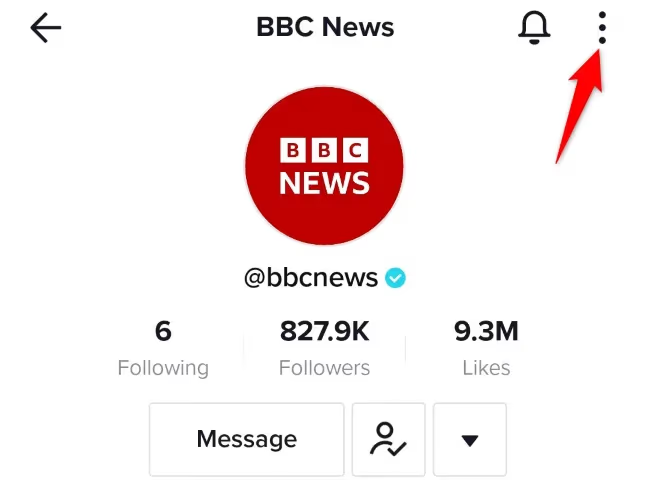
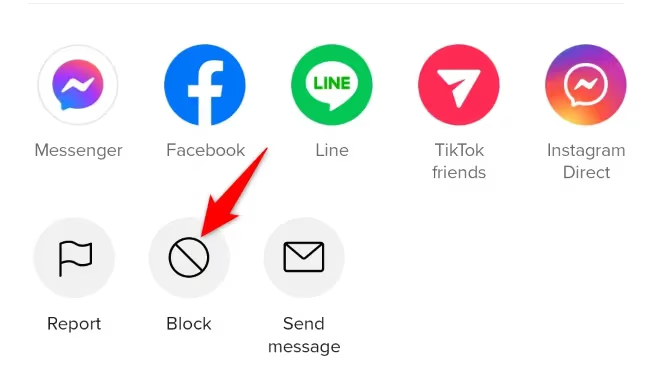
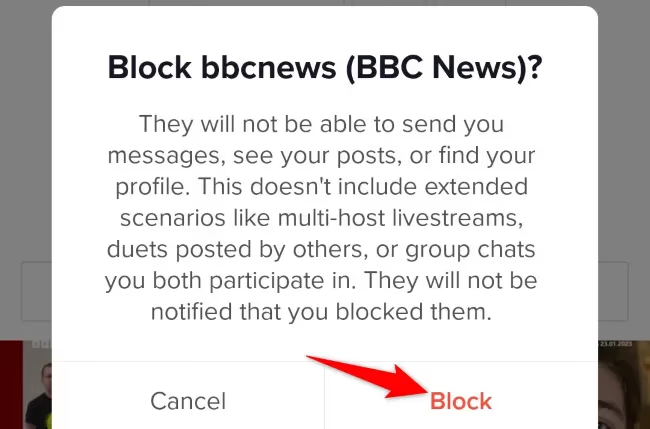
- To block from a profile, tap the three-dot menu icon in the top right corner and select Block, then confirm in the pop-up window.
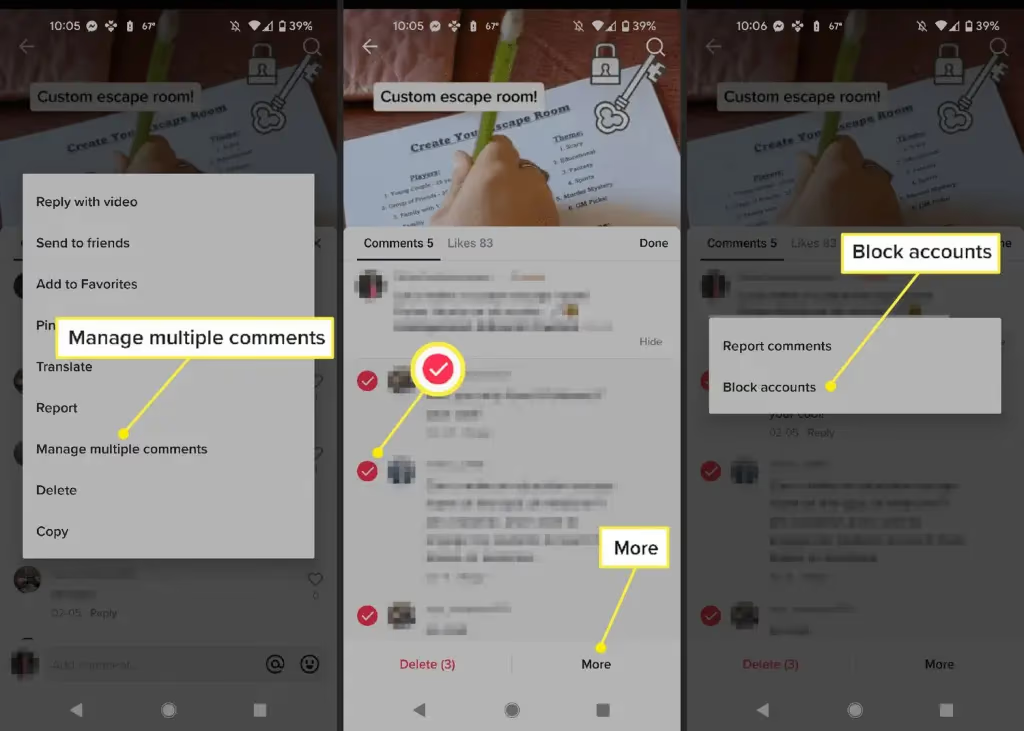
- TikTok allows bulk blocking of up to 100 accounts at once by long-pressing a comment and selecting “Manage multiple comments.”
- Blocked users will not receive a notification that they have been blocked by you.
- All previous likes, comments, and messages from a blocked user are removed from your account automatically after blocking.
#What Happens When You Block a User on TikTok
Before we dive into the how-to, let’s clarify what blocking actually does on TikTok:
- Profile Visibility: The blocked user can no longer view your profile, videos, or any of your content, even if it’s public.
- Interactions: They can’t comment on your videos, like your content, or send you direct messages.
- Notifications: You won’t receive any notifications about their activity.
- Search and Recommendations: Your account won’t appear in their search results or be recommended to them.
- Existing Content: Any previous likes, comments, or messages from the blocked user will be removed from your account.
Essentially, blocking creates a digital barrier between you and the other user on TikTok. It’s important to note that blocking is reciprocal – you also won’t be able to see their content or profile.
#Step-by-Step Guide to Blocking a TikTok User
#Blocking from a User’s Profile
- Open the TikTok app and navigate to the profile of the user you want to block.
- Tap the three-dot menu icon in the top right corner of their profile.
- Scroll down and select “Block” from the list of options.
- Confirm your decision by tapping “Block” again in the pop-up window.
#Blocking via Comments
You can also block users directly from their comments on your videos:
- Find a comment from the user you want to block.
- Long-press on the comment to bring up options.
- Tap “Block” and confirm your choice.
#Bulk Blocking Multiple Users
TikTok allows you to block up to 100 accounts at once, which can be helpful if you’re dealing with spam or harassment:
- Go to your video’s comment section.
- Tap and hold on a comment, then select “Manage multiple comments.”
- Choose up to 100 comments from users you want to block.
- Tap “More” at the bottom, then select “Block accounts.”
- Confirm your action to block all selected accounts.
#How to Unblock Someone on TikTok
If you change your mind, unblocking is a simple process:
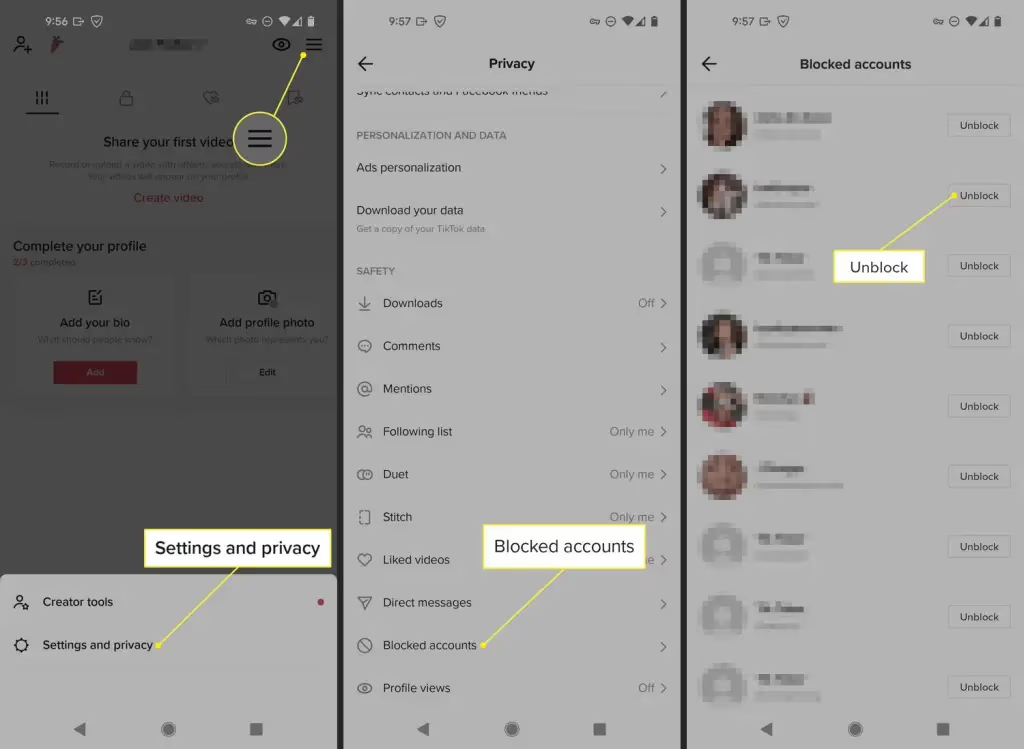
- Go to your profile and tap the three-line menu in the top right.
- Select “Settings and privacy,” then “Privacy.”
- Tap on “Blocked accounts” to see your list of blocked users.
- Find the account you want to unblock and tap the “Unblock” button next to their name.
After unblocking, you’ll be able to see each other’s content again, but any previous interactions (likes, comments, follows) will not be restored automatically.
#Privacy and Safety Considerations
#When to Block vs. Other Actions
Blocking is a powerful tool, but it’s not always the best first step. Consider these alternatives:
- Restrict: Limits the user’s ability to interact with your content without fully blocking them.
- Mute: Hides their content from your feed without them knowing.
- Report: If someone is violating TikTok’s community guidelines, reporting them can help address the issue platform-wide.
#Tips for Maintaining a Safe TikTok Experience
- Set your account to private to control who can see your content.
- Use TikTok’s comment filters to automatically hide offensive comments.
- Be cautious about sharing personal information in your videos or profile.
- Familiarize yourself with TikTok’s safety features and community guidelines.
- Learn how to watch TikTok anonymously to protect your privacy when browsing.
#Advanced TikTok Features and Growth Strategies
While managing your privacy is crucial, TikTok offers various features to enhance your experience and grow your presence:
- If you’re looking to expand your reach, consider how to go live on TikTok without 1000 followers. Live streaming can be a great way to engage with your audience directly.
- For a more professional appearance, learn how to add Linktree to TikTok to showcase multiple links in your bio.
- Manage your online presence by understanding how to turn off active status on TikTok, giving you more control over when others see you’re online.
- Aspiring influencers might be interested in how to get verified on TikTok, which can boost credibility and visibility.
#Impact of Blocking on Your TikTok Experience
Blocking users can significantly improve your TikTok experience by:
- Reducing negative interactions and comments.
- Curating a more positive and enjoyable For You page.
- Giving you greater control over your privacy and online safety.
However, be mindful that excessive blocking could potentially limit your content’s reach if you’re a creator looking to grow your audience. Understanding what is considered viral on TikTok can help you balance growth with maintaining a positive community.
#Best Practices for Content Creators
If you’re a TikTok creator, consider these best practices:
- Establish clear community guidelines for your comment section.
- Use blocking as a last resort after warnings or temporary restrictions.
- Be consistent in your approach to managing inappropriate behavior.
- Consider the impact on your audience before blocking other creators or influencers.
- Regularly engage with your audience and delete TikTok stories that are no longer relevant to maintain a curated profile.
#FAQs About Blocking on TikTok
- Can someone tell if I’ve blocked them on TikTok? No, TikTok doesn’t notify users when they’re blocked.
- Will blocking someone remove their comments from my videos? Yes, all previous comments from the blocked user will be removed.
- Can a blocked user still see my videos if someone else shares them? No, they won’t be able to view your content even if shared by others.
- Does blocking someone on TikTok also block them on other platforms? No, blocking only affects your interactions on TikTok.
- Is there a limit to how many people I can block on TikTok? While there’s no official limit, you can only block up to 100 accounts at once using the bulk block feature.
By understanding how to block someone on TikTok and when to use this feature, you can create a safer, more enjoyable experience on the platform. Remember, your online safety and comfort are paramount, and TikTok provides these tools to help you maintain a positive digital environment. As you grow your presence, balancing privacy with engagement will be key to your success on TikTok in 2026 and beyond.